简介
官网:X File Storage
X File Storage是一个云存储辅助工具
在项目中经常会使用云存储来保存上传的文件,但不同云存储平台的SDK不同,切换使用需要一定的学习成本,而X File Storage解决了这个问题
一行代码将文件存储到本地、FTP、SFTP、WebDAV、阿里云 OSS、华为云 OBS、七牛云 Kodo、腾讯云 COS、百度云 BOS、又拍云 USS、MinIO、 Amazon S3、Amazon S3 V2、GoogleCloud Storage、FastDFS、 Azure Blob Storage、Mongo GridFS、Mongo GridFS、go-fastdfs、 火山引擎 TOS、Cloudflare R2、金山云 KS3、美团云 MSS、京东云 OSS、天翼云 OOS、移动 云EOS、沃云 OSS、 网易数帆 NOS、Ucloud US3、青云 QingStor、平安云 OBS、首云 OSS、IBM COS、其它兼容 S3 协议的存储平台。
本文以SpringBoot环境,阿里云OSS演示
配置阿里云OSS
此处不多赘述,详情见本博客的另一篇文章:文件上传至阿里云OSS的1.1配置阿里云OSS
配置X File Storage
导入X File Storage
在pom.xml文件中导入X File Storage
1
2
3
4
5
|
<dependency>
    <groupId>org.dromara.x-file-storage</groupId>
    <artifactId>x-file-storage-spring</artifactId>
    <version>2.3.0</version>
</dependency>
|
导入对应平台依赖
这里使用阿里云OSS,其他平台可见X File Storage官网
1
2
3
4
5
|
<dependency>
    <groupId>com.aliyun.oss</groupId>
    <artifactId>aliyun-sdk-oss</artifactId>
    <version>3.16.1</version>
</dependency>
|
编写配置文件
在application.yml 配置文件中先添加以下基础配置
 1
 2
 3
 4
 5
 6
 7
 8
 9
10
11
12
13
14
|
dromara:
  x-file-storage: # 文件存储配置
    default-platform: aliyun-oss-1 # 默认使用的存储平台
    thumbnail-suffix: ".min.jpg" # 缩略图后缀,例如【.min.jpg】【.png】
    # 对应平台的配置写在这里,注意缩进要对齐(其他平台见X File Storage官网)
    aliyun-oss:
      - platform: aliyun-oss-1 # 存储平台标识
        enable-storage: true  # 启用存储
        access-key: ********(填前面配置阿里云时生成的AccessKey)
        secret-key: ********(填前面配置阿里云时生成的SecretKey)
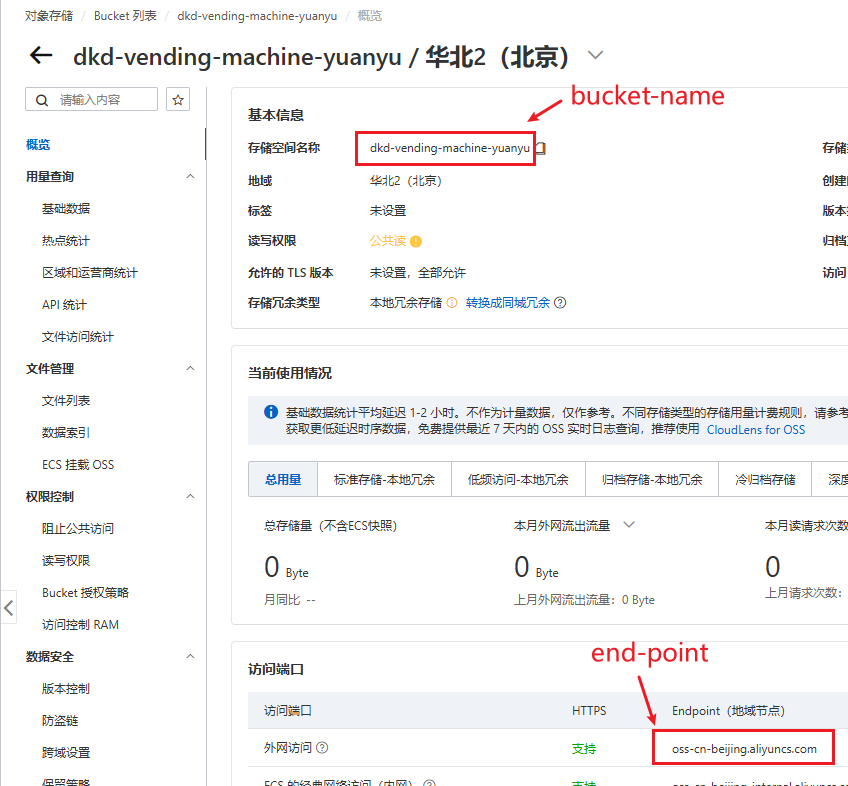
        end-point: oss-cn-beijing.aliyuncs.com
        bucket-name: dkd-vending-machine-yuanyu
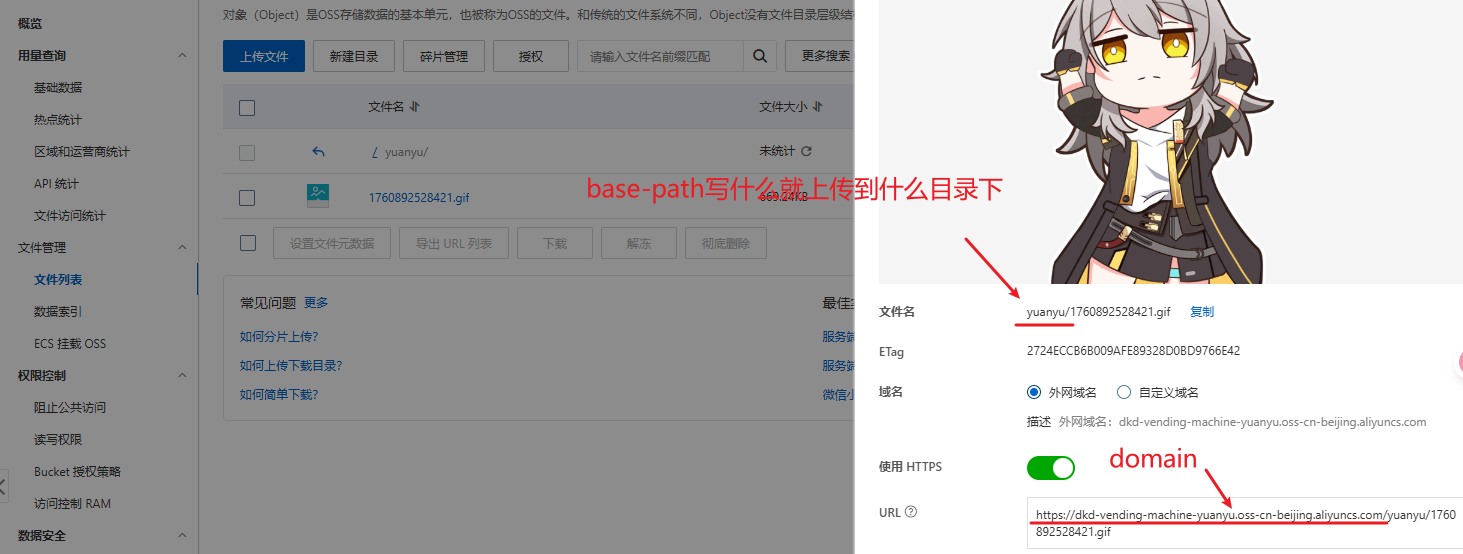
        domain: https://dkd-vending-machine-yuanyu.oss-cn-beijing.aliyuncs.com/ # 访问域名,注意“/”结尾
        base-path: yuanyu/ # 基础路径(按自己的需要填)
|
在启动类加上注解
在启动类上加上@EnableFileStorage注解
1
2
3
4
5
6
7
|
@EnableFileStorage
@SpringBootApplication
public class SpringFileStorageTestApplication {
    public static void main(String[] args) {
        SpringApplication.run(SpringFileStorageTestApplication.class,args);
    }
}
|
开始使用
支持 File、MultipartFile、UploadedFile、byte[]、InputStream、URL、URI、String、HttpServletRequest,大文件会自动分片上传
示例:
 1
 2
 3
 4
 5
 6
 7
 8
 9
10
11
12
13
14
15
16
17
18
19
20
21
22
23
24
25
26
27
28
29
30
31
32
33
34
35
36
37
38
39
40
41
42
43
44
45
46
47
48
49
50
51
52
53
54
55
56
57
58
59
60
|
@RestController
public class FileDetailController {

    @Autowired
    private FileStorageService fileStorageService;//注入实列

    /**
     * 上传文件
     */
    @PostMapping("/upload")
    public FileInfo upload(MultipartFile file) {
        return fileStorageService.of(file).upload();
    }

    /**
     * 上传文件,成功返回文件 url
     */
    @PostMapping("/upload2")
    public String upload2(MultipartFile file) {
        FileInfo fileInfo = fileStorageService.of(file)
                .setPath("upload/") //保存到相对路径下,为了方便管理,不需要可以不写
                .setSaveFilename("image.jpg") //设置保存的文件名,不需要可以不写,会随机生成
                .setObjectId("0")   //关联对象id,为了方便管理,不需要可以不写
                .setObjectType("0") //关联对象类型,为了方便管理,不需要可以不写
                .putAttr("role","admin") //保存一些属性,可以在切面、保存上传记录、自定义存储平台等地方获取使用,不需要可以不写
                .upload();  //将文件上传到对应地方
        return fileInfo == null ? "上传失败!" : fileInfo.getUrl();
    }

    /**
     * 上传图片,成功返回文件信息
     * 图片处理使用的是 https://github.com/coobird/thumbnailator
     */
    @PostMapping("/upload-image")
    public FileInfo uploadImage(MultipartFile file) {
        return fileStorageService.of(file)
                .image(img -> img.size(1000,1000))  //将图片大小调整到 1000*1000
                .thumbnail(th -> th.size(200,200))  //再生成一张 200*200 的缩略图
                .upload();
    }

    /**
     * 上传文件到指定存储平台,成功返回文件信息
     */
    @PostMapping("/upload-platform")
    public FileInfo uploadPlatform(MultipartFile file) {
        return fileStorageService.of(file)
                .setPlatform("aliyun-oss-1")    //使用指定的存储平台
                .upload();
    }

    /**
     * 直接读取 HttpServletRequest 中的文件进行上传,成功返回文件信息
     * 使用这种方式有些注意事项,请查看文档 基础功能-上传 章节
     */
    @PostMapping("/upload-request")
    public FileInfo uploadPlatform(HttpServletRequest request) {
        return fileStorageService.of(request).upload();
    }
}
|
更多操作可见官网