Vue3快速上手

自用

1. Vue3简介

1.1. 【性能的提升】

  • 打包大小减少41%

  • 初次渲染快55%, 更新渲染快133%

  • 内存减少54%

1.2.【 源码的升级】

  • 使用Proxy代替defineProperty实现响应式。

  • 重写虚拟DOM的实现和Tree-Shaking

1.3. 【拥抱TypeScript】

  • Vue3可以更好的支持TypeScript

1.4. 【新的特性】

  1. Composition API(组合API):

    • setup

    • refreactive

    • computedwatch

      ……

  2. 新的内置组件:

    • Fragment

    • Teleport

    • Suspense

      ……

  3. 其他改变:

    • 新的生命周期钩子

    • data 选项应始终被声明为一个函数

    • 移除keyCode支持作为 v-on 的修饰符

      ……

2. 创建Vue3工程

2.1. 【基于 vue-cli 创建】

点击查看官方文档

备注:目前vue-cli已处于维护模式,官方推荐基于 Vite 创建项目。

 1
 2
 3
 4
 5
 6
 7
 8
 9
10
11
12
13
14
15
16
17
### 查看@vue/cli版本,确保@vue/cli版本在4.5.0以上
vue --version

### 安装或者升级你的@vue/cli 
npm install -g @vue/cli

### 执行创建命令
vue create vue_test

###  随后选择3.x
###  Choose a version of Vue.js that you want to start the project with (Use arrow keys)
###  > 3.x
###    2.x

### 启动
cd vue_test
npm run serve

2.2. 【基于 vite 创建】(推荐)

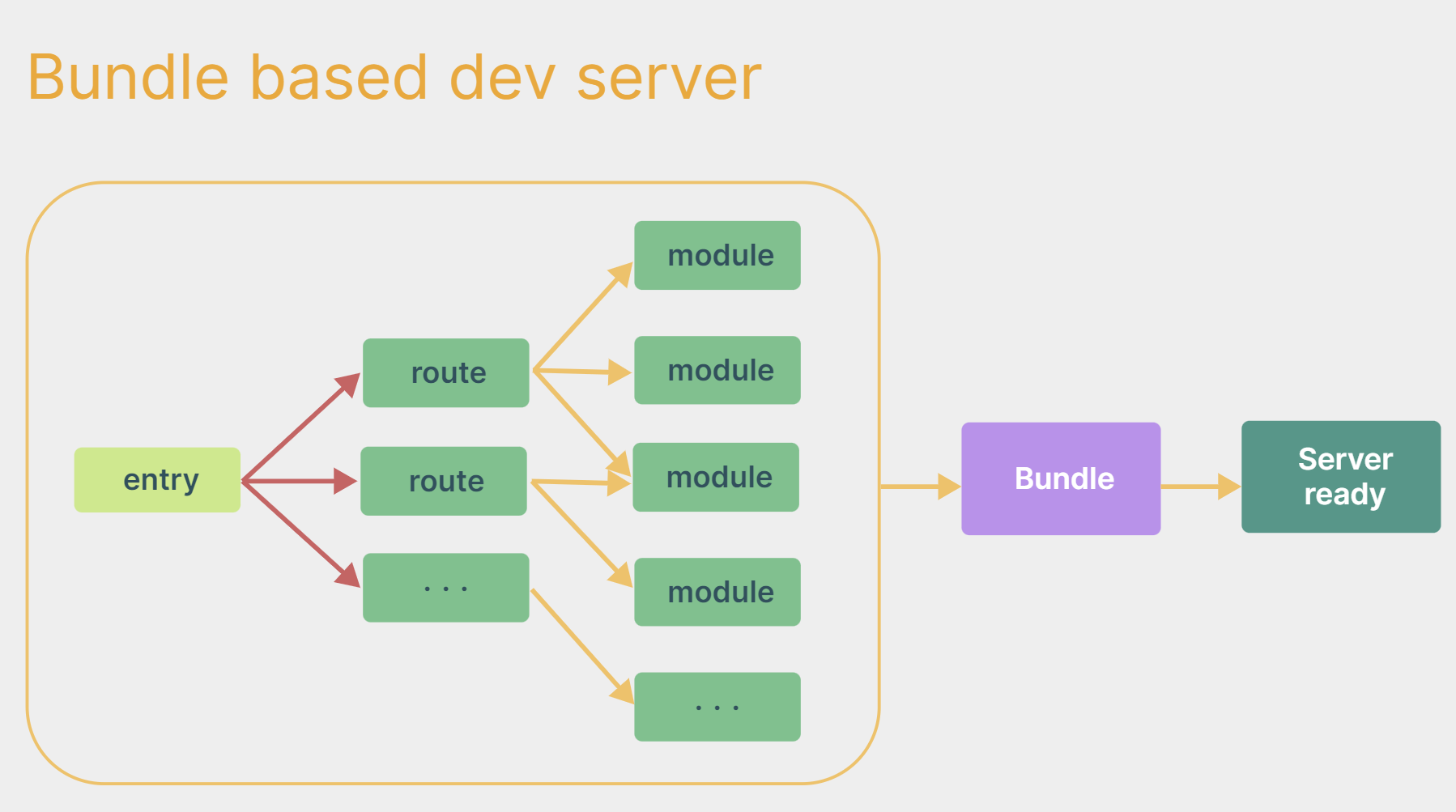
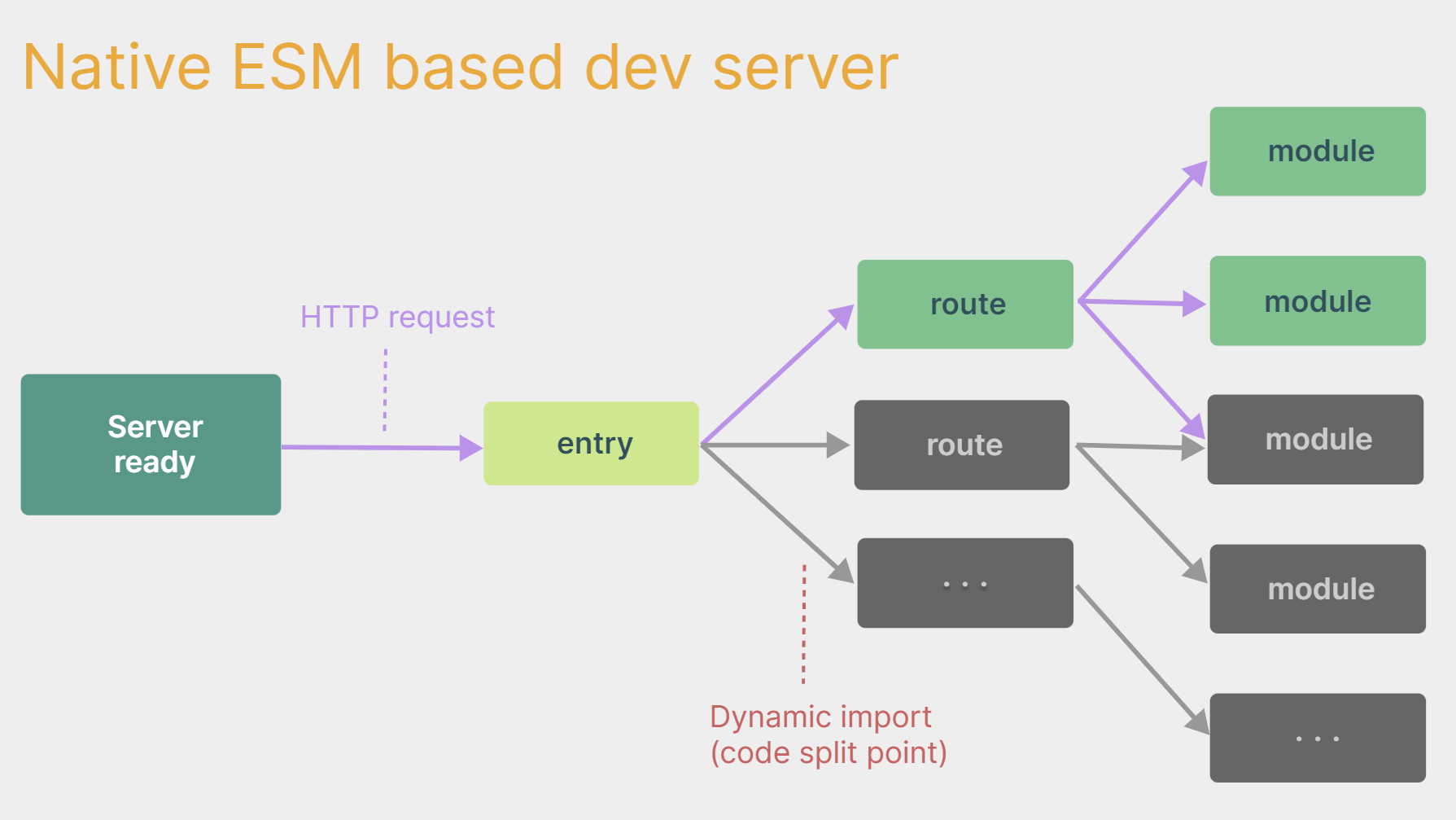
vite 是新一代前端构建工具,官网地址:https://vitejs.cnvite的优势如下:

  • 轻量快速的热重载(HMR),能实现极速的服务启动。
  • TypeScriptJSXCSS 等支持开箱即用。
  • 真正的按需编译,不再等待整个应用编译完成。
  • webpack构建 与 vite构建对比图如下:
  • webpack构建 vite构建
 1
 2
 3
 4
 5
 6
 7
 8
 9
10
11
12
13
14
15
16
17
18
19
20
21
22
### 1.创建命令
npm create vue@latest

### 2.具体配置
### 配置项目名称
 Project name: vue3_test
### 是否添加TypeScript支持
 Add TypeScript?  Yes
### 是否添加JSX支持
 Add JSX Support?  No
### 是否添加路由环境
 Add Vue Router for Single Page Application development?  No
### 是否添加pinia环境
 Add Pinia for state management?  No
### 是否添加单元测试
 Add Vitest for Unit Testing?  No
### 是否添加端到端测试方案
 Add an End-to-End Testing Solution? » No
### 是否添加ESLint语法检查
 Add ESLint for code quality?  Yes
### 是否添加Prettiert代码格式化
 Add Prettier for code formatting?  No

2.2.1. 安装依赖

创建后用vscode打开,发现有的文件冒红,可以在终端输入npm i安装依赖后重新启动来解决

image-20250219184723761

自己动手编写一个App组件(下面内容是写在src文件夹下的App.vue中的)

 1
 2
 3
 4
 5
 6
 7
 8
 9
10
11
12
13
14
15
16
17
18
19
20
21
<template>
  <div class="app">
    <h1>你好啊</h1>
  </div>
</template>

<script lang="ts">
  export default {
    name:'App' //组件名
  }
</script>

<!-- scoped表示局部样式只会修改该vue文件中的元素样式 -->
<style scoped>
  .app {
    background-color: #ddd;
    box-shadow: 0 0 10px;
    border-radius: 10px;
    padding: 20px;
  }
</style>

安装官方推荐的vscode插件:

image-20250219184521064

总结:

  • Vite 项目中,index.html 是项目的入口文件,在项目最外层。
  • 加载index.html后,Vite 解析 <script type="module" src="xxx"> 指向的JavaScript
  • Vue3**中是通过 **createApp 函数创建一个应用实例。

2.2.2. 如何运行

查看package.json文件
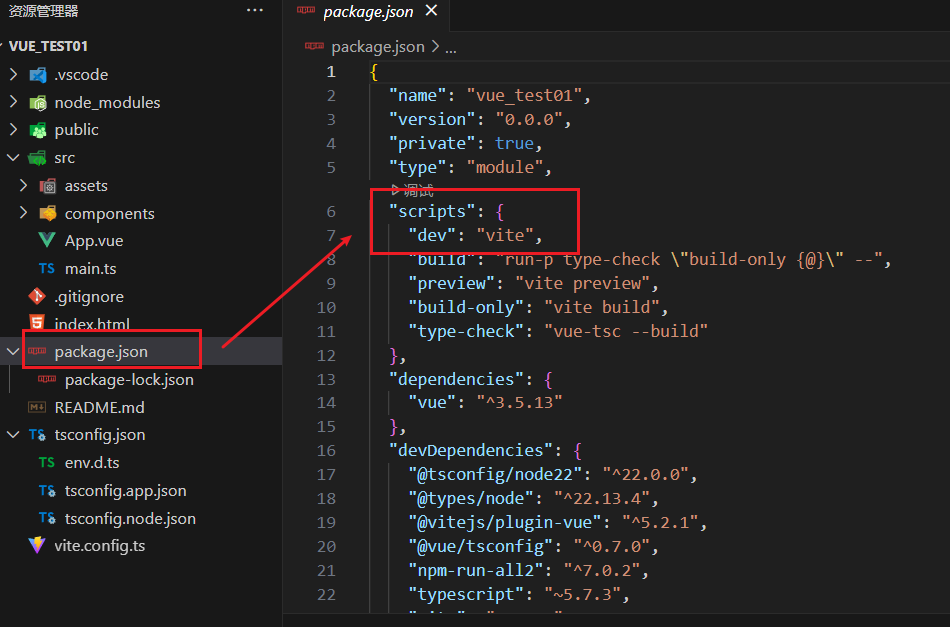
image-20250219192339879

发现是dev,则在终端输入npm run dev后,点开生成的链接即可查看
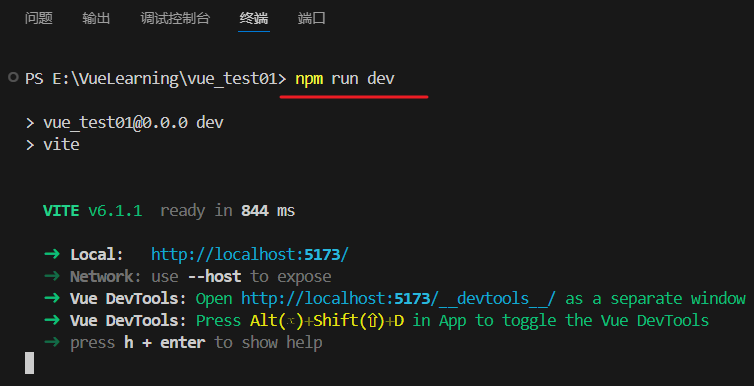
image-20250219192519483

若觉得每次手动打开浏览器麻烦,可以将"dev": "vite"改为"dev": "vite --open"

此时,每次输入运行命令后将自动打开浏览器

2.2.3. 如何停止运行

在终端按快捷键ctrl + c停止运行

2.3. 【一个简单的效果】

Vue3向下兼容Vue2语法,且Vue3中的模板中可以没有根标签

 1
 2
 3
 4
 5
 6
 7
 8
 9
10
11
12
13
14
15
16
17
18
19
20
21
22
23
24
25
26
27
28
29
30
31
32
33
<template>
  <div class="person">
    <h2>姓名{{name}}</h2>
    <h2>年龄{{age}}</h2>
    <button @click="changeName">修改名字</button>
    <button @click="changeAge">年龄+1</button>
    <button @click="showTel">点我查看联系方式</button>
  </div>
</template>

<script lang="ts">
  export default {
    name:'App',
    data() {
      return {
        name:'张三',
        age:18,
        tel:'13888888888'
      }
    },
    methods:{
      changeName(){
        this.name = 'zhang-san'
      },
      changeAge(){
        this.age += 1
      },
      showTel(){
        alert(this.tel)
      }
    },
  }
</script>

3. Vue3核心语法

3.1. 【OptionsAPI 与 CompositionAPI】

  • Vue2API设计是Options(配置)风格的。
  • Vue3API设计是Composition(组合)风格的。

Options API 的弊端

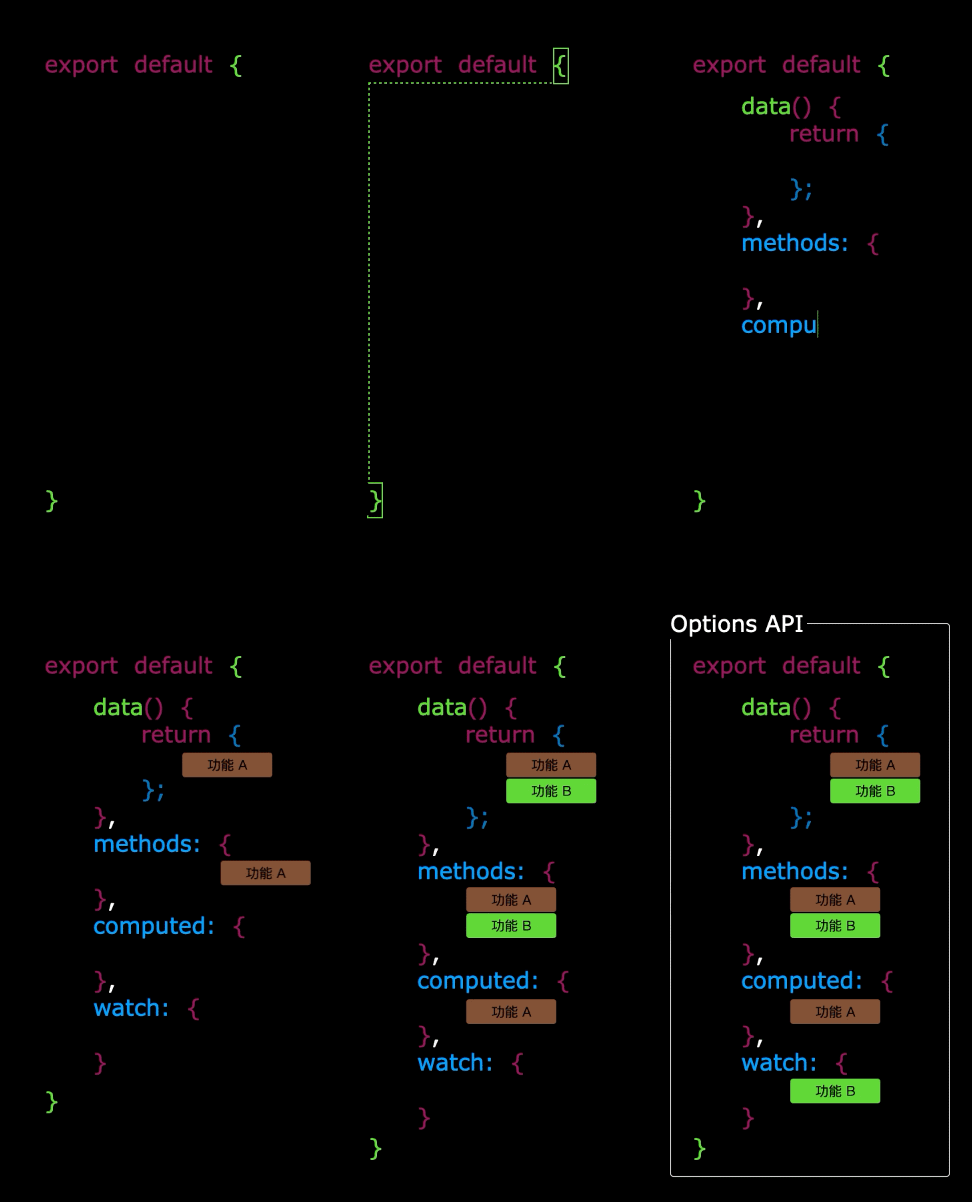
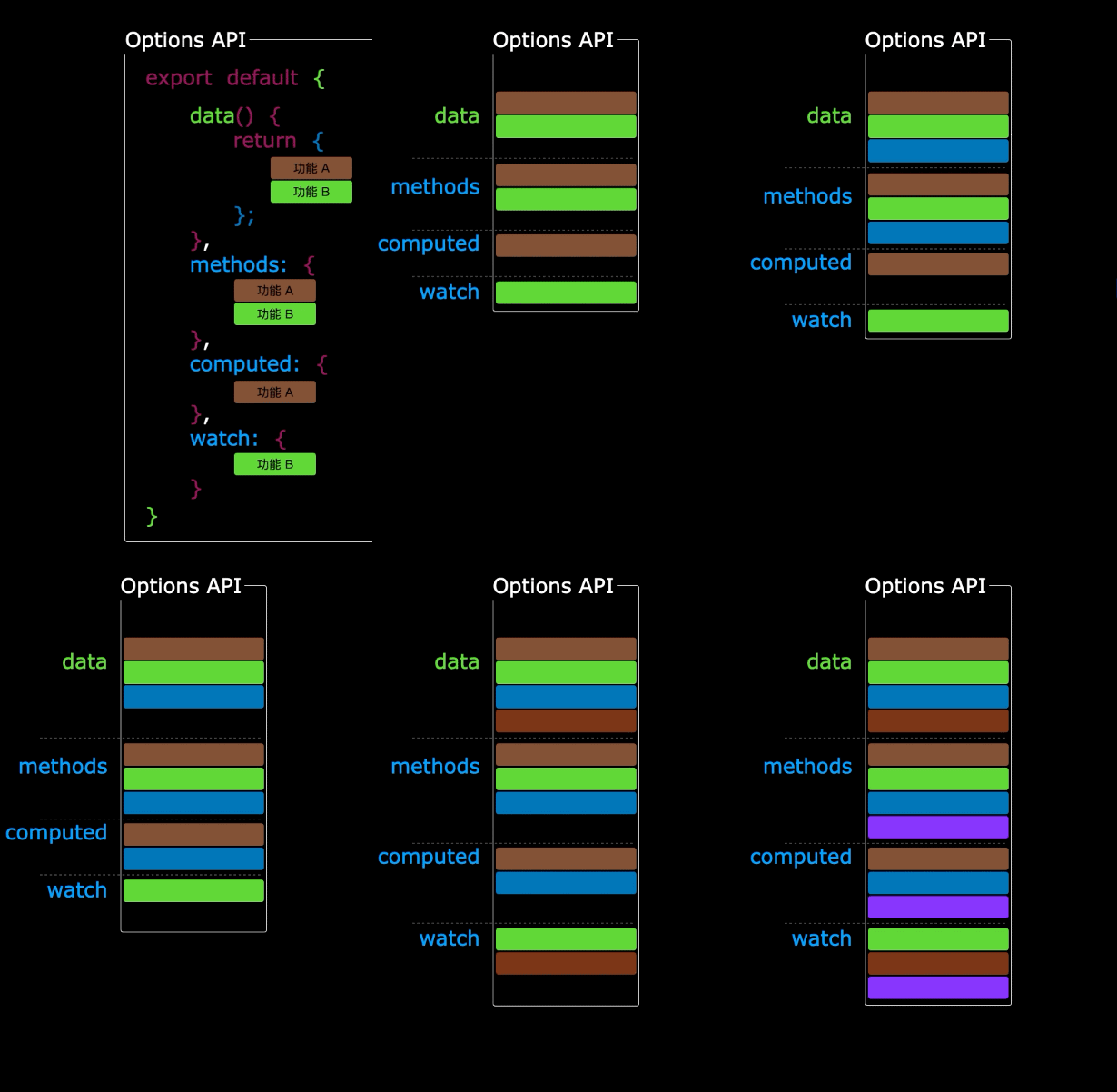
Options类型的 API,数据、方法、计算属性等,是分散在:datamethodscomputed中的,若想新增或者修改一个需求,就需要分别修改:datamethodscomputed,不便于维护和复用。

1.gif2.gif

Composition API 的优势

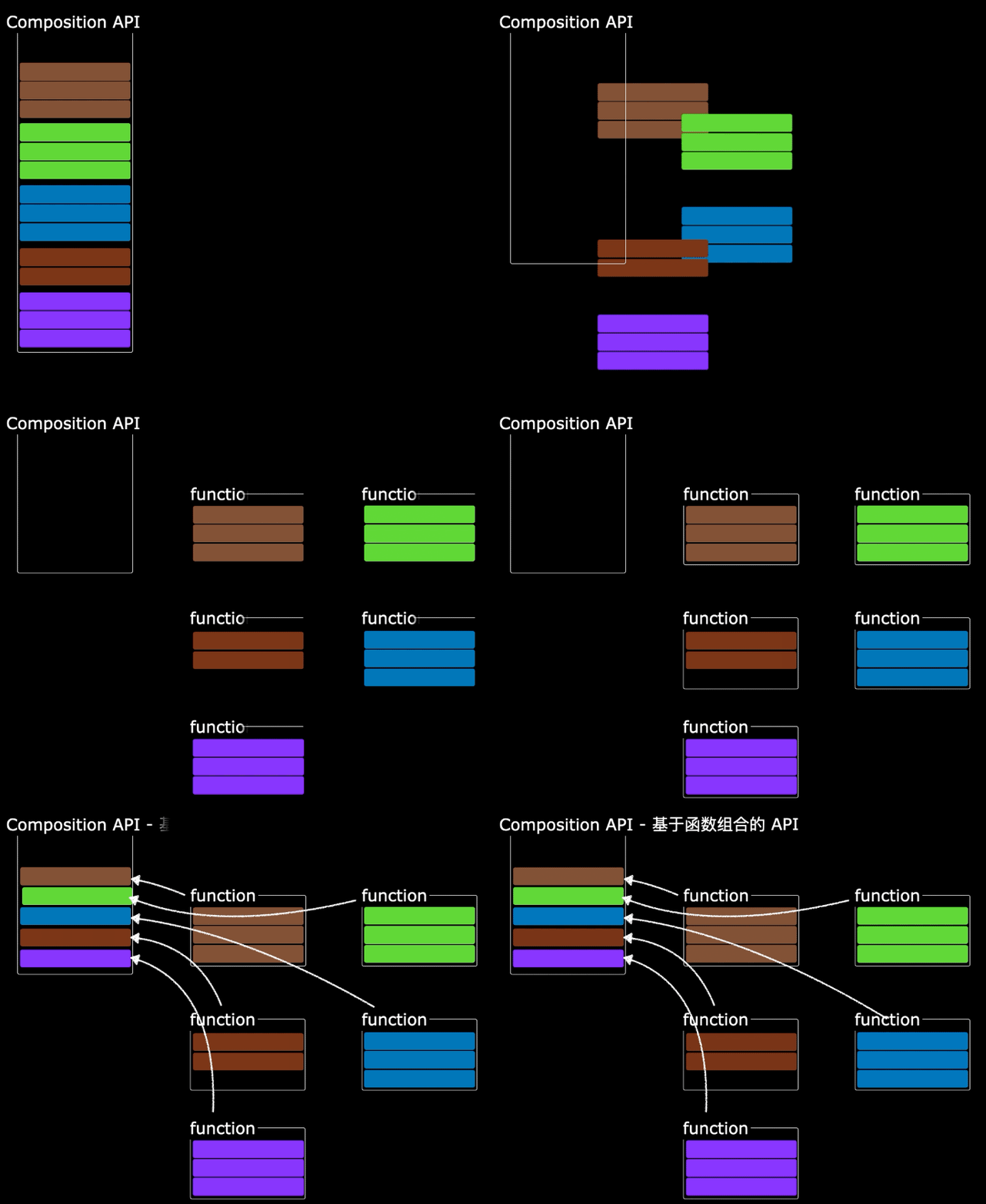
可以用函数的方式,更加优雅的组织代码,让相关功能的代码更加有序的组织在一起。
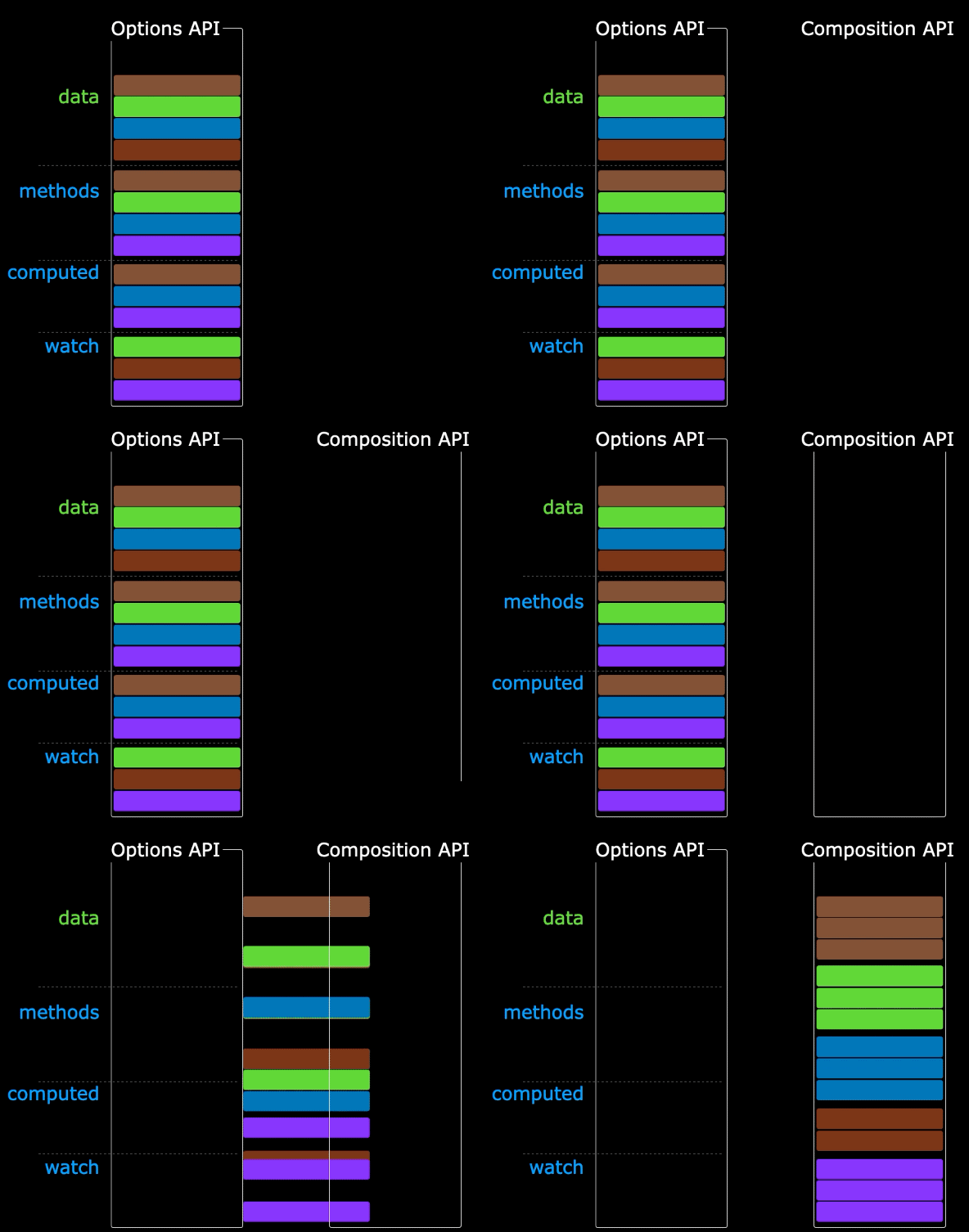
3.gif4.gif

说明:以上四张动图原创作者:大帅老猿

3.2. 【拉开序幕的 setup】

setup 概述

setupVue3中一个新的配置项,值是一个函数,它是 Composition API “表演的舞台,组件中所用到的:数据、方法、计算属性、监视……等等,均配置在setup中。

特点如下:

  • setup函数返回的对象中的内容,可直接在模板中使用。
  • setup中访问thisundefined
  • setup函数会在beforeCreate之前调用,它是“领先”所有钩子执行的。
 1
 2
 3
 4
 5
 6
 7
 8
 9
10
11
12
13
14
15
16
17
18
19
20
21
22
23
24
25
26
27
28
29
30
31
32
33
34
35
36
37
<template>
  <div class="person">
    <h2>姓名{{name}}</h2>
    <h2>年龄{{age}}</h2>
    <button @click="changeName">修改名字</button>
    <button @click="changeAge">年龄+1</button>
    <button @click="showTel">点我查看联系方式</button>
  </div>
</template>

<script lang="ts">
  export default {
    name:'Person',
    setup(){
      // 数据,原来写在data中(注意:此时的name、age、tel数据都不是响应式数据)
      let name = '张三'
      let age = 18
      let tel = '13888888888'

      // 方法,原来写在methods中
      function changeName(){
        name = 'zhang-san' //注意:此时这么修改name页面是不变化的
        console.log(name)
      }
      function changeAge(){
        age += 1 //注意:此时这么修改age页面是不变化的
        console.log(age)
      }
      function showTel(){
        alert(tel)
      }

      // 返回一个对象,对象中的内容,模板中可以直接使用
      return {name,age,tel,changeName,changeAge,showTel}
    }
  }
</script>

setup 的返回值

  • 若返回一个对象:则对象中的:属性、方法等,在模板中均可以直接使用**(重点关注)。**
  • 若返回一个函数:则可以自定义渲染内容,代码如下:
1
2
3
setup(){
  return ()=> '你好啊!'
}

setup 与 Options API 的关系

  • Vue2 的配置(datamethos……)中可以访问到 setup中的属性、方法。
  • 但在setup不能访问到Vue2的配置(datamethos……)。
  • 如果与Vue2冲突,则setup优先。

setup 语法糖

setup函数有一个语法糖,这个语法糖,可以让我们把setup独立出去,代码如下:

 1
 2
 3
 4
 5
 6
 7
 8
 9
10
11
12
13
14
15
16
17
18
19
20
21
22
23
24
25
26
27
28
29
30
31
32
33
34
35
36
37
<template>
  <div class="person">
    <h2>姓名{{name}}</h2>
    <h2>年龄{{age}}</h2>
    <button @click="changName">修改名字</button>
    <button @click="changAge">年龄+1</button>
    <button @click="showTel">点我查看联系方式</button>
  </div>
</template>

<script lang="ts">
  export default {
    name:'Person',
  }
</script>

<!-- 下面的写法是setup语法糖 -->
<script setup lang="ts">
  console.log(this) //undefined
  
  // 数据(注意:此时的name、age、tel都不是响应式数据)
  let name = '张三'
  let age = 18
  let tel = '13888888888'

  // 方法
  function changName(){
    name = '李四'//注意:此时这么修改name页面是不变化的
  }
  function changAge(){
    console.log(age)
    age += 1 //注意:此时这么修改age页面是不变化的
  }
  function showTel(){
    alert(tel)
  }
</script>

扩展:上述代码,还需要编写一个不写setupscript标签,去指定组件名字,比较麻烦,我们可以借助vite中的插件简化

  1. 第一步:npm i vite-plugin-vue-setup-extend -D
  2. 第二步:vite.config.ts
1
2
3
4
5
6
import { defineConfig } from 'vite'
import VueSetupExtend from 'vite-plugin-vue-setup-extend'

export default defineConfig({
  plugins: [ VueSetupExtend() ]
})
  1. 第三步:<script setup lang="ts" name="Person">

3.3. 【ref 创建:基本类型的响应式数据】

  • **作用:**定义响应式变量。
  • 语法:let xxx = ref(初始值)
  • **返回值:**一个RefImpl的实例对象,简称ref对象refref对象的value属性是响应式的
  • 注意点:
    • JS中操作数据需要:xxx.value,但模板中不需要.value,直接使用即可。
    • 对于let name = ref('张三')来说,name不是响应式的,name.value是响应式的。
 1
 2
 3
 4
 5
 6
 7
 8
 9
10
11
12
13
14
15
16
17
18
19
20
21
22
23
24
25
26
27
28
29
30
31
32
33
34
35
<template>
  <div class="person">
    <h2>姓名{{name}}</h2>
    <h2>年龄{{age}}</h2>
    <button @click="changeName">修改名字</button>
    <button @click="changeAge">年龄+1</button>
    <button @click="showTel">点我查看联系方式</button>
  </div>
</template>

<script setup lang="ts" name="Person">
  import {ref} from 'vue'
  // name和age是一个RefImpl的实例对象,简称ref对象,它们的value属性是响应式的。
  let name = ref('张三')
  let age = ref(18)
  // tel就是一个普通的字符串,不是响应式的
  let tel = '13888888888'

  function changeName(){
    // JS中操作ref对象时候需要.value
    name.value = '李四'
    console.log(name.value)

    // 注意:name不是响应式的,name.value是响应式的,所以如下代码并不会引起页面的更新。
    // name = ref('zhang-san')
  }
  function changeAge(){
    // JS中操作ref对象时候需要.value
    age.value += 1 
    console.log(age.value)
  }
  function showTel(){
    alert(tel)
  }
</script>

3.4. 【reactive 创建:对象类型的响应式数据】

  • 作用:定义一个响应式对象(基本类型不要用它,要用ref,否则报错)
  • 语法:let 响应式对象= reactive(源对象)
  • **返回值:**一个Proxy的实例对象,简称:响应式对象。
  • 注意点:reactive定义的响应式数据是“深层次”的。
 1
 2
 3
 4
 5
 6
 7
 8
 9
10
11
12
13
14
15
16
17
18
19
20
21
22
23
24
25
26
27
28
29
30
31
32
33
34
35
36
37
38
39
40
41
42
43
44
45
46
<template>
  <div class="person">
    <h2>汽车信息一台{{ car.brand }}汽车价值{{ car.price }}</h2>
    <h2>游戏列表</h2>
    <ul>
      <!-- 在key前面加:才能将""内的内容识别为变量 -->
      <!-- :其实是v-bind:的简写 -->
      <li v-for="g in games" :key="g.id">{{ g.name }}</li>
    </ul>
    <h2>测试{{obj.a.b.c.d}}</h2>
    <button @click="changeCarPrice">修改汽车价格</button>
    <button @click="changeFirstGame">修改第一游戏</button>
    <button @click="test">测试</button>
  </div>
</template>

<script lang="ts" setup name="Person">
import { reactive } from 'vue'

// 数据
let car = reactive({ brand: '奔驰', price: 100 })
let games = reactive([
  { id: 'ahsgdyfa01', name: '英雄联盟' },
  { id: 'ahsgdyfa02', name: '王者荣耀' },
  { id: 'ahsgdyfa03', name: '原神' }
])
let obj = reactive({
  a:{
    b:{
      c:{
        d:666
      }
    }
  }
})

function changeCarPrice() {
  car.price += 10
}
function changeFirstGame() {
  games[0].name = '流星蝴蝶剑'
}
function test(){
  obj.a.b.c.d = 999
}
</script>

3.5. 【ref 创建:对象类型的响应式数据】

  • 其实ref接收的数据可以是:基本类型对象类型
  • ref接收的是对象类型,内部其实也是调用了reactive函数。
 1
 2
 3
 4
 5
 6
 7
 8
 9
10
11
12
13
14
15
16
17
18
19
20
21
22
23
24
25
26
27
28
29
30
31
32
33
34
35
36
37
38
39
40
41
42
43
44
45
46
<template>
  <div class="person">
    <h2>汽车信息一台{{ car.brand }}汽车价值{{ car.price }}</h2>
    <h2>游戏列表</h2>
    <ul>
      <li v-for="g in games" :key="g.id">{{ g.name }}</li>
    </ul>
    <h2>测试{{obj.a.b.c.d}}</h2>
    <button @click="changeCarPrice">修改汽车价格</button>
    <button @click="changeFirstGame">修改第一游戏</button>
    <button @click="test">测试</button>
  </div>
</template>

<script lang="ts" setup name="Person">
import { ref } from 'vue'

// 数据
let car = ref({ brand: '奔驰', price: 100 })
let games = ref([
  { id: 'ahsgdyfa01', name: '英雄联盟' },
  { id: 'ahsgdyfa02', name: '王者荣耀' },
  { id: 'ahsgdyfa03', name: '原神' }
])
let obj = ref({
  a:{
    b:{
      c:{
        d:666
      }
    }
  }
})

console.log(car)

function changeCarPrice() {
  car.value.price += 10
}
function changeFirstGame() {
  games.value[0].name = '流星蝴蝶剑'
}
function test(){
  obj.value.a.b.c.d = 999
}
</script>

3.6. 【ref 对比 reactive】

宏观角度看:

  1. ref用来定义:基本类型数据对象类型数据

  2. reactive用来定义:对象类型数据

  • 区别:
  1. ref创建的变量必须使用.value(可以使用Vue - Official插件自动添加.value)。
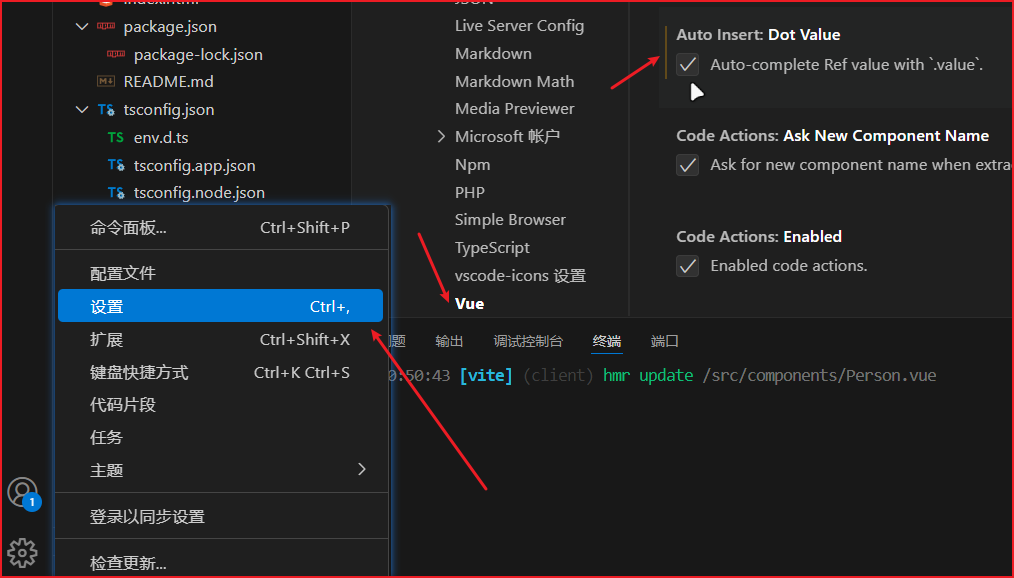
    image-20250223210254796
  2. reactive重新分配一个新对象,会失去响应式(可以使用Object.assign去整体替换)。
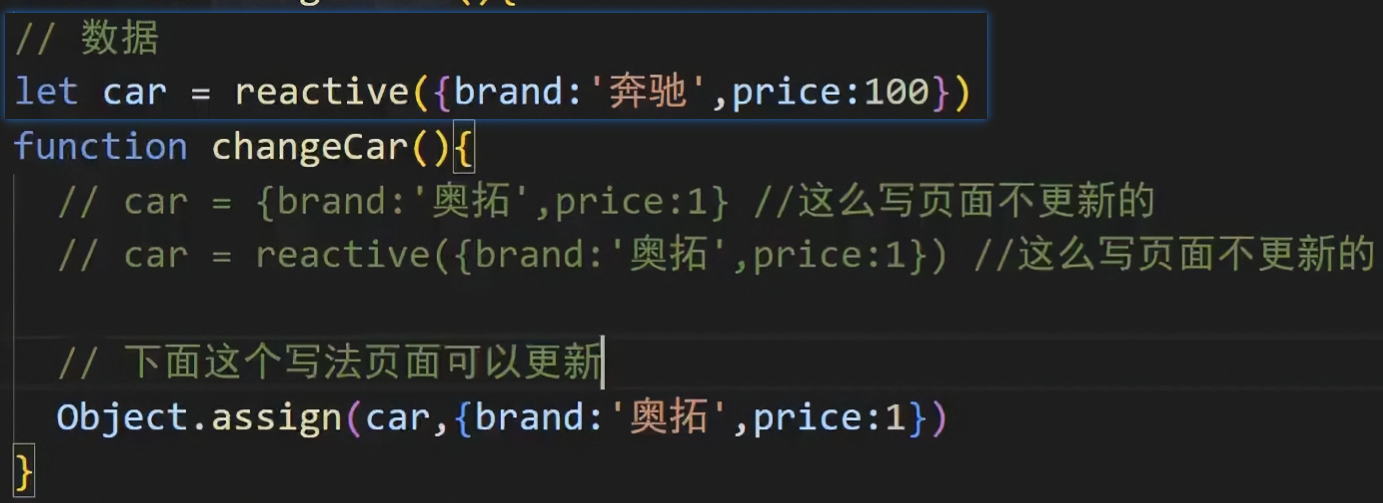
    image-20250223211333335
  • 使用原则:
  1. 若需要一个基本类型的响应式数据,必须使用ref
  2. 若需要一个响应式对象,层级不深,refreactive都可以。
  3. 若需要一个响应式对象,且层级较深,推荐使用reactive

3.7. 【toRefs 与 toRef】

  • 作用:将一个响应式对象中的每一个属性,转换为ref对象。
  • 备注:toRefstoRef功能一致,但toRefs可以批量转换。
  • 语法如下:
 1
 2
 3
 4
 5
 6
 7
 8
 9
10
11
12
13
14
15
16
17
18
19
20
21
22
23
24
25
26
27
28
29
30
31
32
33
34
35
36
<template>
  <div class="person">
    <h2>姓名{{person.name}}</h2>
    <h2>年龄{{person.age}}</h2>
    <h2>性别{{person.gender}}</h2>
    <button @click="changeName">修改名字</button>
    <button @click="changeAge">修改年龄</button>
    <button @click="changeGender">修改性别</button>
  </div>
</template>

<script lang="ts" setup name="Person">
  import {ref,reactive,toRefs,toRef} from 'vue'

  // 数据
  let person = reactive({name:'张三', age:18, gender:'男'})
	
  // 通过toRefs将person对象中的n个属性批量取出,且依然保持响应式的能力
  // 不使用toRefs直接解构,属性会丢失响应式的能力
  let {name,gender} =  toRefs(person)
  // 注:此时修改name和gender时,person.name和person.gender也会跟着改变!!!
  
  // 通过toRef将person对象中的gender属性取出,且依然保持响应式的能力
  let age = toRef(person,'age')

  // 方法
  function changeName(){
    name.value += '~'
  }
  function changeAge(){
    age.value += 1
  }
  function changeGender(){
    gender.value = '女'
  }
</script>

3.8. 【computed】

作用:根据已有数据计算出新数据(和Vue2中的computed作用一致)。
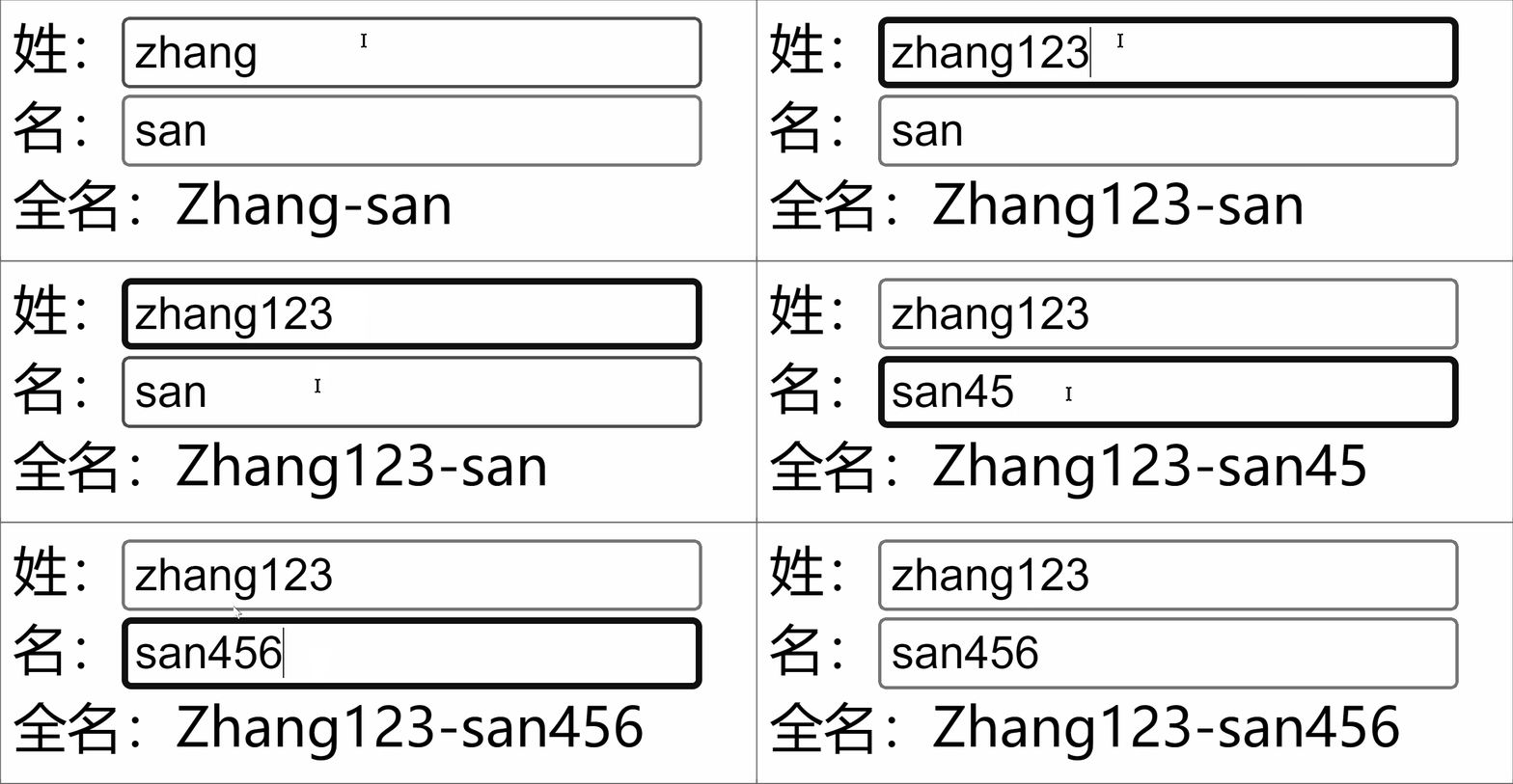
 1
 2
 3
 4
 5
 6
 7
 8
 9
10
11
12
13
14
15
16
17
18
19
20
21
22
23
24
25
26
27
28
29
30
31
32
33
34
35
36
37
38
39
40
41
42
43
44
45
46
47
<template>
  <div class="person">
    <!-- v-model是双向绑定v-bind:是单向绑定 -->
    <!-- 双向绑定后改变input中的内容时这个变量的值也会被修改 -->
    <input type="text" v-model="firstName"> <br>
    <input type="text" v-model="lastName"> <br>
    全名<span>{{fullName}}</span> <br>
    <button @click="changeFullName">全名改为li-si</button>
  </div>
</template>

<script setup lang="ts" name="App">
  import {ref,computed} from 'vue'

  let firstName = ref('zhang')
  let lastName = ref('san')

  // 计算属性——只读取,不修改
  /* let fullName = computed(()=>{
    return firstName.value + '-' + lastName.value
  }) */


  // 计算属性——既读取又修改
  let fullName = computed({
    // 读取
    get(){
      return firstName.value + '-' + lastName.value
    },
    // 修改
    set(val){
      console.log('有人修改了fullName',val)
      firstName.value = val.split('-')[0]
      lastName.value = val.split('-')[1]
      // 也可以用解构数组:
      // const [str1, str2] = val.split('-')
      // lastname.value = str1
      // firstname.value = str2
    }
  })

  function changeFullName(){
    // 此时不是直接修改fullName.value的值,而是把'li-si'传给fullName的set方法
    // 所以此时,set(val)中的val就是'li-si'
    fullName.value = 'li-si'
  } 
</script>

3.9.【watch】

  • 作用:监视数据的变化(和Vue2中的watch作用一致)
  • 特点:Vue3中的watch只能监视以下四种数据
  1. ref定义的数据。
  2. reactive定义的数据。
  3. 函数返回一个值(getter函数)。
  4. 一个包含上述内容的数组。

我们在Vue3中使用watch的时候,通常会遇到以下几种情况:

* 情况一

监视ref定义的【基本类型】数据:直接写数据名即可,监视的是其value值的改变。

 1
 2
 3
 4
 5
 6
 7
 8
 9
10
11
12
13
14
15
16
17
18
19
20
21
22
23
24
25
<template>
  <div class="person">
    <h1>情况一监视ref定义的基本类型数据</h1>
    <h2>当前求和为{{sum}}</h2>
    <button @click="changeSum">点我sum+1</button>
  </div>
</template>

<script lang="ts" setup name="Person">
  import {ref,watch} from 'vue'
  // 数据
  let sum = ref(0)
  // 方法
  function changeSum(){
    sum.value += 1
  }
  // 监视,情况一:监视【ref】定义的【基本类型】数据
  const stopWatch = watch(sum, (newValue,oldValue)=>{
    console.log('sum变化了',newValue,oldValue)
    if(newValue >= 10){
      // 新值大于等于10时停止监视
      stopWatch()  // 函数名与变量名一致
    }
  })
</script>

* 情况二

监视ref定义的【对象类型】数据:直接写数据名,监视的是对象的【地址值】,若想监视对象内部的数据,要手动开启深度监视。

注意:

  • 若修改的是ref定义的对象中的属性,newValueoldValue 都是新值,因为它们是同一个对象。

  • 若修改整个ref定义的对象,newValue 是新值, oldValue 是旧值,因为不是同一个对象了。

 1
 2
 3
 4
 5
 6
 7
 8
 9
10
11
12
13
14
15
16
17
18
19
20
21
22
23
24
25
26
27
28
29
30
31
32
33
34
35
36
37
38
39
<template>
  <div class="person">
    <h1>情况二监视ref定义的对象类型数据</h1>
    <h2>姓名{{ person.name }}</h2>
    <h2>年龄{{ person.age }}</h2>
    <button @click="changeName">修改名字</button>
    <button @click="changeAge">修改年龄</button>
    <button @click="changePerson">修改整个人</button>
  </div>
</template>

<script lang="ts" setup name="Person">
  import {ref,watch} from 'vue'
  // 数据
  let person = ref({
    name:'张三',
    age:18
  })
  // 方法
  function changeName(){
    person.value.name += '~'
  }
  function changeAge(){
    person.value.age += 1
  }
  function changePerson(){
    person.value = {name:'李四',age:90}
  }
  /* 
    监视,情况一:监视【ref】定义的【对象类型】数据,监视的是对象的地址值,若想监视对象内部属性的变化,需要手动开启深度监视
    watch的第一个参数是:被监视的数据
    watch的第二个参数是:监视的回调
    watch的第三个参数是:配置对象(deep、immediate等等.....) 
  */
  watch(person,(newValue,oldValue)=>{
    console.log('person变化了',newValue,oldValue)
  },{deep:true})
  
</script>

* 情况三

监视reactive定义的【对象类型】数据,且默认开启了深度监视。

 1
 2
 3
 4
 5
 6
 7
 8
 9
10
11
12
13
14
15
16
17
18
19
20
21
22
23
24
25
26
27
28
29
30
31
32
33
34
35
36
37
38
39
40
41
42
43
44
45
46
47
48
49
50
<template>
  <div class="person">
    <h1>情况三监视reactive定义的对象类型数据</h1>
    <h2>姓名{{ person.name }}</h2>
    <h2>年龄{{ person.age }}</h2>
    <button @click="changeName">修改名字</button>
    <button @click="changeAge">修改年龄</button>
    <button @click="changePerson">修改整个人</button>
    <hr>
    <h2>测试{{obj.a.b.c}}</h2>
    <button @click="test">修改obj.a.b.c</button>
  </div>
</template>

<script lang="ts" setup name="Person">
  import {reactive,watch} from 'vue'
  // 数据
  let person = reactive({
    name:'张三',
    age:18
  })
  let obj = reactive({
    a:{
      b:{
        c:666
      }
    }
  })
  // 方法
  function changeName(){
    person.name += '~'
  }
  function changeAge(){
    person.age += 1
  }
  function changePerson(){
    Object.assign(person,{name:'李四',age:80})
  }
  function test(){
    obj.a.b.c = 888
  }

  // 监视,情况三:监视【reactive】定义的【对象类型】数据,且默认是开启深度监视的
  watch(person,(newValue,oldValue)=>{
    console.log('person变化了',newValue,oldValue)
  })
  watch(obj,(newValue,oldValue)=>{
    console.log('Obj变化了',newValue,oldValue)
  })
</script>

* 情况四

监视refreactive定义的【对象类型】数据中的某个属性,注意点如下:

  1. 若该属性值不是【对象类型】,需要写成函数形式。
  2. 若该属性值是依然是【对象类型】,可直接编,也可写成函数,建议写成函数。

结论:监视的要是对象里的属性,那么最好写函数式,注意点:若是对象监视的是地址值,需要关注对象内部,需要手动开启深度监视。

 1
 2
 3
 4
 5
 6
 7
 8
 9
10
11
12
13
14
15
16
17
18
19
20
21
22
23
24
25
26
27
28
29
30
31
32
33
34
35
36
37
38
39
40
41
42
43
44
45
46
47
48
49
50
51
52
53
54
55
56
57
<template>
  <div class="person">
    <h1>情况四监视refreactive定义的对象类型数据中的某个属性</h1>
    <h2>姓名{{ person.name }}</h2>
    <h2>年龄{{ person.age }}</h2>
    <h2>汽车{{ person.car.c1 }}{{ person.car.c2 }}</h2>
    <button @click="changeName">修改名字</button>
    <button @click="changeAge">修改年龄</button>
    <button @click="changeC1">修改第一台车</button>
    <button @click="changeC2">修改第二台车</button>
    <button @click="changeCar">修改整个车</button>
  </div>
</template>

<script lang="ts" setup name="Person">
  import {reactive,watch} from 'vue'

  // 数据
  let person = reactive({
    name:'张三',
    age:18,
    car:{
      c1:'奔驰',
      c2:'宝马'
    }
  })
  // 方法
  function changeName(){
    person.name += '~'
  }
  function changeAge(){
    person.age += 1
  }
  function changeC1(){
    person.car.c1 = '奥迪'
  }
  function changeC2(){
    person.car.c2 = '大众'
  }
  function changeCar(){
    person.car = {c1:'雅迪',c2:'爱玛'}
  }

  // 监视,情况四:监视响应式对象中的某个属性,且该属性是基本类型的,要写成函数式
  // () => { return person.name } 简写为 () => person.name
  /* watch(()=> person.name,(newValue,oldValue)=>{
    console.log('person.name变化了',newValue,oldValue)
  }) */

  // 监视,情况四:监视响应式对象中的某个属性,且该属性是对象类型的,可以直接写,也能写函数,更推荐写函数
  // 直接写 person.car 只能监视对象内的属性变化,无法监视整个对象(即对象的地址)的变化
  // 写 () => person.car 只能监视整个对象的变化,无法监视对象内属性的变化
  // 写 () => person.car 时,在后面加一个{ deep: true } 就可以同时监视两者的变化了
  watch(()=>person.car,(newValue,oldValue)=>{
    console.log('person.car变化了',newValue,oldValue)
  },{deep:true})
</script>

* 情况五

监视上述的多个数据

 1
 2
 3
 4
 5
 6
 7
 8
 9
10
11
12
13
14
15
16
17
18
19
20
21
22
23
24
25
26
27
28
29
30
31
32
33
34
35
36
37
38
39
40
41
42
43
44
45
46
47
48
49
<template>
  <div class="person">
    <h1>情况五监视上述的多个数据</h1>
    <h2>姓名{{ person.name }}</h2>
    <h2>年龄{{ person.age }}</h2>
    <h2>汽车{{ person.car.c1 }}{{ person.car.c2 }}</h2>
    <button @click="changeName">修改名字</button>
    <button @click="changeAge">修改年龄</button>
    <button @click="changeC1">修改第一台车</button>
    <button @click="changeC2">修改第二台车</button>
    <button @click="changeCar">修改整个车</button>
  </div>
</template>

<script lang="ts" setup name="Person">
  import {reactive,watch} from 'vue'

  // 数据
  let person = reactive({
    name:'张三',
    age:18,
    car:{
      c1:'奔驰',
      c2:'宝马'
    }
  })
  // 方法
  function changeName(){
    person.name += '~'
  }
  function changeAge(){
    person.age += 1
  }
  function changeC1(){
    person.car.c1 = '奥迪'
  }
  function changeC2(){
    person.car.c2 = '大众'
  }
  function changeCar(){
    person.car = {c1:'雅迪',c2:'爱玛'}
  }

  // 监视,情况五:监视上述的多个数据
  watch([()=>person.name,person.car],(newValue,oldValue)=>{
    console.log('person.car变化了',newValue,oldValue)
  },{deep:true})

</script>

3.10. 【watchEffect】

  • 官网:立即运行一个函数,同时响应式地追踪其依赖,并在依赖更改时重新执行该函数。

  • watch对比watchEffect

    1. 都能监听响应式数据的变化,不同的是监听数据变化的方式不同

    2. watch:要明确指出监视的数据

    3. watchEffect:不用明确指出监视的数据(函数中用到哪些属性,那就监视哪些属性)。

  • 示例代码:

     1
     2
     3
     4
     5
     6
     7
     8
     9
    10
    11
    12
    13
    14
    15
    16
    17
    18
    19
    20
    21
    22
    23
    24
    25
    26
    27
    28
    29
    30
    31
    32
    33
    34
    35
    36
    37
    38
    39
    40
    41
    42
    43
    44
    45
    46
    47
    48
    
    <template>
      <div class="person">
        <h1>需求水温达到50℃,或水位达到20cm则联系服务器</h1>
        <h2 id="demo">水温{{temp}}</h2>
        <h2>水位{{height}}</h2>
        <button @click="changePrice">水温+1</button>
        <button @click="changeSum">水位+10</button>
      </div>
    </template>
    
    <script lang="ts" setup name="Person">
      import {ref,watch,watchEffect} from 'vue'
      // 数据
      let temp = ref(0)
      let height = ref(0)
    
      // 方法
      function changePrice(){
        temp.value += 10
      }
      function changeSum(){
        height.value += 1
      }
    
      // 用watch实现,需要明确的指出要监视:temp、height
      watch([temp,height],(value)=>{
        // 从value中获取最新的temp值、height值
        const [newTemp,newHeight] = value
        // 室温达到50℃,或水位达到20cm,立刻联系服务器
        if(newTemp >= 50 || newHeight >= 20){
          console.log('联系服务器')
        }
      })
    
      // 用watchEffect实现,不用
      const stopWtach = watchEffect(()=>{
        // 室温达到50℃,或水位达到20cm,立刻联系服务器
        if(temp.value >= 50 || height.value >= 20){
          console.log(document.getElementById('demo')?.innerText)
          console.log('联系服务器')
        }
        // 水温达到100,或水位达到50,取消监视
        if(temp.value === 100 || height.value === 50){
          console.log('清理了')
          stopWtach()
        }
      })
    </script>
    

3.11. 【标签的 ref 属性】

作用:用于注册模板引用。

  • 用在普通DOM标签上,获取的是DOM节点。

  • 用在组件标签上,获取的是组件实例对象。

用在普通DOM标签上:

 1
 2
 3
 4
 5
 6
 7
 8
 9
10
11
12
13
14
15
16
17
18
19
20
21
22
23
24
25
26
27
28
29
30
31
32
33
<template>
  <div class="person">
    <h1 ref="title1">尚硅谷</h1>
    <h2 ref="title2">前端</h2>
    <h3 ref="title3">Vue</h3>
    <input type="text" ref="inpt"> <br><br>
    <button @click="showLog">点我打印内容</button>
  </div>
</template>

<script lang="ts" setup name="Person">
  import {ref} from 'vue'
	
  let title1 = ref()
  let title2 = ref()
  let title3 = ref()

  function showLog(){
    // 通过id获取元素
    const t1 = document.getElementById('title1')
    // 打印内容
    console.log((t1 as HTMLElement).innerText)
    console.log((<HTMLElement>t1).innerText)
    console.log(t1?.innerText)
    
		/************************************/
		
    // 通过ref获取元素
    console.log(title1.value)
    console.log(title2.value)
    console.log(title3.value)
  }
</script>

用在组件标签上:

 1
 2
 3
 4
 5
 6
 7
 8
 9
10
11
12
13
14
15
16
17
18
19
20
21
22
23
24
25
26
27
28
29
30
31
<!-- 父组件App.vue -->
<template>
  <!-- 给子组件绑定ref -->
  <Person ref="ren"/>
  <button @click="test">测试</button>
</template>

<script lang="ts" setup name="App">
  import Person from './components/Person.vue'
  import {ref} from 'vue'
  // 创建一个ref对象来存储子组件的引用
  let ren = ref()

  function test(){
    console.log(ren.value.name)
    console.log(ren.value.age)
  }
</script>


<!-- 子组件Person.vue中要使用defineExpose暴露内容 -->
<script lang="ts" setup name="Person">
  import {ref,defineExpose} from 'vue'
	// 数据
  let name = ref('张三')
  let age = ref(18)
  /****************************/
  /****************************/
  // 使用defineExpose将组件中的数据交给外部,只有这样外部才能查看
  defineExpose({name,age})
</script>

3.12. 【props】

1
2
3
4
5
6
7
8
9
// 定义一个接口,限制每个Person对象的格式
export interface PersonInter {
id:string,
name:string,
age:number
}

// 定义一个自定义类型Persons
export type Persons = Array<PersonInter>

App.vue中代码:

 1
 2
 3
 4
 5
 6
 7
 8
 9
10
11
12
13
14
15
16
17
18
<template>
	<!-- 值的前面加:编译器就会把这个值当表达式处理 -->
	<!-- ref前面无需加:编译器默认就会当表达式处理 -->
	<Person :list="persons"/>
</template>

<script lang="ts" setup name="App">
import Person from './components/Person.vue'
import {reactive} from 'vue'
import {type Persons} from './types'

// 效果同let persons:Persons = reactive(...),不过推荐下面的写法
let persons = reactive<Persons>([
{id:'e98219e12',name:'张三',age:18},
{id:'e98219e13',name:'李四',age:19},
 {id:'e98219e14',name:'王五',age:20}
])
</script>

Person.vue中代码:

 1
 2
 3
 4
 5
 6
 7
 8
 9
10
11
12
13
14
15
16
17
18
19
20
21
22
23
24
25
26
27
28
29
30
<template>
<div class="person">
<ul>
<li v-for="item in list" :key="item.id">
  {{item.name}}--{{item.age}}
</li>
</ul>
</div>
</template>

<script lang="ts" setup name="Person">
import {defineProps, withDefaults} from 'vue'
// @ 默认表示src目录,可以在 tsconfig.json 中设置
import {type PersonInter} from '@/types'

// 第一种写法:仅接收
// 会把数组内的所有数据转化为一个对象,所以调用的时候就是props.属性
// const props = defineProps(['list'])

// 第二种写法:接收+限制类型
// defineProps<{list:Persons}>()

// 第三种写法:接收+限制类型+指定默认值+限制必要性
// ?:就是可传可不传
let props = withDefaults(defineProps<{list?:Persons}>(),{
	// 必须写成函数返回值的形式
	list:()=>[{id:'asdasg01',name:'小猪佩奇',age:18}]
})
console.log(props)
</script>

3.13. 【生命周期】

  • 概念:Vue组件实例在创建时要经历一系列的初始化步骤,在此过程中Vue会在合适的时机,调用特定的函数,从而让开发者有机会在特定阶段运行自己的代码,这些特定的函数统称为:生命周期钩子

  • 规律:

    生命周期整体分为四个阶段,分别是:创建、挂载、更新、销毁,每个阶段都有两个钩子,一前一后。

  • Vue2的生命周期

    创建阶段:beforeCreatecreated

    挂载阶段:beforeMountmounted

    更新阶段:beforeUpdateupdated

    销毁阶段:beforeDestroydestroyed

  • Vue3的生命周期

    创建阶段:setup

    挂载阶段:onBeforeMountonMounted

    更新阶段:onBeforeUpdateonUpdated

    卸载阶段:onBeforeUnmountonUnmounted

  • 常用的钩子:onMounted(挂载完毕)、onUpdated(更新完毕)、onBeforeUnmount(卸载之前)

  • 示例代码:

     1
     2
     3
     4
     5
     6
     7
     8
     9
    10
    11
    12
    13
    14
    15
    16
    17
    18
    19
    20
    21
    22
    23
    24
    25
    26
    27
    28
    29
    30
    31
    32
    33
    34
    35
    36
    37
    38
    39
    40
    41
    42
    43
    44
    45
    46
    
    <template>
      <div class="person">
        <h2>当前求和为{{ sum }}</h2>
        <button @click="changeSum">点我sum+1</button>
      </div>
    </template>
    
    <!-- vue3写法 -->
    <script lang="ts" setup name="Person">
      import { 
        ref, 
        onBeforeMount, 
        onMounted, 
        onBeforeUpdate, 
        onUpdated, 
        onBeforeUnmount, 
        onUnmounted 
      } from 'vue'
    
      // 数据
      let sum = ref(0)
      // 方法
      function changeSum() {
        sum.value += 1
      }
      console.log('setup')
      // 生命周期钩子
      onBeforeMount(()=>{
        console.log('挂载之前')
      })
      onMounted(()=>{
        console.log('挂载完毕')
      })
      onBeforeUpdate(()=>{
        console.log('更新之前')
      })
      onUpdated(()=>{
        console.log('更新完毕')
      })
      onBeforeUnmount(()=>{
        console.log('卸载之前')
      })
      onUnmounted(()=>{
        console.log('卸载完毕')
      })
    </script>
    

3.14. 【自定义hook】

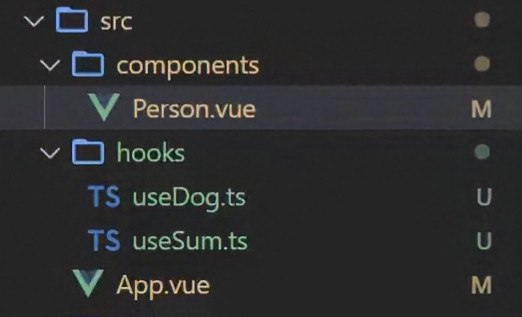
  • 什么是hook?—— 本质是一个函数,把setup函数中使用的Composition API进行了封装,类似于vue2.x中的mixin

  • 自定义hook的优势:复用代码, 让setup中的逻辑更清楚易懂。

示例代码:

image-20250227223103545
  • useSum.ts中内容如下:

     1
     2
     3
     4
     5
     6
     7
     8
     9
    10
    11
    12
    13
    14
    15
    16
    17
    18
    19
    
    import {ref,onMounted} from 'vue'
    
    // 将所有script内容包在一个函数里
    export default function(){
      let sum = ref(0)
    
      const increment = ()=>{
        sum.value += 1
      }
      const decrement = ()=>{
        sum.value -= 1
      }
      onMounted(()=>{
        increment()
      })
    
      //向外部暴露数据
      return {sum,increment,decrement}
    }		
    
  • useDog.ts中内容如下:

     1
     2
     3
     4
     5
     6
     7
     8
     9
    10
    11
    12
    13
    14
    15
    16
    17
    18
    19
    20
    21
    22
    23
    24
    25
    26
    27
    28
    29
    
    import {reactive,onMounted} from 'vue'
    import axios,{AxiosError} from 'axios'
    
    // 将所有script内容包在一个函数里
    export default function(){
      let dogList = reactive<string[]>([])
    
      // 方法
      async function getDog(){
        try {
          // 发请求
          let {data} = await axios.get('https://dog.ceo/api/breed/pembroke/./assets/random')
          // 维护数据
          dogList.push(data.message)
        } catch (error) {
          // 处理错误
          const err = <AxiosError>error
          console.log(err.message)
        }
      }
    
      // 挂载钩子
      onMounted(()=>{
        getDog()
      })
    
      //向外部暴露数据
      return {dogList,getDog}
    }
    
  • 组件中具体使用:

     1
     2
     3
     4
     5
     6
     7
     8
     9
    10
    11
    12
    13
    14
    15
    16
    17
    18
    19
    20
    21
    22
    23
    24
    25
    26
    
    <template>
      <h2>当前求和为{{sum}}</h2>
      <button @click="increment">点我+1</button>
      <button @click="decrement">点我-1</button>
      <hr>
      <img v-for="(u,index) in dogList.urlList" :key="index" :src="(u as string)"> 
      <span v-show="dogList.isLoading">加载中......</span><br>
      <button @click="getDog">再来一只狗</button>
    </template>
    
    <script lang="ts">
      import {defineComponent} from 'vue'
    
      export default defineComponent({
        name:'App',
      })
    </script>
    
    <script setup lang="ts">
      import useSum from './hooks/useSum'
      import useDog from './hooks/useDog'
    
      // 进行解构
      let {sum,increment,decrement} = useSum()
      let {dogList,getDog} = useDog()
    </script>
    

4. 路由

4.1. 【对路由的理解】
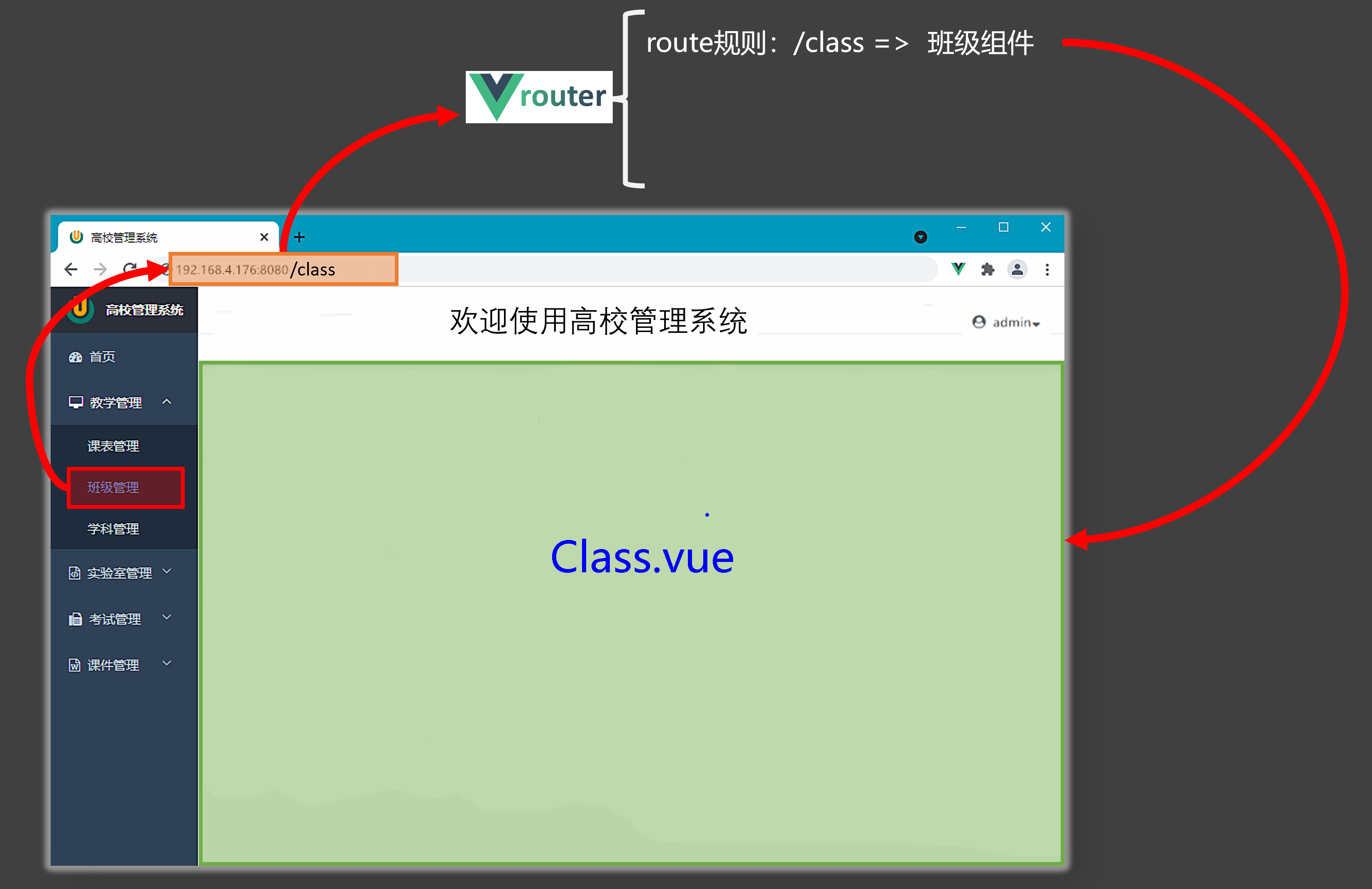
image-20231018144351536

4.2. 【基本切换效果】

  • Vue3中要使用vue-router的最新版本,目前是4版本。

  • 安装命令npm i vue-router

  • 路由配置文件代码如下:

     1
     2
     3
     4
     5
     6
     7
     8
     9
    10
    11
    12
    13
    14
    15
    16
    17
    18
    19
    
    import {createRouter,createWebHistory} from 'vue-router'
    import Home from '@/pages/Home.vue'
    import News from '@/pages/News.vue'
    import About from '@/pages/About.vue'
    
    const router = createRouter({
    	history:createWebHistory(),
    	routes:[
    		{
    			path:'/home',
    			component:Home
    		},
    		{
    			path:'/about',
    			component:About
    		}
    	]
    })
    export default router
    
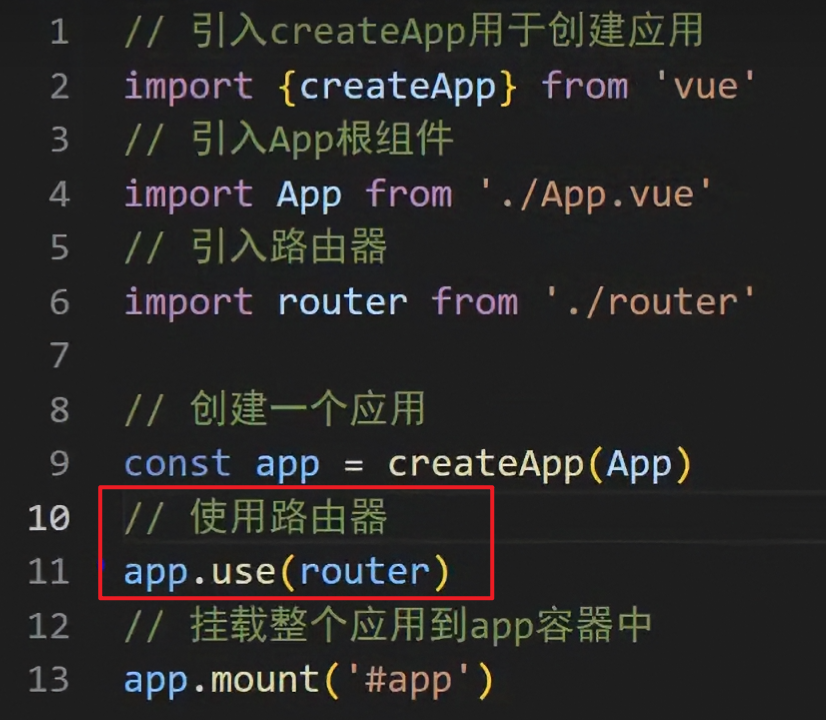
  • main.ts代码如下:

    1
    2
    3
    4
    5
    
    import router from './router/index'
    // 使用路由器
    app.use(router)
    // 挂载整个应用到app容器中
    app.mount('#app')
    
  • App.vue代码如下

     1
     2
     3
     4
     5
     6
     7
     8
     9
    10
    11
    12
    13
    14
    15
    16
    17
    18
    19
    20
    
    <template>
      <div class="app">
        <h2 class="title">Vue路由测试</h2>
        <!-- 导航区 -->
        <div class="navigate">
          <!-- active-class会自动检测当切换到对应页面时自动激活 -->
          <RouterLink to="/home" active-class="active">首页</RouterLink>
          <RouterLink to="/news" active-class="active">新闻</RouterLink>
          <RouterLink to="/about" active-class="active">关于</RouterLink>
        </div>
        <!-- 展示区 -->
        <div class="main-content">
          <RouterView></RouterView>
        </div>
      </div>
    </template>
    
    <script lang="ts" setup name="App">
      import {RouterLink,RouterView} from 'vue-router'  
    </script>
    

4.3. 【两个注意点】

  1. 路由组件通常存放在pagesviews文件夹,一般组件通常存放在components文件夹。

    路由组件:靠路由的规则渲染出来的

    一般组件:亲手写标签出来的

  2. 通过点击导航,视觉效果上“消失” 了的路由组件,默认是被卸载掉的,需要的时候再去挂载

4.4.【路由器工作模式】

  1. history模式

    优点:URL更加美观,不带有#,更接近传统的网站URL

    缺点:后期项目上线,需要服务端配合处理路径问题,否则刷新会有404错误。

    1
    2
    3
    4
    
    const router = createRouter({
    	history:createWebHistory(), //history模式
    	/******/
    })
    
  2. hash模式

    优点:兼容性更好,因为不需要服务器端处理路径。

    缺点:URL带有#不太美观,且在SEO优化方面相对较差。

    1
    2
    3
    4
    
    const router = createRouter({
    	history:createWebHashHistory(), //hash模式
    	/******/
    })
    

4.5. 【to的两种写法】

1
2
3
4
5
<!-- 第一种to的字符串写法 -->
<router-link active-class="active" to="/home">主页</router-link>

<!-- 第二种to的对象写法 -->
<router-link active-class="active" :to="{path:'/home'}">Home</router-link>

4.6. 【命名路由】

作用:可以简化路由跳转及传参(后面就讲)。

给路由规则命名:

 1
 2
 3
 4
 5
 6
 7
 8
 9
10
11
12
13
14
15
16
17
routes:[
  {
    name:'zhuye',
    path:'/home',
    component:Home
  },
  {
    name:'xinwen',
    path:'/news',
    component:News,
  },
  {
    name:'guanyu',
    path:'/about',
    component:About
  }
]

跳转路由:

1
2
3
4
5
<!--简化前需要写完整的路径to的字符串写法 -->
<router-link to="/news/detail">跳转</router-link>

<!--简化后直接通过名字跳转to的对象写法配合name属性 -->
<router-link :to="{name:'guanyu'}">跳转</router-link>

4.7. 【嵌套路由】

  1. 编写News的子路由:Detail.vue

  2. 配置路由规则,使用children配置项:

     1
     2
     3
     4
     5
     6
     7
     8
     9
    10
    11
    12
    13
    14
    15
    16
    17
    18
    19
    20
    21
    22
    23
    24
    25
    26
    27
    28
    
    const router = createRouter({
      history:createWebHistory(),
    	routes:[
    		{
    			name:'zhuye',
    			path:'/home',
    			component:Home
    		},
    		{
    			name:'xinwen',
    			path:'/news',
    			component:News,
    			children:[  // 子集路由
    				{
    					name:'xiang',
    					path:'detail',  // 子集不用写/
    					component:Detail
    				}
    			]
    		},
    		{
    			name:'guanyu',
    			path:'/about',
    			component:About
    		}
    	]
    })
    export default router
    
  3. 跳转路由(记得要加完整路径):

    1
    2
    3
    
    <router-link to="/news/detail">xxxx</router-link>
    <!--  -->
    <router-link :to="{path:'/news/detail'}">xxxx</router-link>
    
  4. 记得去Home组件中预留一个<router-view>

     1
     2
     3
     4
     5
     6
     7
     8
     9
    10
    11
    12
    
    <template>
      <div class="news">
        <nav class="news-list">
          <RouterLink v-for="news in newsList" :key="news.id" :to="{path:'/news/detail'}">
            {{news.name}}
          </RouterLink>
        </nav>
        <div class="news-detail">
          <RouterView/>
        </div>
      </div>
    </template>
    

4.8. 【路由传参】

query参数

  1. 传递参数

     1
     2
     3
     4
     5
     6
     7
     8
     9
    10
    11
    12
    13
    14
    15
    16
    17
    18
    19
    
    <!-- 跳转并携带query参数to的字符串写法 -->
    <router-link to="/news/detail?a=1&b=2&content=欢迎你">
    	跳转
    </router-link>
    
    <!-- 跳转并携带query参数to的对象写法 -->
    <RouterLink 
      :to="{
        //name:'xiang', //用name也可以跳转
        path:'/news/detail',
        query:{
          id:news.id,
          title:news.title,
          content:news.content
        }
      }"
    >
      {{news.title}}
    </RouterLink>
    
  2. 接收参数:

    1
    2
    3
    4
    
    import {useRoute} from 'vue-router'
    const route = useRoute()
    // 打印query参数
    console.log(route.query)
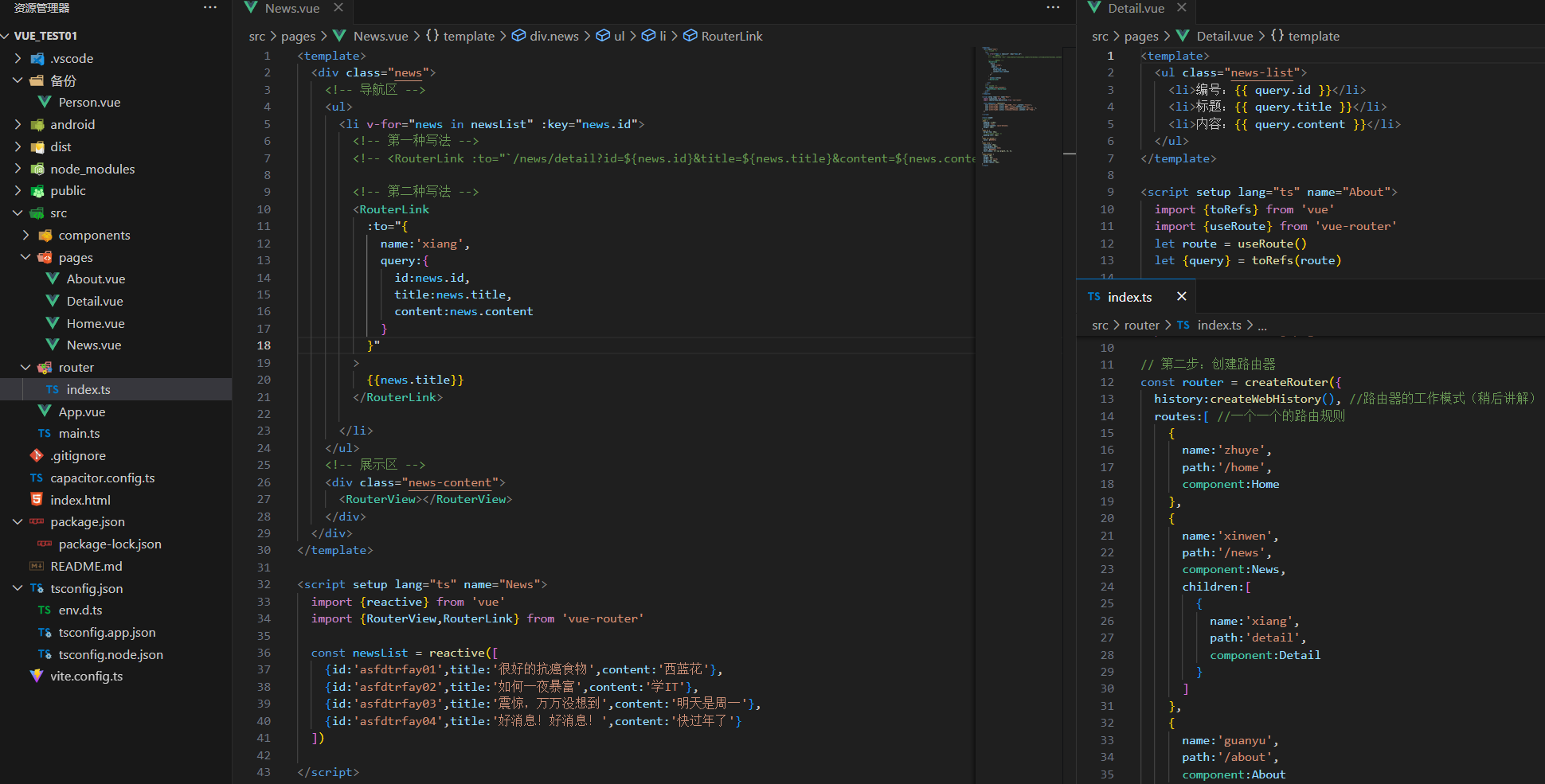
    

image-20250302151507104

params参数

  1. 传递参数

     1
     2
     3
     4
     5
     6
     7
     8
     9
    10
    11
    12
    13
    14
    15
    16
    
    <!-- 跳转并携带params参数to的字符串写法 -->
    <RouterLink :to="`/news/detail/001/新闻001/内容001`">{{news.title}}</RouterLink>
    
    <!-- 跳转并携带params参数to的对象写法 -->
    <RouterLink 
      :to="{
        name:'xiang', // 用name跳转,不能用path
        params:{
          id:news.id,
          title:news.title,
          content:news.title
        }
      }"
    >
      {{news.title}}
    </RouterLink>
    
  2. 接收参数:

    1
    2
    3
    4
    
    import {useRoute} from 'vue-router'
    const route = useRoute()
    // 打印params参数
    console.log(route.params)
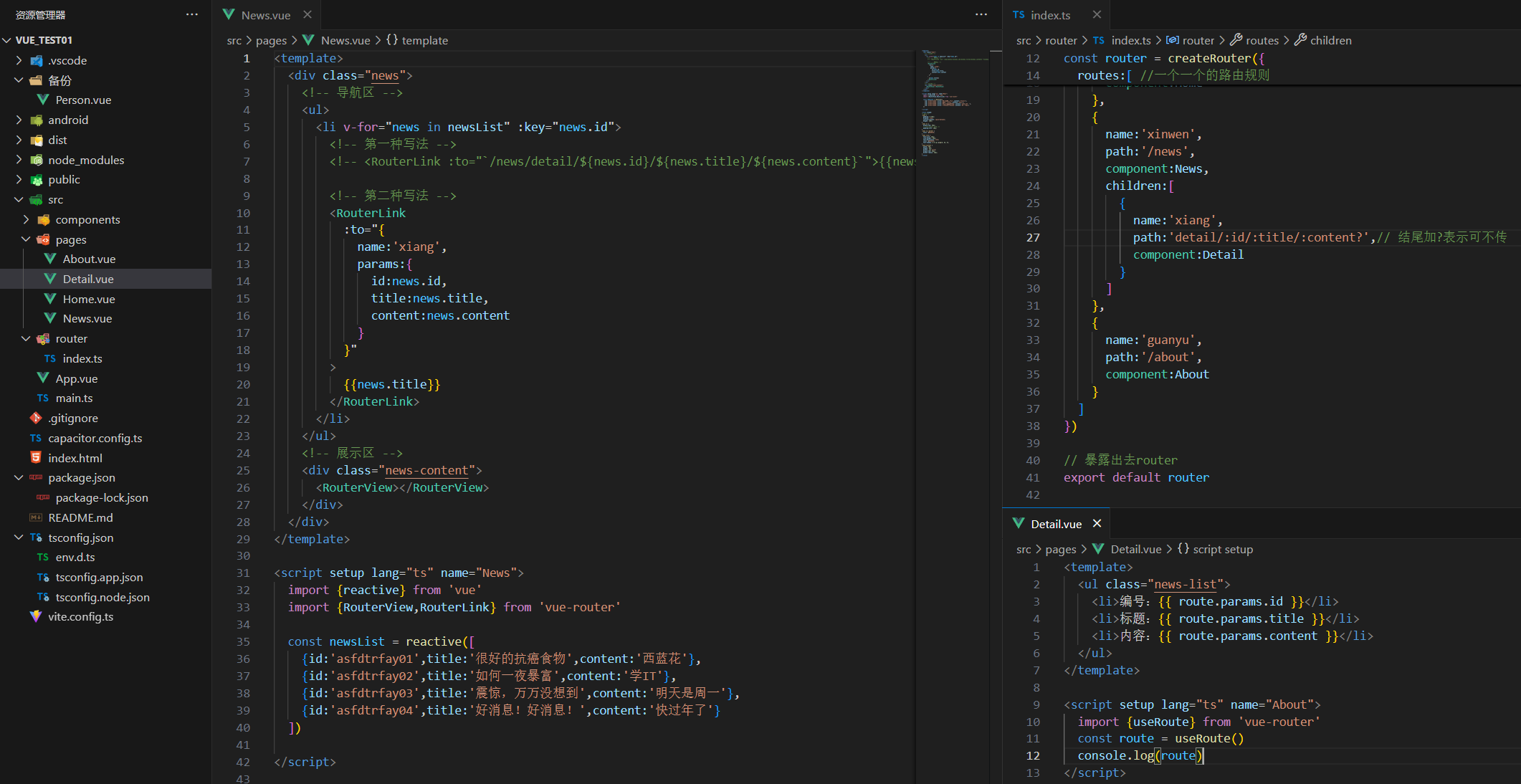
    

image-20250302170358160

备注1:传递params参数时,若使用to的对象写法,必须使用name配置项,不能用path

备注2:传递params参数时,需要提前在规则中占位。

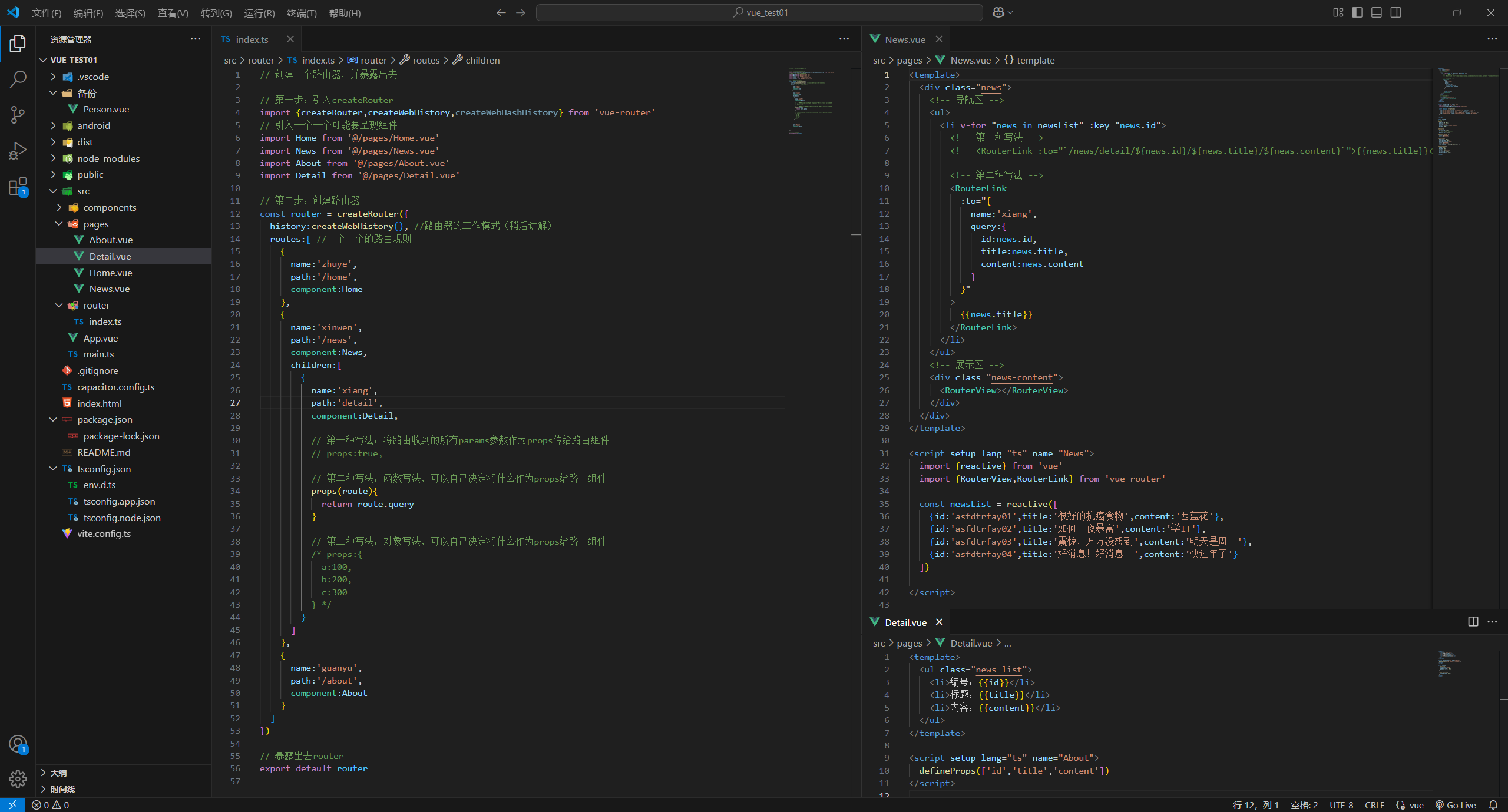
4.9. 【路由的props配置】

作用:让路由组件更方便的收到参数(可以将路由参数作为props传给组件)

备注:在src/router/index.ts中编写

 1
 2
 3
 4
 5
 6
 7
 8
 9
10
11
12
13
14
15
16
{
	name:'xiang',
	path:'detail/:id/:title/:content',
	component:Detail,

  // props的对象写法,作用:把对象中的每一组key-value作为props传给Detail组件
  // props:{a:1,b:2,c:3}, 

  // props的布尔值写法,作用:把收到了每一组params参数,作为props传给Detail组件
  // props:true
  
  // props的函数写法,作用:把返回的对象中每一组key-value作为props传给Detail组件
  props(route){
    return route.query
  }
}

image-20250302172545977

4.10. 【 replace属性】

  1. 作用:控制路由跳转时操作浏览器历史记录的模式。

  2. 浏览器的历史记录有两种写入方式:分别为pushreplace

    • push是追加历史记录(默认值)。
    • replace是替换当前记录。
  3. 开启replace模式:

    1
    
    <RouterLink replace .......>News</RouterLink>
    

push和replace区别演示:
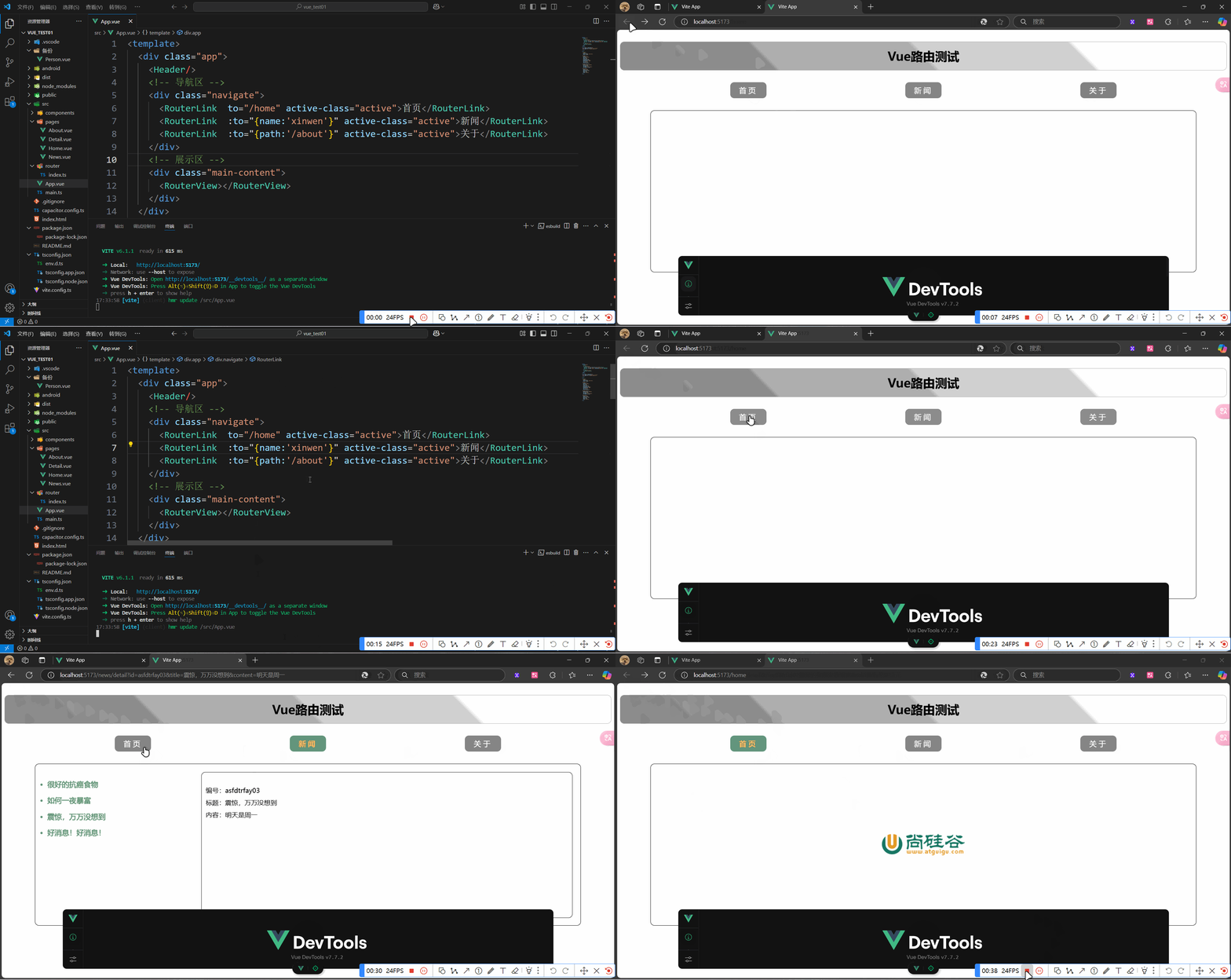
PixPin_2025-03-02_17-35-39

4.11. 【编程式导航】

编程式路由导航:脱离实现路由跳转

路由组件的两个重要的属性:routerouter变成了两个hooks

 1
 2
 3
 4
 5
 6
 7
 8
 9
10
11
12
13
14
15
16
17
18
19
import {useRoute,useRouter} from 'vue-router'

const route = useRoute()
const router = useRouter()

console.log(route.query)
console.log(route.parmas)
console.log(router.push)
console.log(router.replace)

// 挂载后3秒自动跳转
/*
onMounted(() => {
    setTimeout(() => {
        router.push('/news')
    }, 3000)
})
*/
// to的写法同样适用于router.push()的括号内

简单演示:

 1
 2
 3
 4
 5
 6
 7
 8
 9
10
11
12
13
14
15
16
17
18
19
20
21
22
23
24
25
26
27
28
29
30
31
32
33
34
35
36
37
38
39
40
41
42
43
44
45
46
47
48
49
50
51
52
53
54
55
56
57
<template>
  <div class="news">
    <!-- 导航区 -->
    <ul>
      <li v-for="news in newsList" :key="news.id">
        <button @click="showNewsDetail(news)">查看新闻</button>
        <RouterLink 
          :to="{
            name:'xiang',
            query:{
              id:news.id,
              title:news.title,
              content:news.content
            }
          }"
        >
          {{news.title}}
        </RouterLink>
      </li>
    </ul>
    <!-- 展示区 -->
    <div class="news-content">
      <RouterView></RouterView>
    </div>
  </div>
</template>

<script setup lang="ts" name="News">
  import {reactive} from 'vue'
  import {RouterView,RouterLink,useRouter} from 'vue-router'

  const newsList = reactive([
    {id:'asfdtrfay01',title:'很好的抗癌食物',content:'西蓝花'},
    {id:'asfdtrfay02',title:'如何一夜暴富',content:'学IT'},
    {id:'asfdtrfay03',title:'震惊,万万没想到',content:'明天是周一'},
    {id:'asfdtrfay04',title:'好消息!好消息!',content:'快过年了'}
  ])

  const router = useRouter()

  interface NewsInter {
    id:string,
    title:string,
    content:string
  }

  function showNewsDetail(news:NewsInter){
    router.replace({
      name:'xiang',
      query:{
        id:news.id,
        title:news.title,
        content:news.content
      }
    })
  }
</script>

4.12. 【重定向】

  1. 作用:将特定的路径,重新定向到已有路由。

  2. 具体编码:

    1
    2
    3
    4
    
    {
        path:'/',
        redirect:'/about'
    }
    

5. pinia

5.1【准备一个效果】
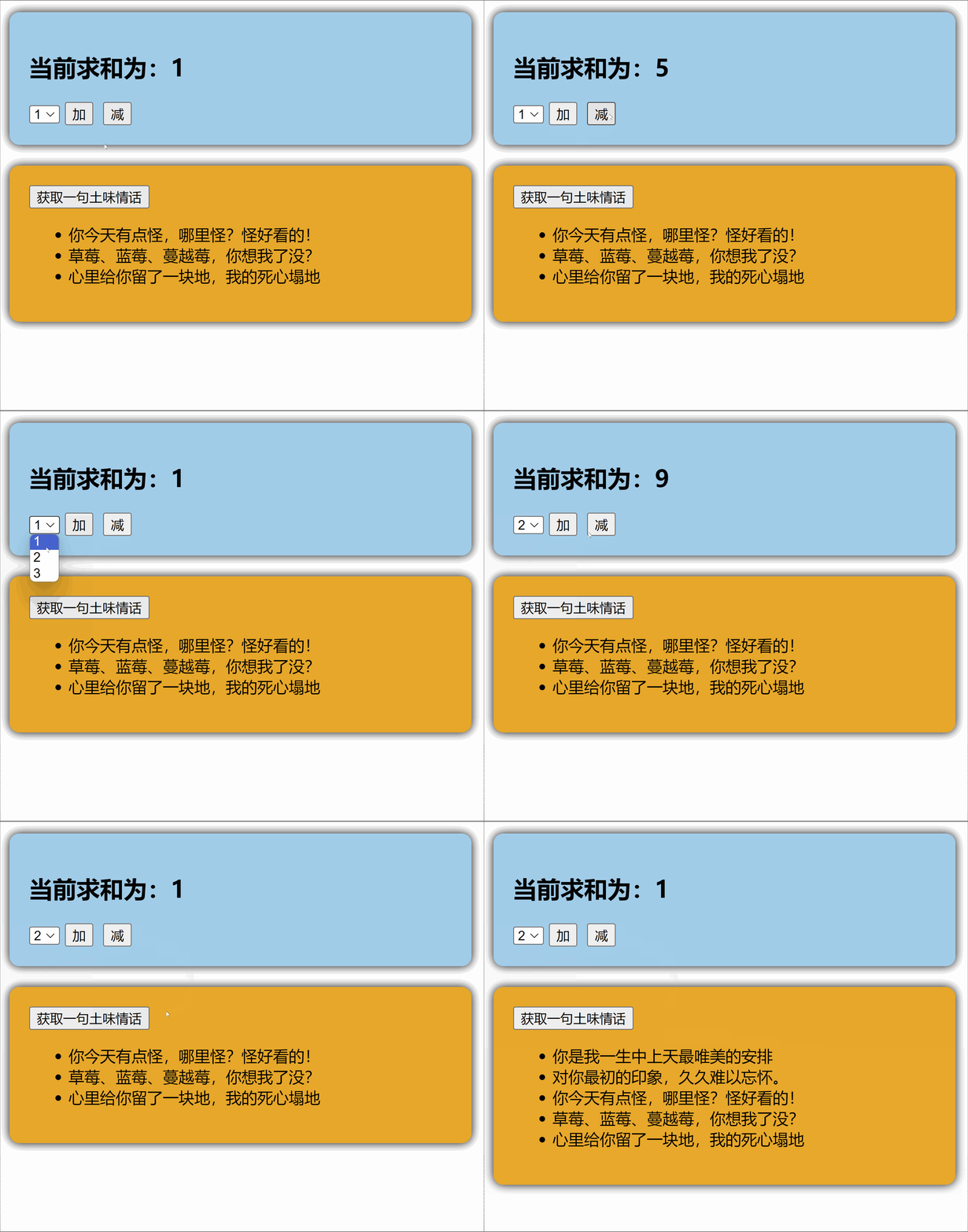
pinia_example

src/App.vue

 1
 2
 3
 4
 5
 6
 7
 8
 9
10
<template>
  <Count/>
  <br>
  <LoveTalk/>
</template>

<script setup lang="ts" name="App">
  import Count from './components/Count.vue'
  import LoveTalk from './components/LoveTalk.vue'
</script>

src/components/Count.vue

 1
 2
 3
 4
 5
 6
 7
 8
 9
10
11
12
13
14
15
16
17
18
19
20
21
22
23
24
25
26
27
28
29
30
31
32
33
34
35
36
37
38
39
40
<template>
  <div class="count">
    <h2>当前求和为{{ sum }}</h2>
    <select v-model.number="n">
      <option value="1">1</option>
      <option value="2">2</option>
      <option value="3">3</option>
    </select>
    <button @click="add"></button>
    <button @click="minus"></button>
  </div>
</template>

<script setup lang="ts" name="Count">
  import { ref } from "vue";
  // 数据
  let sum = ref(1) // 当前求和
  let n = ref(1) // 用户选择的数字

  // 方法
  function add(){
    sum.value += n.value
  }
  function minus(){
    sum.value -= n.value
  }
</script>

<style scoped>
  .count {
    background-color: skyblue;
    padding: 10px;
    border-radius: 10px;
    box-shadow: 0 0 10px;
  }
  select,button {
    margin: 0 5px;
    height: 25px;
  }
</style>

src/components/LoveTalk.vue

 1
 2
 3
 4
 5
 6
 7
 8
 9
10
11
12
13
14
15
16
17
18
19
20
21
22
23
24
25
26
27
28
29
30
31
32
33
34
35
36
37
38
39
40
<template>
  <div class="talk">
    <button @click="getLoveTalk">获取一句土味情话</button>
    <ul>
      <li v-for="talk in talkList" :key="talk.id">{{talk.title}}</li>
    </ul>
  </div>
</template>

<script setup lang="ts" name="LoveTalk">
  import {reactive} from 'vue'
  import axios from "axios";  // npm i axios
  import {nanoid} from 'nanoid'  // npm i nanoid
  // 数据
  let talkList = reactive([
    {id:'ftrfasdf01',title:'今天你有点怪,哪里怪?怪好看的!'},
    {id:'ftrfasdf02',title:'草莓、蓝莓、蔓越莓,今天想我了没?'},
    {id:'ftrfasdf03',title:'心里给你留了一块地,我的死心塌地'}
  ])
  // 方法
  async function getLoveTalk(){
    // 发请求,下面这行的写法是:连续解构赋值+重命名
    // 从await axios中解构出 data,再从 data 中解构出 content,再将 content 重命名为 title
    let {data:{content:title}} = await axios.get('https://api.uomg.com/api/rand.qinghua?format=json')
    // 把请求回来的字符串,包装成一个对象
    // title 的 key 和 value 相同,可简写
    let obj = {id:nanoid(),title}
    // 放到数组中
    talkList.unshift(obj)
  }
</script>

<style scoped>
  .talk {
    background-color: orange;
    padding: 10px;
    border-radius: 10px;
    box-shadow: 0 0 10px;
  }
</style>

5.2【搭建 pinia 环境】

第一步:npm install pinia

第二步:操作src/main.ts

 1
 2
 3
 4
 5
 6
 7
 8
 9
10
11
12
13
import { createApp } from 'vue'
import App from './App.vue'

/* 引入createPinia,用于创建pinia */
import { createPinia } from 'pinia'

/* 创建pinia */
const pinia = createPinia()
const app = createApp(App)

/* 使用插件 */{}
app.use(pinia)
app.mount('#app')

此时开发者工具中已经有了pinia选项

5.3【存储+读取数据】

  1. Store是一个保存:状态业务逻辑 的实体,每个组件都可以读取写入它。

  2. 它有三个概念:stategetteraction,相当于组件中的: datacomputedmethods

  3. 具体编码:src/store/count.ts

     1
     2
     3
     4
     5
     6
     7
     8
     9
    10
    11
    12
    13
    14
    15
    16
    
    // 引入defineStore用于创建store
    import {defineStore} from 'pinia'
    
    // 定义并暴露一个store
    export const useCountStore = defineStore('count',{
      // 动作
      actions:{},
      // 状态
      state(){
        return {
          sum:6
        }
      },
      // 计算
      getters:{}
    })
    
  4. 具体编码:src/store/talk.ts

     1
     2
     3
     4
     5
     6
     7
     8
     9
    10
    11
    12
    13
    14
    15
    16
    17
    18
    19
    20
    
    // 引入defineStore用于创建store
    import {defineStore} from 'pinia'
    
    // 定义并暴露一个store
    export const useTalkStore = defineStore('talk',{
      // 动作
      actions:{},
      // 状态
      state(){
        return {
          talkList:[
            {id:'yuysada01',content:'你今天有点怪,哪里怪?怪好看的!'},
         	{id:'yuysada02',content:'草莓、蓝莓、蔓越莓,你想我了没?'},
            {id:'yuysada03',content:'心里给你留了一块地,我的死心塌地'}
          ]
        }
      },
      // 计算
      getters:{}
    })
    
  5. 组件中使用state中的数据

     1
     2
     3
     4
     5
     6
     7
     8
     9
    10
    11
    12
    13
    14
    15
    
    <template>
      <h2>当前求和为{{ sumStore.sum }}</h2>
    </template>
    
    <script setup lang="ts" name="Count">
      // 引入对应的useXxxxxStore	
      import {useSumStore} from '@/store/sum'
    
      // 调用useXxxxxStore得到对应的store
      const sumStore = useSumStore()
      // 查看sumStore是什么
      console.log(sumStore)
      // reactive 对象中的 ref 对象的value值可以直接调用
      console.log(sumStore.sum)  // 此时的sum不需要.value
    </script>
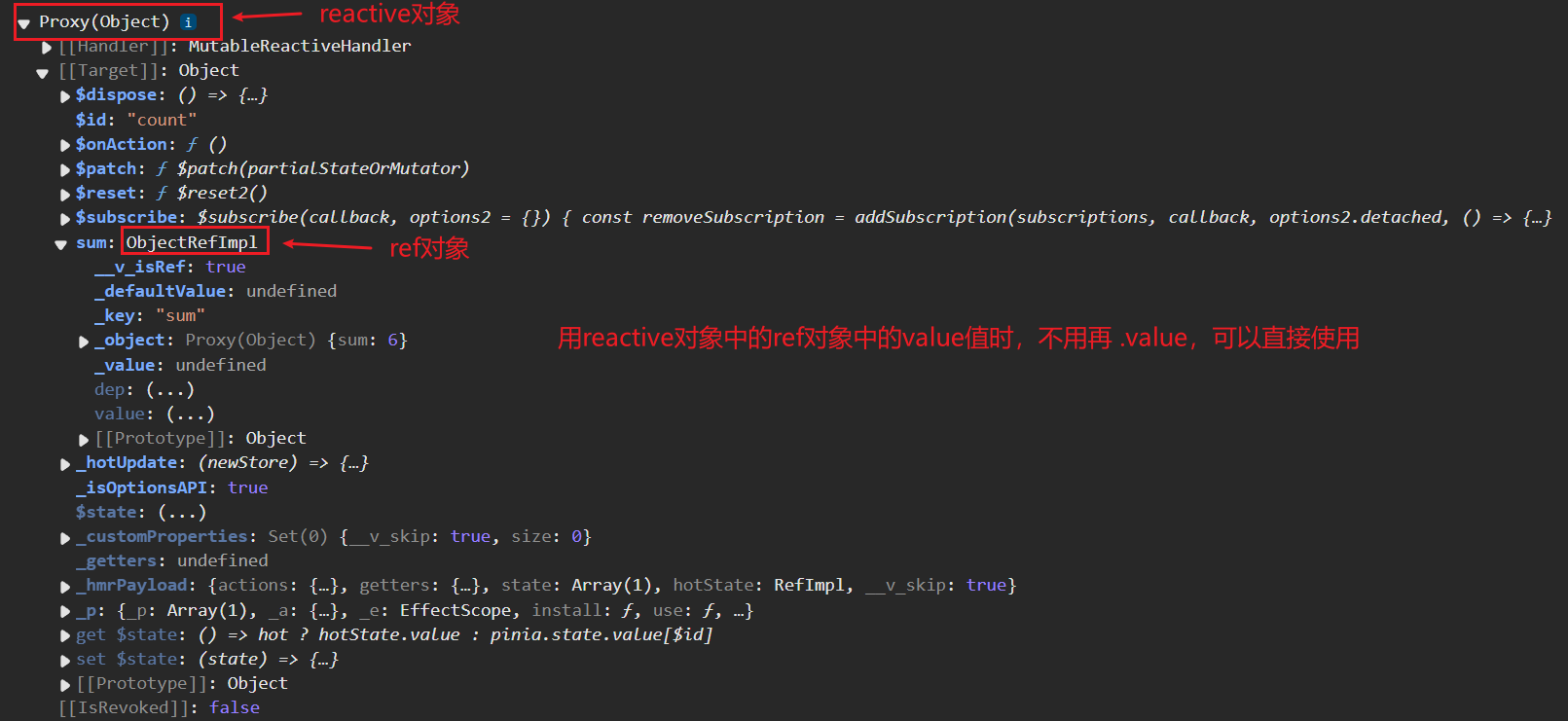
    

    image-20250303200553737

     1
     2
     3
     4
     5
     6
     7
     8
     9
    10
    11
    12
    13
    14
    
    <template>
    	<ul>
        <li v-for="talk in talkStore.talkList" :key="talk.id">
          {{ talk.content }}
        </li>
      </ul>
    </template>
    
    <script setup lang="ts" name="Count">
      import axios from 'axios'
      import {useTalkStore} from '@/store/talk'
    
      const talkStore = useTalkStore()
    </script>
    

5.4.【修改数据】(三种方式)

  1. 第一种修改方式,直接修改

    1
    
    countStore.sum = 666
    
  2. 第二种修改方式:批量修改

    1
    2
    3
    4
    
    countStore.$patch({
      sum:999,
      school:'atguigu'
    })
    
  3. 第三种修改方式:借助action修改(action中可以编写一些业务逻辑)

     1
     2
     3
     4
     5
     6
     7
     8
     9
    10
    11
    12
    13
    14
    15
    16
    17
    18
    19
    20
    21
    22
    23
    
    import { defineStore } from 'pinia'
    
    export const useCountStore = defineStore('count', {
      /*************/
      actions: {
        //加
        increment(value:number) {
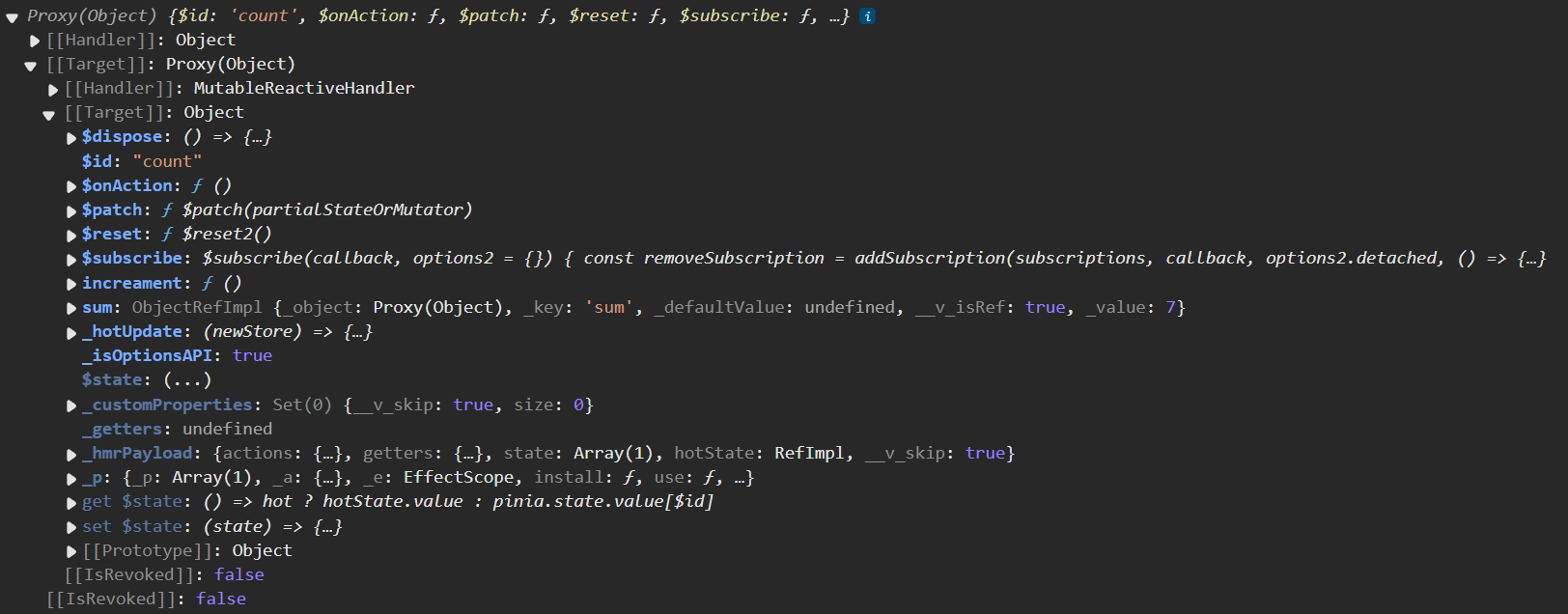
          console.log(this)  // 打印结果见下图
          // this 是当前的store,即useCountStore
          if (this.sum < 10) {
            //操作countStore中的sum
            this.sum += value
          }
        },
        //减
        decrement(value:number){
          if(this.sum > 1){
            this.sum -= value
          }
        }
      },
      /*************/
    })
    

    下图为console.log(this)的结果

    image-20250303204203262

    组件中调用action即可

    1
    2
    3
    4
    5
    
    // 使用countStore
    const countStore = useCountStore()
    
    // 调用对应action
    countStore.increment(n.value)
    

5.5.【storeToRefs】

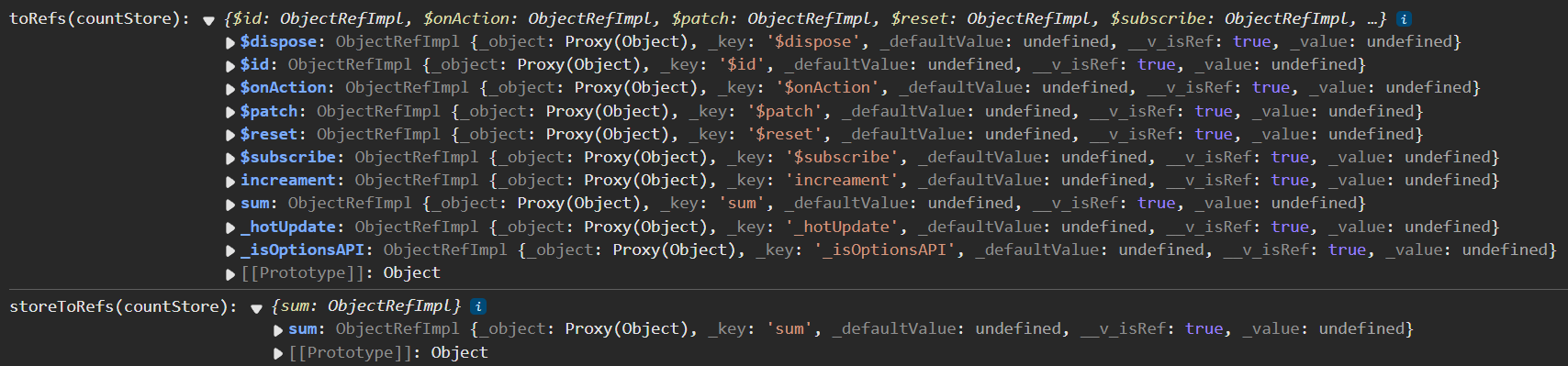
  • 借助storeToRefsstore中的数据转为ref对象,方便在模板中使用。
  • 注意:pinia提供的storeToRefs只会将数据做转换,而VuetoRefs会转换store中数据。
 1
 2
 3
 4
 5
 6
 7
 8
 9
10
11
12
13
14
15
16
17
<template>
	<div class="count">
		<h2>当前求和为{{sum}}</h2>
	</div>
</template>

<script setup lang="ts" name="Count">
  import { useCountStore } from '@/store/count'
  /* 引入storeToRefs */
  import { storeToRefs } from 'pinia'

	/* 得到countStore */
  const countStore = useCountStore()
  /* 使用storeToRefs转换countStore,随后解构 */
  // storeToRefs只会关注store中的数据,不会对方法进行ref包裹
  const {sum} = storeToRefs(countStore)
</script>

toRefs与storeToRefs对比:

image-20250303205905641

5.6.【getters】

  1. 概念:当state中的数据,需要经过处理后再使用时,可以使用getters配置。

  2. 追加getters配置。

     1
     2
     3
     4
     5
     6
     7
     8
     9
    10
    11
    12
    13
    14
    15
    16
    17
    18
    19
    20
    21
    22
    23
    24
    25
    26
    27
    28
    
    // 引入defineStore用于创建store
    import {defineStore} from 'pinia'
    
    // 定义并暴露一个store
    export const useCountStore = defineStore('count',{
      // 动作
      actions:{
        /************/
      },
      // 状态
      state(){
        return {
          sum:1,
          school:'atguigu'
        }
      },
      // 计算
      getters:{
        /* bigSum(state) {
            return state.sum * 10
        } 下行为简写形式 */
        // getters有一个名为bigSum的属性,属性值为箭头函数state => state.sum * 10,函数返回值是number类型
        bigSum:(state):number => state.sum *10,
        upperSchool():string {
          return this.school.toUpperCase()
        }
      }
    })
    
  3. 组件中读取数据:

    1
    2
    
    const {increment,decrement} = countStore
    let {sum,school,bigSum,upperSchool} = storeToRefs(countStore)
    

5.7.【$subscribe】

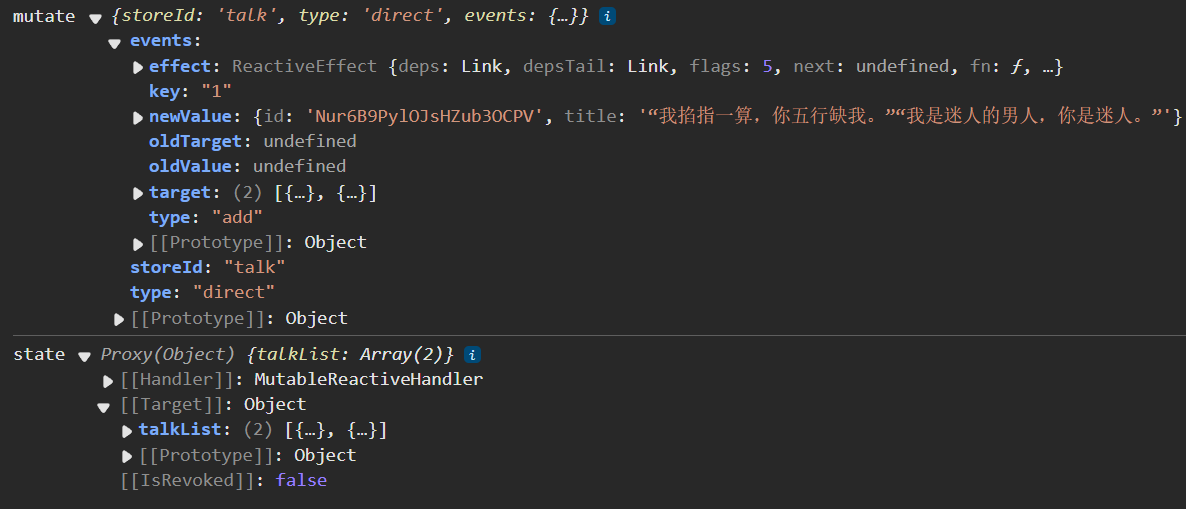
通过 store 的 $subscribe() 方法侦听 state 及其变化

1
2
3
4
5
6
// mutate为本次修改的信息,state为数据
talkStore.$subscribe((mutate,state)=>{
  console.log('LoveTalk',mutate,state)
  // localStorage.setItem:在浏览器本地存储
  localStorage.setItem('talk',JSON.stringify(talkList.value))
})

image-20250303212916386

5.8. 【store组合式写法】

 1
 2
 3
 4
 5
 6
 7
 8
 9
10
11
12
13
14
15
16
17
18
19
20
21
22
23
24
import {defineStore} from 'pinia'
import axios from 'axios'
import {nanoid} from 'nanoid'
import {reactive} from 'vue'

export const useTalkStore = defineStore('talk',()=>{
  // talkList就是state
  const talkList = reactive(
    // JSON.parse只能对字符串使用,所以将localStorage.getItem('talkList')断言为字符串
    // 当本地浏览器数据为空时,JSON.parse(localStorage.getItem('talkList') as string)为null,考虑到null的情况,要用条件或来设置前者为null时的处理方式
    JSON.parse(localStorage.getItem('talkList') as string) || []
  )

  // getATalk函数相当于action
  async function getATalk(){
    // 发请求,下面这行的写法是:连续解构赋值+重命名
    let {data:{content:title}} = await axios.get('https://api.uomg.com/api/rand.qinghua?format=json')
    // 把请求回来的字符串,包装成一个对象
    let obj = {id:nanoid(),title}
    // 放到数组中
    talkList.unshift(obj)
  }
  return {talkList,getATalk}
})

6. 组件通信

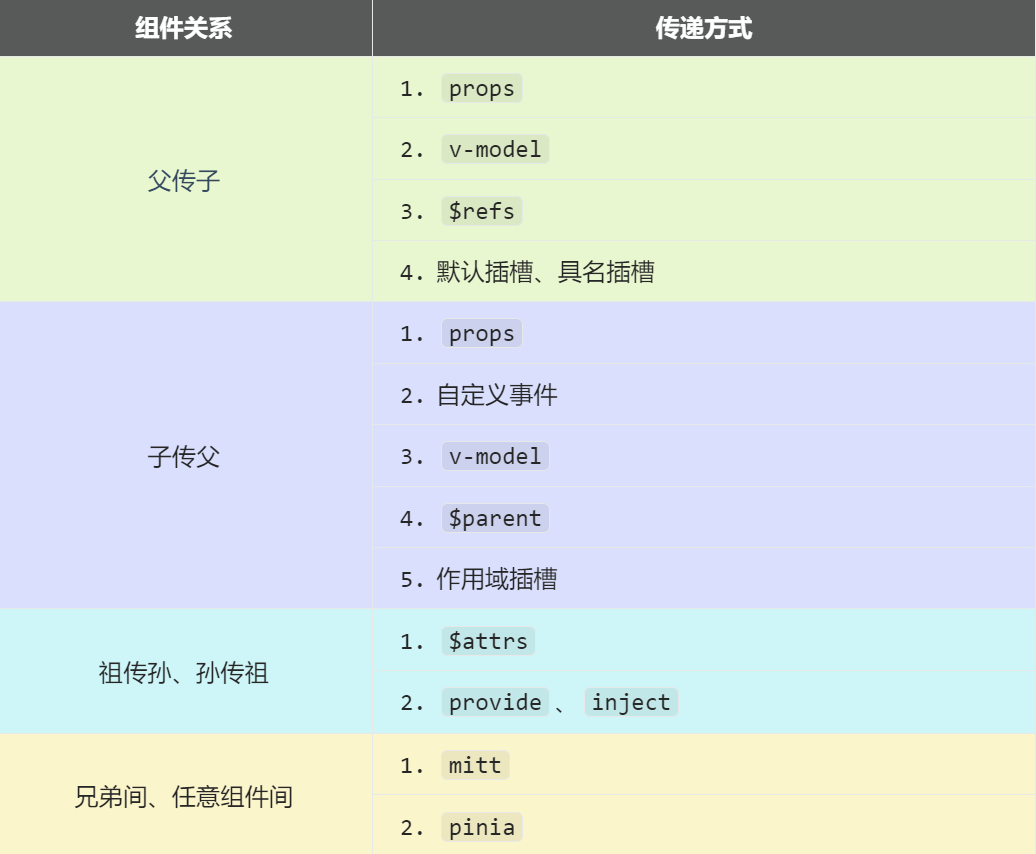
Vue3组件通信和Vue2的区别:

  • 移出事件总线,使用mitt代替。
  • vuex换成了pinia
  • .sync优化到了v-model里面了。
  • $listeners所有的东西,合并到$attrs中了。
  • $children被砍掉了。

常见搭配形式:

image-20231119185900990

6.1. 【props】

概述:props是使用频率最高的一种通信方式,常用与 :父 ↔ 子

  • 父传子:属性值是非函数
  • 子传父:属性值是函数

父组件:

 1
 2
 3
 4
 5
 6
 7
 8
 9
10
11
12
13
14
15
16
17
18
19
20
<template>
  <div class="father">
    <h3>父组件</h3>
		<h4>我的车{{ car }}</h4>
		<h4>儿子给的玩具{{ toy }}</h4>
		<Child :car="car" :getToy="getToy"/>
  </div>
</template>

<script setup lang="ts" name="Father">
	import Child from './Child.vue'
	import { ref } from "vue";
	// 数据
	const car = ref('奔驰')
	const toy = ref()
	// 方法
	function getToy(value:string){
		toy.value = value
	}
</script>

子组件

 1
 2
 3
 4
 5
 6
 7
 8
 9
10
11
12
13
14
15
<template>
  <div class="child">
    <h3>子组件</h3>
		<h4>我的玩具{{ toy }}</h4>
		<h4>父给我的车{{ car }}</h4>
		<button @click="getToy(toy)">玩具给父亲</button>
  </div>
</template>

<script setup lang="ts" name="Child">
	import { ref } from "vue";
	const toy = ref('奥特曼')
	
	defineProps(['car','getToy'])
</script>

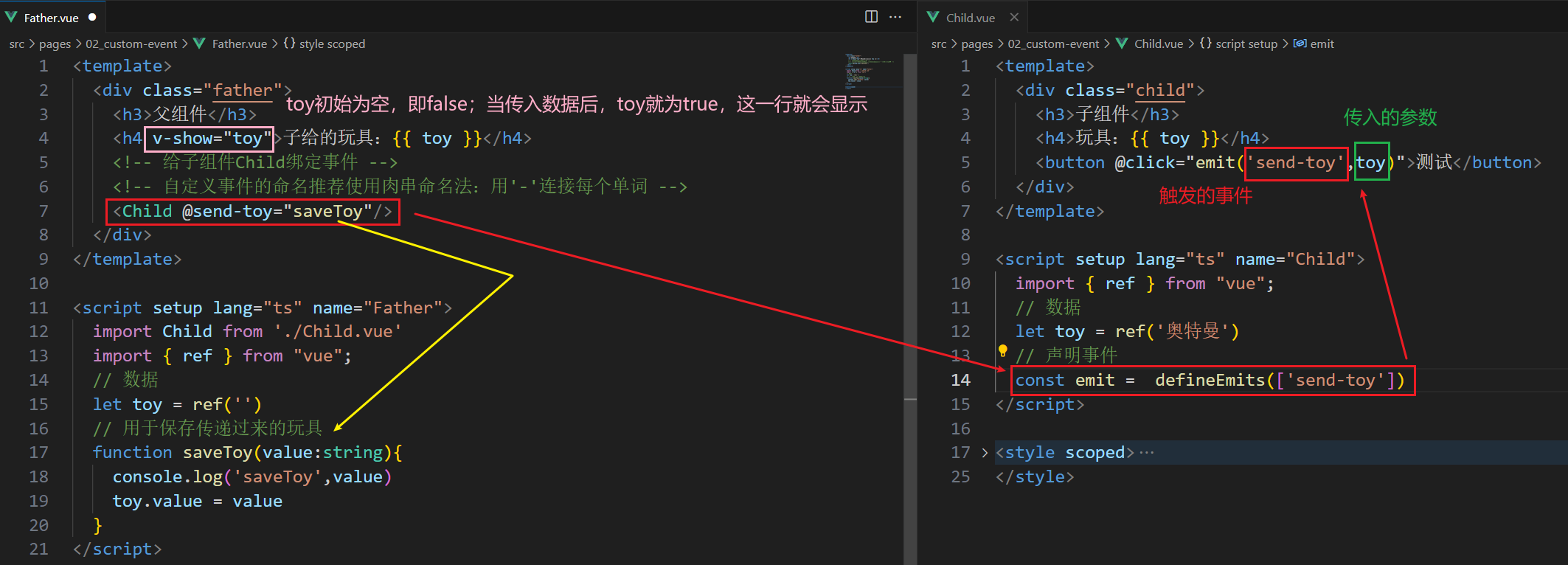
6.2. 【自定义事件】

  1. 概述:自定义事件常用于:子 => 父。
  2. 注意区分好:原生事件、自定义事件。
  • 原生事件:
    • 事件名是特定的(clickmosueenter等等)
    • 事件对象$event: 是包含事件相关信息的对象(pageXpageYtargetkeyCode
  • 自定义事件:
    • 事件名是任意名称
    • 事件对象$event: 是调用emit时所提供的数据,可以是任意类型!!!
  1. 示例:

    1
    2
    3
    4
    5
    6
    7
    
    <!--在父组件中,给子组件绑定自定义事件:-->
    <Child @send-toy="toy = $event"/>
    
    <!--注意区分原生事件与自定义事件中的$event-->
    <!--原生事件中的$event表示事件对象 -->
    <!--自定义事件中的$event表示自定义事件传递的参数 -->
    <button @click="toy = $event">测试</button>
    
    1
    2
    
    //子组件中,触发事件:
    this.$emit('send-toy', 传给$event的具体数据)
    
  2. 案例演示

    image-20250304194956556

6.3. 【mitt】

概述:与消息订阅与发布(pubsub)功能类似,可以实现任意组件间通信。

安装mitt

1
npm i mitt

新建文件:src\utils\emitter.ts

 1
 2
 3
 4
 5
 6
 7
 8
 9
10
11
12
13
14
15
16
17
18
19
20
21
22
23
24
25
26
27
28
29
30
31
// 引入mitt 
import mitt from "mitt";

// 调用mitt得到emitter,emitter能绑定事件、触发事件
const emitter = mitt()

/*
  // 绑定事件
  emitter.on('abc',(value)=>{
    console.log('abc事件被触发',value)
  })
  emitter.on('xyz',(value)=>{
    console.log('xyz事件被触发',value)
  })

  setInterval(() => {
    // 触发事件
    emitter.emit('abc',666)
    emitter.emit('xyz',777)
  }, 1000);

  setTimeout(() => {
  	// 解绑abc事件
  	emitter.off('abc')
    // 清理事件,一次性解绑所有事件
    emitter.all.clear()
  }, 3000); 
*/

// 创建并暴露mitt
export default emitter

接收数据的组件中:绑定事件、同时在销毁前解绑事件:

 1
 2
 3
 4
 5
 6
 7
 8
 9
10
11
12
13
import emitter from "@/utils/emitter";
import { onUnmounted } from "vue";

// 绑定事件
emitter.on('send-toy',(value)=>{
  console.log('send-toy事件被触发',value)
})

// 在组件卸载时解绑事件
onUnmounted(()=>{
  // 解绑事件
  emitter.off('send-toy')
})

【第三步】:提供数据的组件,在合适的时候触发事件

1
2
3
4
5
6
import emitter from "@/utils/emitter";

function sendToy(){
  // 触发事件
  emitter.emit('send-toy',toy.value)
}

注意这个重要的内置关系,总线依赖着这个内置关系

6.4.【v-model】

  1. 概述:实现 父↔子 之间相互通信。

  2. 前序知识 —— v-model的本质

    1
    2
    3
    4
    5
    6
    7
    8
    9
    
    <!-- 使用v-model指令 -->
    <input type="text" v-model="userName">
    
    <!-- v-model的本质是下面这行代码 -->
    <input 
      type="text" 
      :value="userName" 
      @input="userName =(<HTMLInputElement>$event.target).value"
    >
    
  3. 组件标签上的v-model的本质::moldeValueupdate:modelValue事件。

    1
    2
    3
    4
    5
    
    <!-- 组件标签上使用v-model指令 -->
    <AtguiguInput v-model="userName"/>
    
    <!-- 组件标签上v-model的本质 -->
    <AtguiguInput :modelValue="userName" @update:model-value="userName = $event"/>
    

    AtguiguInput组件中:

     1
     2
     3
     4
     5
     6
     7
     8
     9
    10
    11
    12
    13
    14
    15
    16
    17
    18
    
    <template>
      <div class="box">
        <!--将接收的value值赋给input元素的value属性目的是为了呈现数据 -->
    	<!--给input元素绑定原生input事件触发input事件时进而触发update:model-value事件-->
        <input 
           type="text" 
           :value="modelValue" 
           @input="emit('update:model-value',$event.target.value)"
        >
      </div>
    </template>
    
    <script setup lang="ts" name="AtguiguInput">
      // 接收props
      defineProps(['modelValue'])
      // 声明事件
      const emit = defineEmits(['update:model-value'])
    </script>
    
  4. 也可以更换value,例如改成abc

    1
    2
    3
    4
    5
    
    <!-- 也可以更换value例如改成abc-->
    <AtguiguInput v-model:abc="userName"/>
    
    <!-- 上面代码的本质如下 -->
    <AtguiguInput :abc="userName" @update:abc="userName = $event"/>
    

    AtguiguInput组件中:

     1
     2
     3
     4
     5
     6
     7
     8
     9
    10
    11
    12
    13
    14
    15
    16
    
    <template>
      <div class="box">
        <input 
           type="text" 
           :value="abc" 
           @input="emit('update:abc',$event.target.value)"
        >
      </div>
    </template>
    
    <script setup lang="ts" name="AtguiguInput">
      // 接收props
      defineProps(['abc'])
      // 声明事件
      const emit = defineEmits(['update:abc'])
    </script>
    
  5. 如果value可以更换,那么就可以在组件标签上多次使用v-model

    1
    
    <AtguiguInput v-model:abc="userName" v-model:xyz="password"/>
    

6.5.【$attrs 】

  1. 概述:$attrs用于实现当前组件的父组件,向当前组件的子组件通信(祖→孙)。

  2. 具体说明:$attrs是一个对象,包含所有父组件传入的标签属性。

    注意:$attrs会自动排除props中声明的属性(可以认为声明过的 props 被子组件自己“消费”了)

父组件:

 1
 2
 3
 4
 5
 6
 7
 8
 9
10
11
12
13
14
15
16
17
18
19
20
<template>
  <div class="father">
    <h3>父组件</h3>
    <!-- v-bind="{x:100,y:200}" 相当于 :x='100' :y='200' -->
	<Child :a="a" :b="b" :c="c" :d="d" v-bind="{x:100,y:200}" :updateA="updateA"/>
  </div>
</template>

<script setup lang="ts" name="Father">
	import Child from './Child.vue'
	import { ref } from "vue";
	let a = ref(1)
	let b = ref(2)
	let c = ref(3)
	let d = ref(4)

	function updateA(value){
		a.value = value
	}
</script>

子组件:

 1
 2
 3
 4
 5
 6
 7
 8
 9
10
11
<template>
	<div class="child">
		<h3>子组件</h3>
        <!-- 把父组件传入的数据再传给子组件 -->
		<GrandChild v-bind="$attrs"/>
	</div>
</template>

<script setup lang="ts" name="Child">
	import GrandChild from './GrandChild.vue'
</script>

孙组件:

 1
 2
 3
 4
 5
 6
 7
 8
 9
10
11
12
13
14
15
16
<template>
	<div class="grand-child">
		<h3>孙组件</h3>
		<h4>a{{ a }}</h4>
		<h4>b{{ b }}</h4>
		<h4>c{{ c }}</h4>
		<h4>d{{ d }}</h4>
		<h4>x{{ x }}</h4>
		<h4>y{{ y }}</h4>
		<button @click="updateA(666)">点我更新A</button>
	</div>
</template>

<script setup lang="ts" name="GrandChild">
	defineProps(['a','b','c','d','x','y','updateA'])
</script>

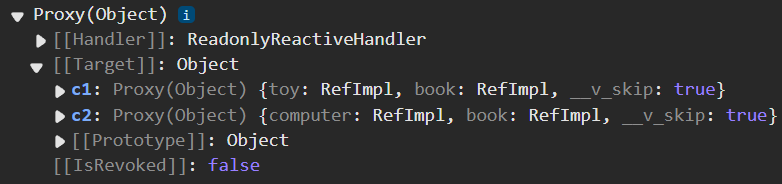
6.6. 【$refs、$parent】

  1. 概述:

    • $refs用于 :父→子。
    • $parent用于:子→父。
  2. 原理如下:

    属性 说明
    $refs 值为对象,包含所有被ref属性标识的DOM元素或组件实例。
    $parent 值为对象,当前组件的父组件实例对象。

$refs 示例:

Father.vue

 1
 2
 3
 4
 5
 6
 7
 8
 9
10
11
12
13
14
15
16
17
18
19
20
21
22
23
24
<template>
	<div class="father">
		<h3>父组件</h3>
		<button @click="getAllChild($refs)">让所有孩子的书变多</button>
		<Child1 ref="c1"/>
		<Child2 ref="c2"/>
	</div>
</template>

<script setup lang="ts" name="Father">
	import Child1 from './Child1.vue'
	import Child2 from './Child2.vue'
	import { ref } from "vue";
	let c1 = ref()
	let c2 = ref()
	// 方法
	// refs:{[key:string]:any} 表示,refs是一个对象,对象中有为字符串类型的属性,属性存储的类型可能是任何类型(实在搞不懂直接用any)
	function getAllChild(refs:{[key:string]:any}){
		console.log(refs)  // 打印结果见下图
		for (let key in refs){
			refs[key].book += 3
		}
	}
</script>

Child1.vue

 1
 2
 3
 4
 5
 6
 7
 8
 9
10
11
12
13
14
15
16
17
<template>
  <div class="child1">
    <h3>子组件1</h3>
		<h4>玩具{{ toy }}</h4>
		<h4>书籍{{ book }} </h4>
  </div>
</template>

<script setup lang="ts" name="Child1">
	import { ref } from "vue";
	// 数据
	let toy = ref('奥特曼')
	let book = ref(3)

	// 把数据交给外部
	defineExpose({toy,book})
</script>

Child2.vue

 1
 2
 3
 4
 5
 6
 7
 8
 9
10
11
12
13
14
15
16
<template>
  <div class="child2">
    <h3>子组件2</h3>
		<h4>电脑{{ computer }}</h4>
		<h4>书籍{{ book }} </h4>
  </div>
</template>

<script setup lang="ts" name="Child2">
		import { ref } from "vue";
		// 数据
		let computer = ref('联想')
		let book = ref(6)
		// 把数据交给外部
		defineExpose({computer,book})
</script>

image-20250305171225984

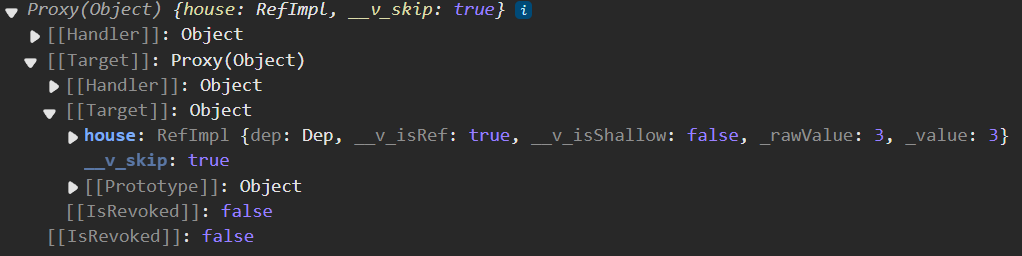
$parent 示例:

Father.vue

 1
 2
 3
 4
 5
 6
 7
 8
 9
10
11
12
13
14
15
16
17
<template>
	<div class="father">
		<h3>父组件</h3>
		<h4>房产{{ house }}</h4>
		<Child/>
	</div>
</template>

<script setup lang="ts" name="Father">
	import Child from './Child.vue'
	import { ref } from "vue";
	// 数据
	let house = ref(4)

	// 向外部提供数据
	defineExpose({house})
</script>

Child.vue

 1
 2
 3
 4
 5
 6
 7
 8
 9
10
11
12
13
14
15
<template>
  <div class="child">
    <h3>子组件</h3>
	<button @click="minusHouse($parent)">干掉父亲的一套房产</button>
  </div>
</template>

<script setup lang="ts" name="Child">
	// 方法
	function minusHouse(parent:any){
        console.log(parent)  // 打印结果见下图
        // parent是响应式对象,所以调用其中的响应式属性house不用.value
		parent.house -= 1
	}
</script>

image-20250305172147967

6.7. 【provide、inject】

  1. 概述:实现祖孙组件直接通信

  2. 具体使用:

    • 在祖先组件中通过provide配置向后代组件提供数据

      provide(数据名称,数据的值)

    • 在后代组件中通过inject配置来声明接收数据

      inject(接收的属性名[,该属性的默认值])

  3. 具体编码:

    【第一步】父组件中,使用provide提供数据

     1
     2
     3
     4
     5
     6
     7
     8
     9
    10
    11
    12
    13
    14
    15
    16
    17
    18
    19
    20
    21
    22
    23
    24
    25
    26
    27
    28
    
    <template>
      <div class="father">
        <h3>父组件</h3>
        <h4>资产{{ money }}</h4>
        <h4>汽车{{ car }}</h4>
        <button @click="money += 1">资产+1</button>
        <button @click="car.price += 1">汽车价格+1</button>
        <Child/>
      </div>
    </template>
    
    <script setup lang="ts" name="Father">
      import Child from './Child.vue'
      import { ref,reactive,provide } from "vue";
      // 数据
      let money = ref(100)
      let car = reactive({
        brand:'奔驰',
        price:100
      })
      // 用于更新money的方法
      function updateMoney(value:number){
        money.value += value
      }
      // 向后代提供数据
      provide('moneyContext',{money,updateMoney})
      provide('car',car)
    </script>
    

    注意:子组件中不用编写任何东西,是不受到任何打扰的

    【第二步】孙组件中使用inject配置项接受数据。

     1
     2
     3
     4
     5
     6
     7
     8
     9
    10
    11
    12
    13
    14
    15
    16
    
    <template>
      <div class="grand-child">
        <h3>我是孙组件</h3>
        <h4>资产{{ money }}</h4>
        <h4>汽车{{ car }}</h4>
        <button @click="updateMoney(6)">点我</button>
      </div>
    </template>
    
    <script setup lang="ts" name="GrandChild">
      import { inject } from 'vue';
      // 注入数据
      // 写一个默认值告诉编译器,moneyContext内有money和updateMoney
      let {money,updateMoney} = inject('moneyContext',{money:0,updateMoney:(x:number)=>{}})
      let car = inject('car')
    </script>
    

6.8. 【pinia】

参考之前pinia部分的讲解

6.9. 【slot】

1. 默认插槽

img

 1
 2
 3
 4
 5
 6
 7
 8
 9
10
11
12
13
14
15
16
父组件中
        <Category title="今日热门游戏">
          <ul>
            <li v-for="g in games" :key="g.id">{{ g.name }}</li>
          </ul>
        </Category>
子组件中
        <template>
          <div class="item">
            <h3>{{ title }}</h3>
            <!-- 默认插槽会把父组件使用该组件时写在组件中间的内容放进默认插槽中 -->
            <slot>
                <!-- 内部可以写默认内容父组件不传内容时就会显示默认内容父组件传值时就不显示 -->
            </slot>
          </div>
        </template>

完整:

Father.vue

 1
 2
 3
 4
 5
 6
 7
 8
 9
10
11
12
13
14
15
16
17
18
19
20
21
22
23
24
25
26
27
28
29
30
31
32
33
34
35
36
37
38
39
40
41
42
43
44
45
46
47
48
<template>
  <div class="father">
    <h3>父组件</h3>
    <div class="content">
      <Category title="热门游戏列表">
        <ul>
          <li v-for="g in games" :key="g.id">{{ g.name }}</li>
        </ul>
      </Category>
      <Category title="今日美食城市">
        <img :src="imgUrl" alt="">
      </Category>
      <Category title="今日影视推荐">
        <video :src="videoUrl" controls></video>
      </Category>
    </div>
  </div>
</template>

<script setup lang="ts" name="Father">
  import Category from './Category.vue'
  import { ref,reactive } from "vue";

  let games = reactive([
    {id:'asgytdfats01',name:'英雄联盟'},
    {id:'asgytdfats02',name:'王者农药'},
    {id:'asgytdfats03',name:'红色警戒'},
    {id:'asgytdfats04',name:'斗罗大陆'}
  ])
  let imgUrl = ref('https://z1.ax1x.com/2023/11/19/piNxLo4.jpg')
  let videoUrl = ref('http://clips.vorwaerts-gmbh.de/big_buck_bunny.mp4')

</script>

<style scoped>
  .father {
    background-color: rgb(165, 164, 164);
    padding: 20px;
    border-radius: 10px;
  }
  .content {
    display: flex;
    justify-content: space-evenly;
  }
  img,video {
    width: 100%;
  }
</style>

Category.vue

 1
 2
 3
 4
 5
 6
 7
 8
 9
10
11
12
13
14
15
16
17
18
19
20
21
22
23
24
25
26
27
<template>
  <div class="category">
    <h2>{{title}}</h2>
    <slot>默认内容</slot>
  </div>
</template>

<script setup lang="ts" name="Category">
  defineProps(['title'])
</script>

<style scoped>
  .category {
    background-color: skyblue;
    border-radius: 10px;
    box-shadow: 0 0 10px;
    padding: 10px;
    width: 200px;
    height: 300px;
  }
  h2 {
    background-color: orange;
    text-align: center;
    font-size: 20px;
    font-weight: 800;
  }
</style>

2. 具名插槽

 1
 2
 3
 4
 5
 6
 7
 8
 9
10
11
12
13
14
15
16
17
18
19
20
21
父组件中
		<!-- v-slot:也可以写在组件(Category)不过不如写在template上灵活 -->
        <Category title="今日热门游戏">
          <template v-slot:s1>
            <ul>
              <li v-for="g in games" :key="g.id">{{ g.name }}</li>
            </ul>
          </template>
          <!-- #s2等效于v-slot:s2 -->
          <template #s2>
            <a href="">更多</a>
          </template>
        </Category>
子组件中
        <template>
          <div class="item">
            <h3>{{ title }}</h3>
            <slot name="s1"></slot>
            <slot name="s2"></slot>
          </div>
        </template>

默认插槽其实也有名字,名字为default

3. 作用域插槽

  1. 理解:数据在组件的自身,但根据数据生成的结构需要组件的使用者来决定。(新闻数据在News组件中,但使用数据所遍历出来的结构由App组件决定)

  2. 具体编码:

     1
     2
     3
     4
     5
     6
     7
     8
     9
    10
    11
    12
    13
    14
    15
    16
    17
    18
    19
    20
    21
    22
    23
    24
    25
    26
    27
    28
    29
    30
    31
    32
    33
    34
    35
    
    父组件中
    	 <!-- 用v-slot接收子组件传来的对象 -->
          <Game v-slot="params">
          <!-- 作用域插槽也可以有名字不写名字其实名字就是默认的default -->
          <!-- <Game v-slot:default="params"> -->
          <!-- <Game #default="params"> -->
            <ul>
              <li v-for="g in params.games" :key="g.id">{{ g.name }}</li>
            </ul>
          </Game>
    
    	  <!-- 直接解构出games省得每次都params.games -->
    	  <!-- 数据存放在子组件但具体结构有父组件决定 -->
    	  <Game v-slot="{games}">
              <h3 v-for="g in games" :key="g.id">{{ g.name }}</h3>
          </Game>
    
    子组件中
          <template>
            <div class="category">
              <h2>今日游戏榜单</h2>
              <!-- 会把所有props打包成一个对象传给父组件  -->
              <slot :games="games" a="哈哈"></slot>
            </div>
          </template>
    
          <script setup lang="ts" name="Category">
            import {reactive} from 'vue'
            let games = reactive([
              {id:'asgdytsa01',name:'英雄联盟'},
              {id:'asgdytsa02',name:'王者荣耀'},
              {id:'asgdytsa03',name:'红色警戒'},
              {id:'asgdytsa04',name:'斗罗大陆'}
            ])
          </script>
    

作用域插槽也可以有名字,可与具名插槽结合

7. 其它 API

7.1.【shallowRef 与 shallowReactive 】

shallowRef

  1. 作用:创建一个响应式数据,但只对顶层属性进行响应式处理。

  2. 用法:

    1
    
    let myVar = shallowRef(initialValue);
    
  3. 特点:只跟踪引用值的变化,不关心值内部的属性变化。

即只有myVar.value这一层是响应式的,myVar.value.xxx开始的数据就不是响应式的了

shallowReactive

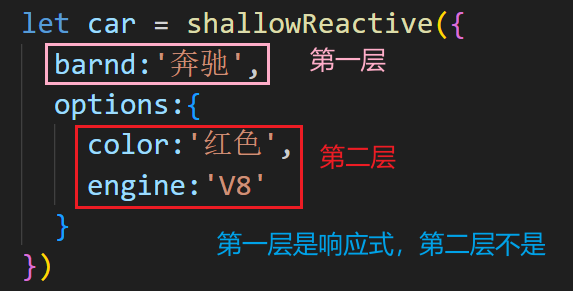
  1. 作用:创建一个浅层响应式对象,只会使对象的最顶层属性变成响应式的,对象内部的嵌套属性则不会变成响应式的

  2. 用法:

    1
    
    const myObj = shallowReactive({ ... });
    
  3. 特点:对象的顶层属性是响应式的,但嵌套对象的属性不是。

image-20250306205411531

总结

通过使用 shallowRef()shallowReactive() 来绕开深度响应。浅层式 API 创建的状态只在其顶层是响应式的,对所有深层的对象不会做任何处理,避免了对每一个内部属性做响应式所带来的性能成本,这使得属性的访问变得更快,可提升性能。

注意

不是响应式不代表数据不变,当页面中有响应式数据发生了变化,这些被修改的非响应式数据也会跟着变化
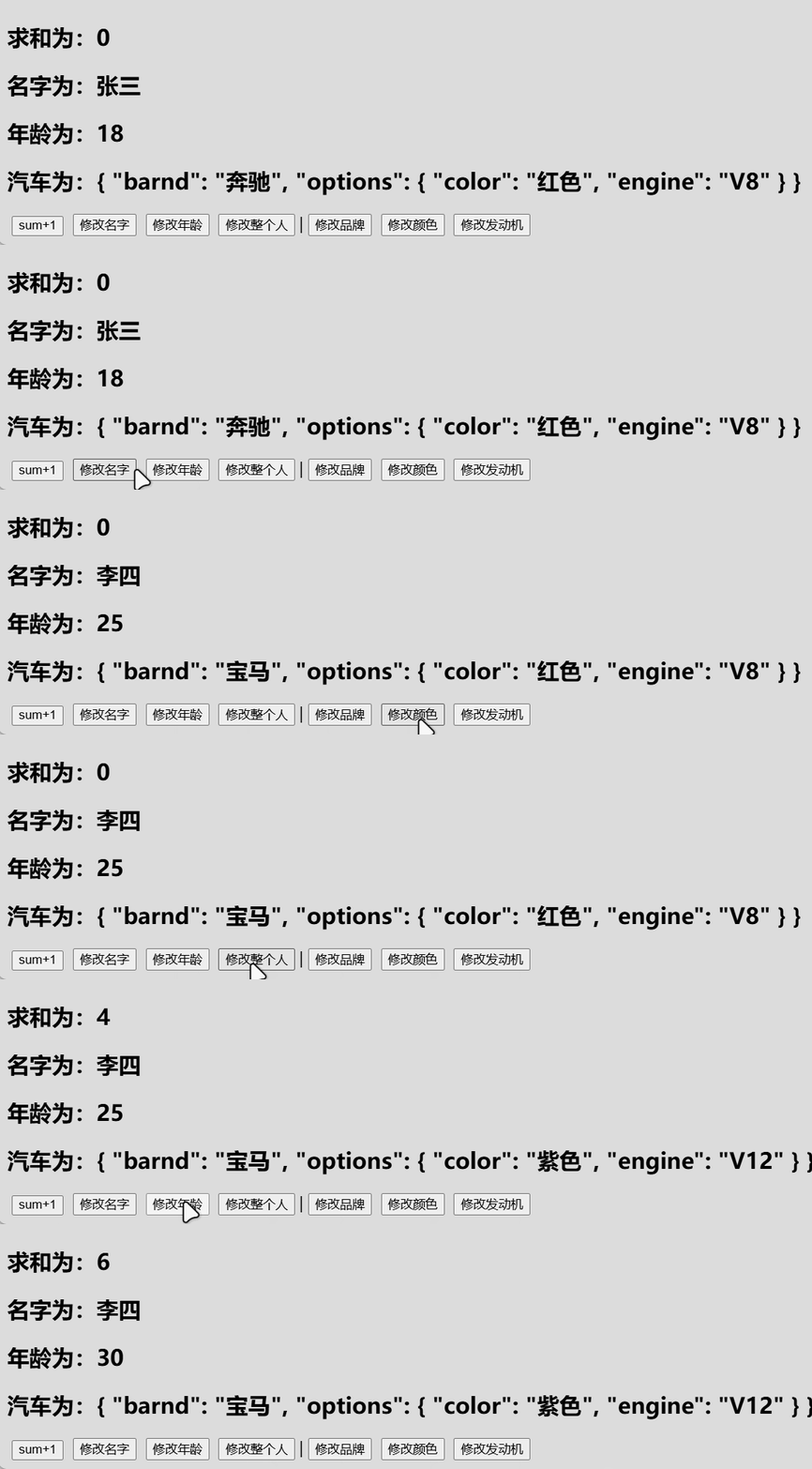
PixPin_2025-03-06_20-59-07

上图页面代码:

 1
 2
 3
 4
 5
 6
 7
 8
 9
10
11
12
13
14
15
16
17
18
19
20
21
22
23
24
25
26
27
28
29
30
31
32
33
34
35
36
37
38
39
40
41
42
43
44
45
46
47
48
49
50
51
52
53
54
55
56
57
58
59
60
61
62
63
64
65
66
67
68
<template>
	<div class="app">
		<h2>求和为{{ sum }}</h2>
		<h2>名字为{{ person.name }}</h2>
		<h2>年龄为{{ person.age }}</h2>
		<h2>汽车为{{ car }}</h2>
		<button @click="changeSum">sum+1</button>
		<button @click="changeName">修改名字</button>
		<button @click="changeAge">修改年龄</button>
		<button @click="changePerson">修改整个人</button>
		<span>|</span>
		<button @click="changeBrand">修改品牌</button>
		<button @click="changeColor">修改颜色</button>
		<button @click="changeEngine">修改发动机</button>
	</div>
</template>

<script setup lang="ts" name="App">
	import { ref,reactive,shallowRef,shallowReactive } from 'vue'

	let sum = shallowRef(0)
	let person = shallowRef({
		name:'张三',
		age:18
	})
	let car = shallowReactive({
		barnd:'奔驰',
		options:{
			color:'红色',
			engine:'V8'
		}
	})

	function changeSum (){
		sum.value += 1
	}
	function changeName (){
		person.value.name = '李四'
	}
	function changeAge (){
		person.value.age += 1
	}
	function changePerson (){
		person.value = {name:'tony',age:100}
	}
	/* ****************** */
	function changeBrand(){
		car.barnd = '宝马'
	}
	function changeColor(){
		car.options.color = '紫色'
	}
	function changeEngine(){
		car.options.engine = 'V12'
	}
</script>

<style scoped>
	.app {
		background-color: #ddd;
		border-radius: 10px;
		box-shadow: 0 0 10px;
		padding: 10px;
	}
	button {
		margin:0 5px;
	}
</style>

7.2.【readonly 与 shallowReadonly】

readonly

  1. 作用:用于创建一个对象的深只读副本。

  2. 用法:

    1
    2
    
    const original = reactive({ ... });
    const readOnlyCopy = readonly(original);
    
  3. 特点:

    • 对象的所有嵌套属性都将变为只读。
    • 任何尝试修改这个对象的操作都会被阻止(在开发模式下,还会在控制台中发出警告)。
  4. 应用场景:

    • 创建不可变的状态快照。
    • 保护全局状态或配置不被修改。

shallowReadonly

  1. 作用:与 readonly 类似,但只作用于对象的顶层属性。

  2. 用法:

    1
    2
    
    const original = reactive({ ... });
    const shallowReadOnlyCopy = shallowReadonly(original);
    
  3. 特点:

    • 只将对象的顶层属性设置为只读,对象内部的嵌套属性仍然是可变的。

    • 适用于只需保护对象顶层属性的场景。

7.3.【toRaw 与 markRaw】

toRaw

  1. 作用:用于获取一个响应式对象的原始对象, toRaw 返回的对象不再是响应式的,不会触发视图更新。

    官网描述:这是一个可以用于临时读取而不引起代理访问/跟踪开销,或是写入而不触发更改的特殊方法。不建议保存对原始对象的持久引用,请谨慎使用。

    何时使用? —— 在需要将响应式对象传递给非 Vue 的库或外部系统时,使用 toRaw 可以确保它们收到的是普通对象

  2. 具体编码:

     1
     2
     3
     4
     5
     6
     7
     8
     9
    10
    
    import { reactive,toRaw,markRaw,isReactive } from "vue";
    
    /* toRaw */
    // 响应式对象
    let person = reactive({name:'tony',age:18})
    // 原始对象
    let rawPerson = toRaw(person)
    
    console.log(isReactive(person))
    console.log(isReactive(rawPerson))
    

注:修改rawPerson的内容时,虽然页面不会更新,但原person的内容也会被修改,等到其他响应式数据更新时,person被修改的内容也会同步在页面更新

markRaw

  1. 作用:标记一个对象,使其永远不会变成响应式的。

    例如使用mockjs时,为了防止误把mockjs变为响应式对象,可以使用 markRaw 去标记mockjs

  2. 编码:

     1
     2
     3
     4
     5
     6
     7
     8
     9
    10
    11
    
    /* markRaw */
    let citys = markRaw([
      {id:'asdda01',name:'北京'},
      {id:'asdda02',name:'上海'},
      {id:'asdda03',name:'天津'},
      {id:'asdda04',name:'重庆'}
    ])
    // 根据原始对象citys去创建响应式对象citys2 —— 创建失败,因为citys被markRaw标记了
    let citys2 = reactive(citys)
    console.log(isReactive(citys))
    console.log(isReactive(citys2))
    

7.4.【customRef】

作用:创建一个自定义的ref,并对其依赖项跟踪和更新触发进行逻辑控制。

实现防抖效果(useSumRef.ts):

 1
 2
 3
 4
 5
 6
 7
 8
 9
10
11
12
13
14
15
16
17
18
19
20
21
22
23
import {customRef } from "vue";

export default function(initValue:string,delay:number){
  let msg = customRef((track,trigger)=>{  // track-跟踪,trigger-触发,底层代码自动传递
    let timer:number
    return {
      // msg被读取时,get()会被调用
      get(){
        track() // 告诉Vue数据msg很重要,要对msg持续关注,一旦变化就更新
        return initValue
      },
      // msg被修改时,set()会被调用
      set(value){
        clearTimeout(timer)  // 防止快速输入时出bug
        timer = setTimeout(() => {
          initValue = value
          trigger() //通知Vue数据msg变化了
        }, delay);
      }
    }
  }) 
  return {msg}
}

组件中使用:

 1
 2
 3
 4
 5
 6
 7
 8
 9
10
11
12
13
14
15
16
17
<template>
	<div class="app">
		<h2>{{ msg }}</h2>
		<input type="text" v-model="msg">
	</div>
</template>

<script setup lang="ts" name="App">
	import {ref} from 'vue'
	import useMsgRef from './useMsgRef'

	// 使用Vue提供的默认ref定义响应式数据,数据一变,页面就更新
	// let msg = ref('你好')

	// 使用useMsgRef来定义一个响应式数据且有延迟效果
	let {msg} = useMsgRef('你好',2000)
</script>

8. Vue3新组件

8.1. 【Teleport】

  • 什么是Teleport?—— Teleport 是一种能够将我们的组件html结构移动到指定位置的技术。
1
2
3
4
5
6
7
8
9
<!-- to=''中写的是选择器,如类选择器.xxx,id选择器#xxx等等 -->
<!-- 将teleport包裹的内容传送到页面的body中 -->
<teleport to='body' > 
    <div class="modal" v-show="isShow">
      <h2>我是一个弹窗</h2>
      <p>我是弹窗中的一些内容</p>
      <button @click="isShow = false">关闭弹窗</button>
    </div>
</teleport>

8.2. 【Suspense】

  • 等待异步组件时渲染一些额外内容,让应用有更好的用户体验
  • 使用步骤:
    • 异步引入组件
    • 使用Suspense包裹组件,并配置好defaultfallback
 1
 2
 3
 4
 5
 6
 7
 8
 9
10
11
12
13
14
15
16
17
18
19
20
<template>
    <div class="app">
        <h3>我是App组件</h3>
        <Suspense>
          <!-- 异步任务完成时 -->
          <template v-slot:default>
            <Child/>
          </template>
		 <!-- 异步任务还在执行时因为在异步任务完成前子组件会消失所以可以写点提示 -->
          <template v-slot:fallback>
            <h3>加载中.......</h3>
          </template>
        </Suspense>
    </div>
</template>

<script setup lang="ts" name="App">
    import { defineAsyncComponent,Suspense } from "vue";
    const Child = defineAsyncComponent(()=>import('./Child.vue'))
</script>

不使用Suspense时,若子组件有异步任务,该子组件会直接消失

8.3.【全局API转移到应用对象】

  • app.component

    src/main.ts

     1
     2
     3
     4
     5
     6
     7
     8
     9
    10
    11
    
    import {createApp} from 'vue'
    import App from './App.vue'
    import Hello from './Hello.vue'
    
    // 创建应用
    const app = createApp(App)
    // 让Hello组件成为全局组件,即使用时无需再引入
    app.component('Hello',Hello)
    
    // 挂载应用
    app.mount('#app')
    
  • app.config

    src/main.ts

     1
     2
     3
     4
     5
     6
     7
     8
     9
    10
    11
    12
    13
    14
    15
    16
    
    import {createApp} from 'vue'
    import App from './App.vue'
    
    // 创建应用
    const app = createApp(App)
    // 设置全局属性 x ,x 的值为 99
    app.config.globalProperties.x = 99
    // 若只有上一行代码,x可以使用,但使用时会报红,加上下面的代码即可解决报红
    declare module 'vue' {
      interface ComponentCustomProperties {
        // 上面都是固定内容,此处写自定义全局属性的数据类型
        x:number
      }
    }
    // 挂载应用
    app.mount('#app')
    
  • app.directive

    src/main.ts

     1
     2
     3
     4
     5
     6
     7
     8
     9
    10
    11
    12
    13
    14
    
    import {createApp} from 'vue'
    import App from './App.vue'
    
    // 创建应用
    const app = createApp(App)
    // 注册全局指令
    app.directive('beauty',(element,{value})=>{
      element.innerText += value
      element.style.color = 'green'
      element.style.backgroundColor = 'yellow'
    })
    
    // 挂载应用
    app.mount('#app')
    

    使用演示:

    image-20250306225454937

  • app.mount

    挂载app

  • app.unmount

    卸载app

     1
     2
     3
     4
     5
     6
     7
     8
     9
    10
    11
    12
    
    import {createApp} from 'vue'
    import App from './App.vue'
    
    // 创建应用
    const app = createApp(App)
    
    // 挂载应用
    app.mount('#app')
    // 2秒后卸载应用
    setTimeout(() => {
      app.unmount()
    }, 2000);
    
  • app.use

    安装插件

    image-20250306225755089

8.4.【其他(Vue3的非兼容性改变)】

  • 过渡类名 v-enter 修改为 v-enter-from、过渡类名 v-leave 修改为 v-leave-from

  • keyCode 作为 v-on 修饰符的支持。

  • v-model 指令在组件上的使用已经被重新设计,替换掉了 v-bind.sync。

  • v-ifv-for 在同一个元素身上使用时的优先级发生了变化。

  • 移除了$on$off$once 实例方法。

  • 移除了过滤器 filter

  • 移除了$children 实例 propert

    ……(详情见官网,在Vue3迁移指南中)

9. Element Plus

9.1. 安装与导入

ElementPlus官网:https://element-plus.org/zh-CN/

安装:npm install element-plus --save

完整引入:

src/main.ts中如下

 1
 2
 3
 4
 5
 6
 7
 8
 9
10
11
12
13
14
import { createApp } from 'vue'
// 整体导入 ElementPlus 组件库
// 导入ElementPlus组件库的所有模块和功能
import ElementPlus from 'element-plus'
// 导入ElementPlus组件库所需的全局CSS样式
import 'element-plus/dist/index.css'

import App from './App.vue'

const app = createApp(App)

// 使用ElementPlus
app.use(ElementPlus)
app.mount('#app')
本站于2025年3月26日建立
使用 Hugo 构建
主题 StackJimmy 设计