简单介绍
Velocity是一个基于Java的模板引擎,可以通过特定的语法获取在java对象的数据 , 填充到模板中,从而实现界面和java代码的分离
常见的应用场景:
- Web内容生成 : 生成动态Web页面。
- 代码生成 : 生成Java源代码、SQL脚本、XML配置文件等。
- 网页静态化 : 生成静态网页。
入门使用案例
案例基于SpringBoot演示
准备模板
在/resources目录下创建模板文件index.html.vm
 1
 2
 3
 4
 5
 6
 7
 8
 9
10
11
12
13
|
<!DOCTYPE html>
<html lang="en">
<head>
    <meta charset="UTF-8">
    <meta name="viewport" content="width=device-width, initial-scale=1.0">
    <title>velocity快速入门</title>
</head>
<body>

<h3>现在是北京时间${time}</h3>

</body>
</html>
|
上述代码中的${message}是一个动态变量(占位符),方便动态填充数据
数据填充
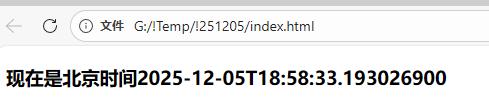
编写java代码实现数据填充,并生成文件
 1
 2
 3
 4
 5
 6
 7
 8
 9
10
11
12
13
14
15
16
17
18
19
20
21
22
23
24
25
26
27
|
import org.apache.velocity.Template;
import org.apache.velocity.VelocityContext;
import org.apache.velocity.app.Velocity;

import java.io.FileWriter;
import java.io.IOException;
import java.time.LocalDateTime;

public class VelocityTest {
    public static void main(String[] args) throws IOException {
        //1. 初始化模板引擎(相对固定)
        // VelocityInitializer类下方有提供,复制一个到项目中
        VelocityInitializer.initVelocity();

        //2. 准备数据模型(根据情况填入数据)
        VelocityContext velocityContext = new VelocityContext();
        velocityContext.put("time", LocalDateTime.now());

        //3. 读取模板(相对固定)
        Template template = Velocity.getTemplate("index.html.vm", "UTF-8");

        //4. 渲染模板(相对固定)
        FileWriter fileWriter = new FileWriter("G:\\!Temp\\!251205\\index.html");
        template.merge(velocityContext, fileWriter);
        fileWriter.close();
    }
}
|
其中用来初始化的VelocityInitializer类相对固定,可以直接复制
 1
 2
 3
 4
 5
 6
 7
 8
 9
10
11
12
13
14
15
16
17
18
19
20
21
22
23
|
public class VelocityInitializer
{
    /**
     * 初始化vm方法
     */
    public static void initVelocity()
    {
        Properties p = new Properties();
        try
        {
            // 加载classpath目录下的vm文件
            p.setProperty("resource.loader.file.class", "org.apache.velocity.runtime.resource.loader.ClasspathResourceLoader");
            // 定义字符集
            p.setProperty(Velocity.INPUT_ENCODING, Constants.UTF8);
            // 初始化Velocity引擎,指定配置Properties
            Velocity.init(p);
        }
        catch (Exception e)
        {
            throw new RuntimeException(e);
        }
    }
}
|
效果
基础语法
变量
Velocity中的变量语法
- 在模板中定义变量:
#set开头,比如 #set($name = "yuanyu")
- 获取变量的的值:
$name 或者 ${name}
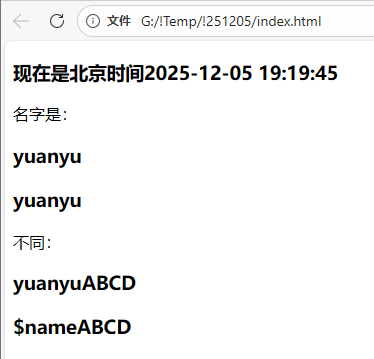
两种获取变量方式的不同:${}形式便于字符串拼接
下方在入门案例基础上演示:
普通变量
 1
 2
 3
 4
 5
 6
 7
 8
 9
10
11
12
13
14
15
16
17
18
19
20
21
22
23
|
<!DOCTYPE html>
<html lang="en">
<head>
    <meta charset="UTF-8">
    <meta name="viewport" content="width=device-width, initial-scale=1.0">
    <title>velocity快速入门</title>
</head>
<body>

<h3>现在是北京时间${time}</h3>

## 定义变量
#set ($name = "yuanyu")
名字是:<br/>
<h3>${name}</h3>
<h3>$name</h3>

不同:<br/>
<h3>${name}ABCD</h3>
<h3>$nameABCD</h3>

</body>
</html>
|
对象
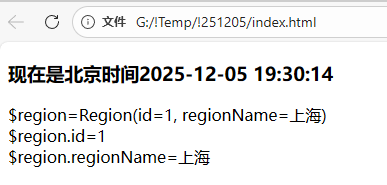
对象变量一般在Java代码中定义:
 1
 2
 3
 4
 5
 6
 7
 8
 9
10
11
12
13
14
15
16
17
18
19
20
21
22
23
24
25
26
27
28
29
30
31
|
import com.dkd.generator.util.VelocityInitializer;
import org.apache.velocity.Template;
import org.apache.velocity.VelocityContext;
import org.apache.velocity.app.Velocity;

import java.io.FileWriter;
import java.io.IOException;
import java.time.LocalDateTime;
import java.time.format.DateTimeFormatter;

public class VelocityTest {
    public static void main(String[] args) throws IOException {
        //1. 初始化模板引擎(相对固定)
        VelocityInitializer.initVelocity();

        //2. 准备数据模型(根据情况填入数据)
        VelocityContext velocityContext = new VelocityContext();
        DateTimeFormatter formatter = DateTimeFormatter.ofPattern("yyyy-MM-dd HH:mm:ss");
        velocityContext.put("time", LocalDateTime.now().format(formatter));
        Region region = new Region(1L, "上海");
        velocityContext.put("region", region);

        //3. 读取模板(相对固定)
        Template template = Velocity.getTemplate("vm/index.html.vm", "UTF-8");

        //4. 渲染模板(相对固定)
        FileWriter fileWriter = new FileWriter("G:\\!Temp\\!251205\\index.html");
        template.merge(velocityContext, fileWriter);
        fileWriter.close();
    }
}
|
其中Region类:
 1
 2
 3
 4
 5
 6
 7
 8
 9
10
11
|
import lombok.AllArgsConstructor;
import lombok.Data;
import lombok.NoArgsConstructor;

@Data
@NoArgsConstructor
@AllArgsConstructor
public class Region {
    private Long id;
    private String regionName;
}
|
模板文件:
 1
 2
 3
 4
 5
 6
 7
 8
 9
10
11
12
13
14
15
16
17
|
<!DOCTYPE html>
<html lang="en">
<head>
    <meta charset="UTF-8">
    <meta name="viewport" content="width=device-width, initial-scale=1.0">
    <title>velocity快速入门</title>
</head>
<body>

<h3>现在是北京时间${time}</h3>

\$region=$region<br/>
\$region.id=$region.id<br/>
\$region.regionName=$region.regionName<br/>

</body>
</html>
|
效果:
循环
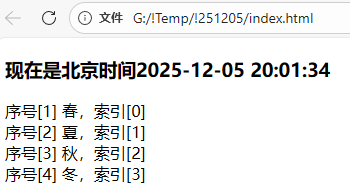
循环的语法:#foreach(...) ... #end
遍历普通集合
 1
 2
 3
 4
 5
 6
 7
 8
 9
10
11
12
13
14
15
16
17
18
19
20
21
|
<!DOCTYPE html>
<html lang="en">
<head>
    <meta charset="UTF-8">
    <meta name="viewport" content="width=device-width, initial-scale=1.0">
    <title>velocity快速入门</title>
</head>
<body>

<h3>现在是北京时间${time}</h3>

##定义一个集合
#set($list = ["春", "夏", "秋", "冬"])

## 遍历循环
#foreach($item in $list)
序号[$foreach.count] $item,索引[$foreach.index] <br> ## count从1开始 index从0开始
#end

</body>
</html>
|
遍历对象集合
Java文件:
 1
 2
 3
 4
 5
 6
 7
 8
 9
10
11
12
13
14
15
16
17
18
19
20
21
22
23
|
public class VelocityTest {
    public static void main(String[] args) throws IOException {
        //1. 初始化模板引擎(相对固定)
        …………

        //2. 准备数据模型(根据情况填入数据)
        VelocityContext velocityContext = new VelocityContext();
        DateTimeFormatter formatter = DateTimeFormatter.ofPattern("yyyy-MM-dd HH:mm:ss");
        velocityContext.put("time", LocalDateTime.now().format(formatter));
        Region region = new Region(1L, "上海");
        Region region2 = new Region(2L, "北京");
        ArrayList<Region> regionList = new ArrayList<>();
        regionList.add(region);
        regionList.add(region2);
        velocityContext.put("regionList", regionList);

        //3. 读取模板(相对固定)
        …………

        //4. 渲染模板(相对固定)
        …………
    }
}
|
模板文件:
 1
 2
 3
 4
 5
 6
 7
 8
 9
10
11
12
13
14
15
16
17
18
19
|
<!DOCTYPE html>
<html lang="en">
<head>
    <meta charset="UTF-8">
    <meta name="viewport" content="width=device-width, initial-scale=1.0">
    <title>velocity快速入门</title>
</head>
<body>

<h3>现在是北京时间${time}</h3>

## 遍历循环
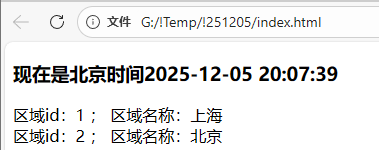
#foreach($region in $regionList)
    区域id:$region.id ;
    区域名称:$region.regionName <br>
#end

</body>
</html>
|
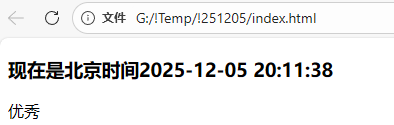
if判断
判断的语法:#if(condition) ... #elseif(condition) ... #else ... #end
在条件判断中,velocity支持常见的关系操作符,比如:&&(与), ||(或), !(非)
 1
 2
 3
 4
 5
 6
 7
 8
 9
10
11
12
13
14
15
16
17
18
19
20
21
22
23
24
|
<!DOCTYPE html>
<html lang="en">
<head>
    <meta charset="UTF-8">
    <meta name="viewport" content="width=device-width, initial-scale=1.0">
    <title>velocity快速入门</title>
</head>
<body>

<h3>现在是北京时间${time}</h3>
##定义变量
#set($score=80)

## if判断
#if($score>=80)
    优秀
#elseif($score>=60)
    及格
#else
    不及格
#end

</body>
</html>
|