Stream流
使用案例
|
|
简介
-
Stream流的思想
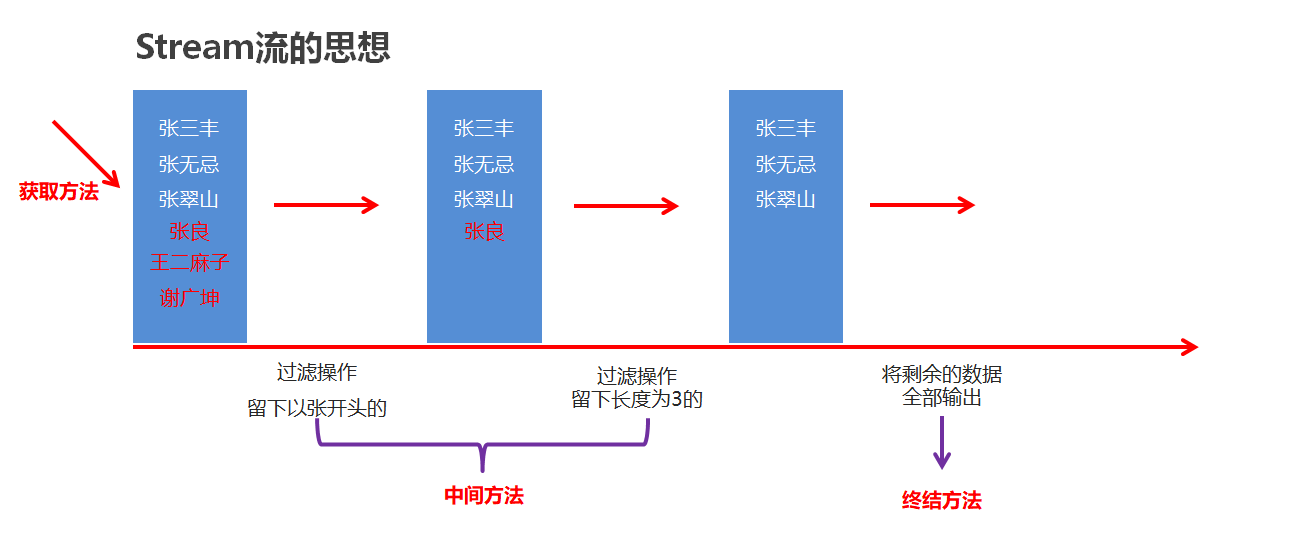
-
Stream流的三类方法
- 获取Stream流
- 创建一条流水线,并把数据放到流水线上准备进行操作
- 中间方法
- 流水线上的操作
- 一次操作完毕之后,还可以继续进行其他操作
- 终结方法
- 一个Stream流只能有一个终结方法
- 是流水线上的最后一个操作,之后不能再执行其他操作
- 获取Stream流
Stream流的常见生成方式
常见生成方式简介
-
Collection体系集合
使用默认方法stream()生成流, default Stream
stream() -
Map体系集合
把Map转成Set集合,间接的生成流
-
数组
通过Arrays中的静态方法stream生成流
-
同种数据类型的多个数据
通过Stream接口的静态方法of(T… values)生成流
| 获取方式 | 方法名 | 说明 |
|---|---|---|
| 单列集合 | default Stream |
Collection 中的默认方法 |
| 双列集合 | 无 | 无法直接使用 stream 流 |
| 数组 | public static |
Arrays 工具类中的静态方法 |
| 一堆零散数据 | public static |
Stream 接口中的静态方法 |
代码演示
|
|
Stream流的中间操作方法
常见中间操作简介
| 方法名 | 说明 |
|---|---|
| Stream |
用于对流中的数据进行过滤 |
| Stream |
返回此流中的元素组成的流,截取前指定参数个数的数据 |
| Stream |
跳过指定参数个数的数据,返回由该流的剩余元素组成的流 |
| static |
合并a和b两个流为一个流,尽量保证a和b数据类型一致 |
| Stream |
去重,返回由该流的不同元素(根据Object.equals(Object) )组成的流 |
| Stream |
转换流中的数据类型 |
- 中间方法,返回新的Stream流,原来的Stream流只能使用一次,建议使用链式编程
- 修改Stream流中的数据,不会影响原来集合或数组中的数据
代码演示
- filter方法:
|
|
- limit和skip方法:
|
|
- concat和distinct方法:
|
|
- map方法:
|
|
Stream流的终结操作方法
常见终结方法简介
| 方法名 | 说明 |
|---|---|
| void forEach(Consumer action) | 对此流的每个元素执行操作 |
| long count() | 返回此流中的元素数 |
| A[] toArray() | 收集流中数据,放入数组中 |
| R collect(Collector collector) | 收集流中数据,放入集合中 |
- 工具类Collectors提供了具体的收集到集合的方式
方法名 说明 public static Collector toList() 把元素收集到List集合中 public static Collector toSet() 把元素收集到Set集合中 public static Collector toMap(Function keyMapper,Function valueMapper) 把元素收集到Map集合中
代码演示
- forEach、count、toArray方法:
|
|
- collect方法:
|
|
注意:收集到Map集合当中时,键不能重复,否则会报错
方法引用
入门体验
|
|
方法引用符
-
方法引用符
::该符号为引用运算符,而它所在的表达式被称为方法引用 -
推导与省略
- 如果使用Lambda,那么根据“可推导就是可省略”的原则,无需指定参数类型,也无需指定的重载形式,它们都将被自动推导
- 如果使用方法引用,也是同样可以根据上下文进行推导
- 方法引用是Lambda的孪生兄弟
引用类方法
引用类方法,其实就是引用类的静态方法
-
格式
类名::静态方法 -
范例
Integer::parseIntInteger类的方法:public static int parseInt(String s) 将此String转换为int类型数据
-
代码演示
1 2 3 4 5 6 7 8 9 10public class Demo2 { public static void main(String[] args) { ArrayList<String> list = new ArrayList<>(); Collections.addAll(list, "1", "2", "3", "4", "5"); // 将字符串形式的数字转化为整型数字并打印 list.stream() .map(Integer::parseInt) .forEach(System.out::println); } }
特殊情况:引用类中的成员方法
-
格式
类名::成员方法 -
范例
String::toUpperCase -
代码演示
1 2 3 4 5 6 7 8 9 10 11 12 13 14 15 16 17 18 19 20 21 22 23 24 25 26 27 28 29 30 31 32 33 34public class Demo5 { public static void main(String[] args) { ArrayList<String> list = new ArrayList<>(); Collections.addAll(list, "aaa", "bbb", "ccc", "ddd"); // 需求:将集合中的字符串转换成大写 // 方法引用 list.stream() .map(String::toUpperCase) // 相当于拿着流中每一个数据调用String类中的toUpperCase方法,方法的返回值就是转换后的结果 .forEach(System.out::println); // 原始形式 list.stream().map(new Function<String, String>() { @Override // 第一个参数是String类型,则只能引用String类中的成员方法 // 只有一个形参,则只能调用String类中的无参成员方法 public String apply(String s) { return s.toUpperCase(); } }).forEach(System.out::println); /* 下方是String类中的toUpperCase方法 public String toUpperCase() { return toUpperCase(Locale.getDefault()); } 问题来了,明明说被引用方法的形参和返回值类型必须和函数式接口的抽象方法一致,但是这里却可以调用String类中的toUpperCase方法 因为这里是特殊规则:被引用方法的形参需要跟抽象方法的第二个形参到最后一个形参保持一致,返回值需要跟抽象方法的返回值一致 抽象方法形参介绍: 第一个参数:表示被引用方法的调用者,决定了可以引用哪些类中的方法 在Stream流当中,第一个参数一般都表示流里面的每一个数据 假设流里面的数据是字符串,那么使用这种方式进行方法引用,只能引用String类中的方法 第二个参数到最后一个参数:跟被引用方法的形参保持一致,如果没有第二个参数,则被引用方法需要是无参的成员方法 */ } }
引用对象的实例方法
引用对象的实例方法,其实就引用类中的成员方法
-
格式
其他类:
其他类对象::成员方法本类:
this::方法名父类:
super::方法名(静态方法中没有this和super,所以后两个不能在静态方法中使用)
-
代码演示
1 2 3 4 5 6 7 8 9 10 11 12 13 14 15 16 17 18 19 20 21public class Demo3 { public static void main(String[] args) { ArrayList<String> list = new ArrayList<>(); Collections.addAll(list, "1", "2", "a", "b", "c"); // 需求:将集合中字符串数字进行过滤并输出 list.stream() .filter(new Demo()::isNumber) .forEach(System.out::println); } } public class Demo { // 判断字符串是否是数字 public boolean isNumber(String str) { if (str == null || str.trim().isEmpty()) { return false; // 空字符串或null直接返回false } String regex = "^-?\\d+(\\.\\d+)?$"; return str.matches(regex); } }
引用构造器
引用构造器,其实就是引用构造方法
-
格式
一般类的构造方法:
类名::new数组的构造方法:
数据类型[]::new -
范例
Student::newIntegerp[]::new -
代码演示
一般类的构造方法:
1 2 3 4 5 6 7 8 9 10 11 12 13 14 15 16 17 18 19 20 21 22 23 24 25 26 27 28 29 30 31 32 33 34 35 36 37 38 39 40 41 42 43 44 45 46 47 48 49 50public class Demo4 { public static void main(String[] args) { ArrayList<String> list = new ArrayList<>(); Collections.addAll(list, "张三,18", "李四,19", "王五,20", "赵六,21"); // 需求:将集合中的字符串转换成Student对象 List<Student> studentList = list.stream() .map(Student::new) .collect(Collectors.toList()); System.out.println(studentList); // [Student{name='张三', age=18}, Student{name='李四', age=19}, Student{name='王五', age=20}, Student{name='赵六', age=21}] } } public class Student { private String name; private int age; public String getName() { return name; } public void setName(String name) { this.name = name; } public int getAge() { return age; } public void setAge(int age) { this.age = age; } // 被引用方法的形参和返回值类型必须和函数式接口的抽象方法一致 // 抽象方法是Student apply(String s) { ... return new Student(name, age);} // 构造方法只要保证结束时生成的对象与抽象方法的返回值保持一致即可 public Student(String str) { String[] split = str.split(","); this.name = split[0]; this.age = Integer.parseInt(split[1]); } @Override public String toString() { return "Student{" + "name='" + name + '\'' + ", age=" + age + '}'; } }数组的构造方法:
 1
 2
 3
 4
 5
 6
 7
 8
 9
10
public class Demo6 { public static void main(String[] args) { ArrayList<Integer> list = new ArrayList<>(); Collections.addAll(list, 1, 2, 3, 4, 5); // 将集合中的整数收集到数组中 // 注意:数组的类型需要跟流中数据的类型保持一致 Integer[] array = list.stream().toArray(Integer[]::new); System.out.println(Arrays.toString(array)); // [1, 2, 3, 4, 5] } }