SpringAOP
什么是AOP
AOP:Aspect Oriented Programming(面向切面编程、面向方面编程),可简单理解为就是面向特定方法编程
场景:案例中部分业务方法运行较慢,定位执行耗时较长的接口,此时需要统计每一个业务方法的执行耗时
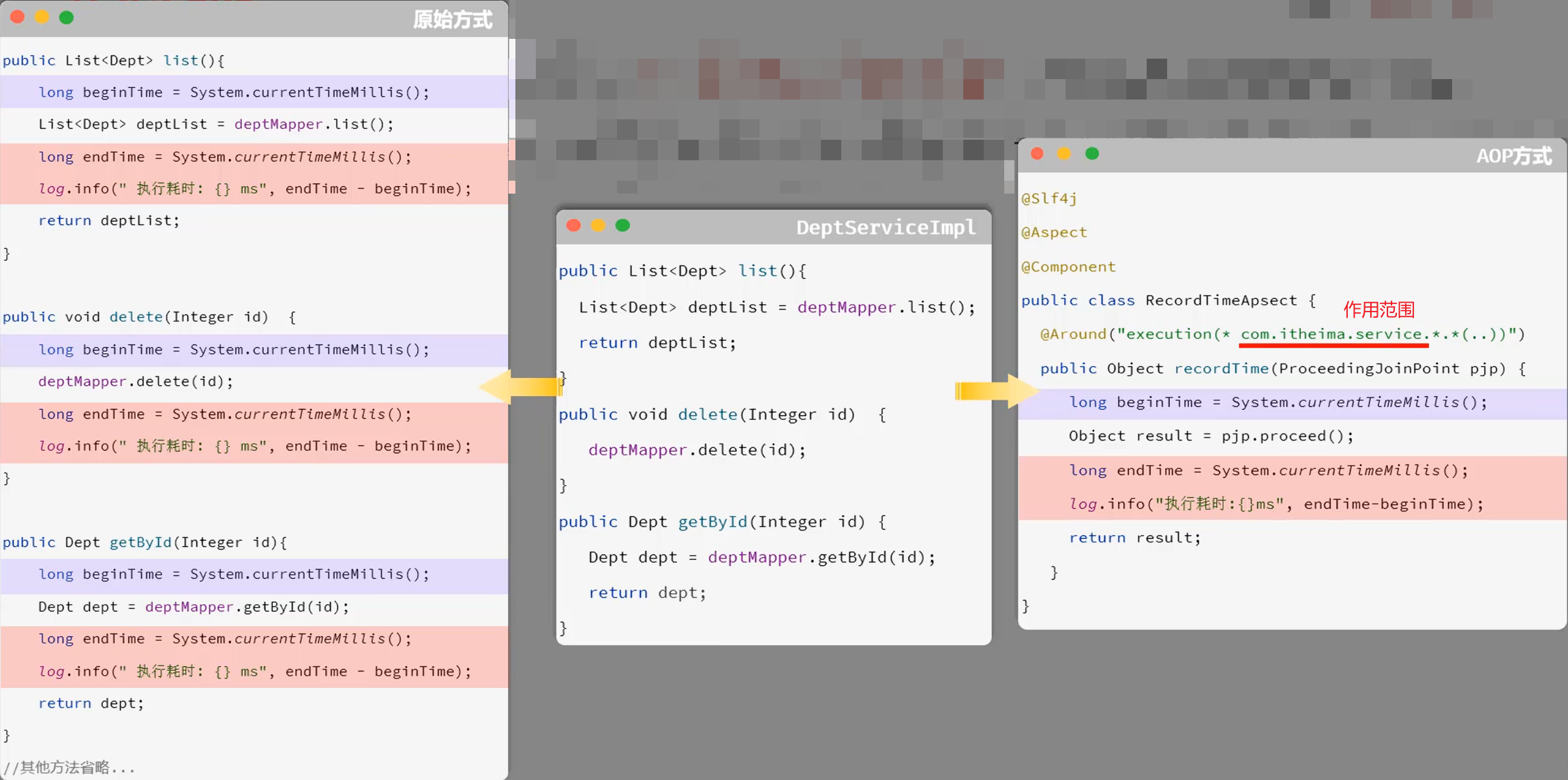
好处:减少重复代码、代码无入侵、提高开发效率、维护方便
AOP是一种思想,而在Spring框架中对这种思想进行的实现,就是Spring AOP
AOP基础
AOP快速入门
需求:统计所有业务层方法的执行耗时
步骤:
- 导入依赖:在
pom.xml中引入AOP依赖
1
2
3
4
|
<dependency>
    <groupId>org.springframework.boot</groupId>
    <artifactId>spring-boot-starter-aop</artifactId>
</dependency>
|
- 编写AOP程序
 1
 2
 3
 4
 5
 6
 7
 8
 9
10
11
12
13
14
15
16
17
|
@Slf4j
@Aspect // 声明这是一个切面类
@Component
public class RecordTimeAspect {
    // 使用@Around注解定义一个环绕通知,用于拦截指定包下的所有方法
    @Around("execution(* com.yuanyu.service.impl.*.*(..))")
    public Object recordTime(ProceedingJoinPoint pjp) throws Throwable {
        // 记录方法执行的开始时间
        long begin = System.currentTimeMillis();
        // 执行原始的方法
        Object result = pjp.proceed();
        // 记录方法执行的结束时间
        long end = System.currentTimeMillis();
        log.info("方法{}执行时间:{}ms", pjp.getSignature(), end-begin);
        return result;
    }
}
|
AOP核心概念
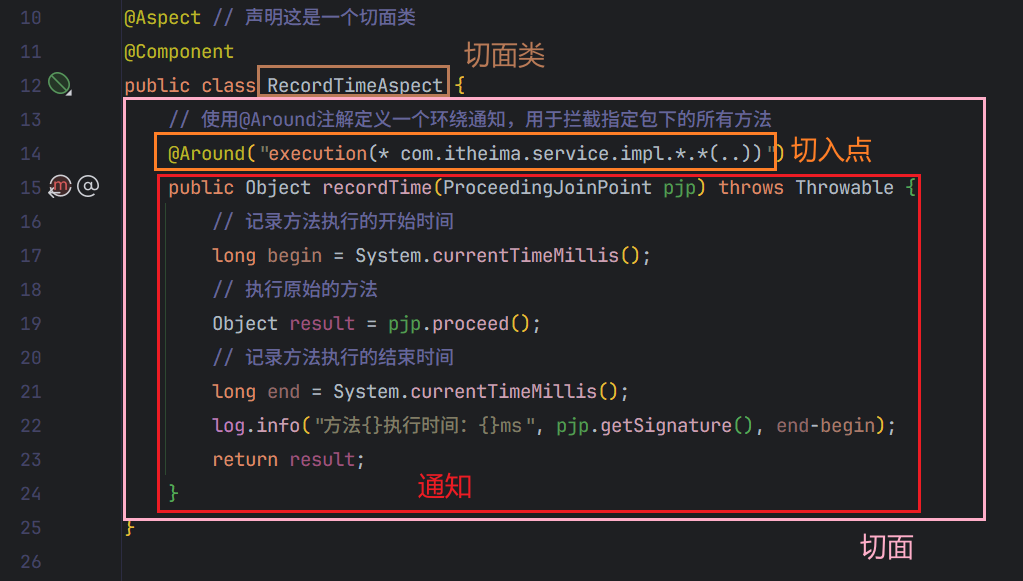
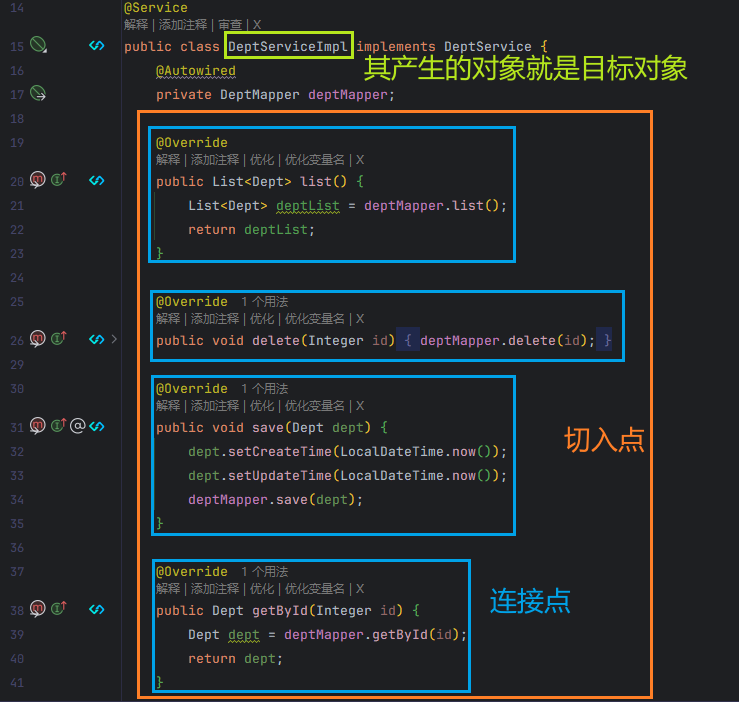
连接点:JoinPoint,可以被AOP控制的方法(暗含方法执行时的相关信息)
通知:Advice,指那些重复的逻辑,也就是共性功能(最终体现为一个方法)
切入点:PointCut,匹配连接点的条件,通知仅会在切入点方法执行时被应用(切入点一定是连接点,但连接点不一定是切入点)
切面:Aspect,描述通知与切入点的对应关系(通知+切入点)
目标对象:Target,通知所应用的对象
切入点表达式会在后面详细介绍
执行流程
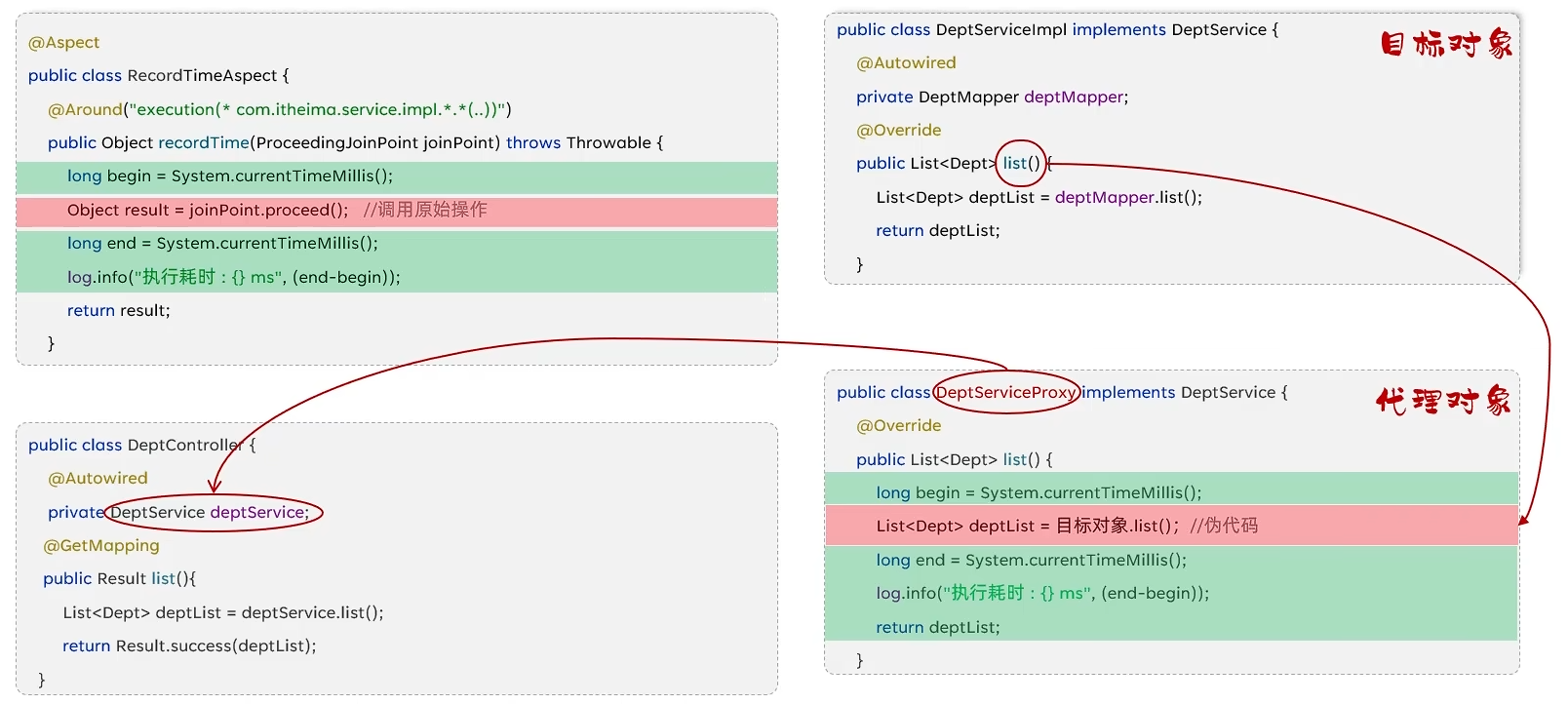
执行过程中使用的是动态代理技术
在Controller层中调用的对象其实是代理对象
AOP进阶
通知类型
根据通知方法执行时机的不同,将通知类型分为以下常见的五类:
@Around:环绕通知,此注解标注的通知方法在目标方法前、后都被执行
@Before:前置通知,此注解标注的通知方法在目标方法前被执行
@After:后置通知,此注解标注的通知方法在目标方法后被执行,无论是否有异常都会执行
@AfterReturning:返回后通知,此注解标注的通知方法在目标方法后被执行,有异常不会执行
@AfterThrowing:异常后通知,此注解标注的通知方法发生异常后执行
1.@Around环绕通知需要自己调用ProceedingJoinPoint.proceed()来让原始方法执行,其他通知不需要考虑目标方法执行
2.@Around环绕通知方法的返回值,必须指定为Object,来接收原始方法的返回值
@PointCut
当有多个目标方法相同的通知时,如果一个个写范围不够方便,也不好统一管理
@PointCut注解的作用是将公共的切点表达式抽取出来,需要用到时引用该切点表达式即可
 1
 2
 3
 4
 5
 6
 7
 8
 9
10
11
12
13
14
15
16
17
18
19
20
|
@Slf4j
@Aspect
@Component
public class RecordTimeAspect {
    @Pointcut("execution(* com.yuanyu.service.impl.*.*(..))")
    public void pointcut() {}

    @Before("pointcut()")
    public void before() {
        log.info("before...");
    }

    @Around("pointcut()")
    public Object recordTime(ProceedingJoinPoint pjp) throws Throwable {
        log.info("aroundBefore...");
        Object result = pjp.proceed();
        log.info("aroundAfter...");
        return result;
    }
}
|
通知顺序
当有多个切面的切入点都匹配到了目标方法,目标方法运行时,多个通知方法都会被执行
执行顺序:
-
不同切面类中,默认按照切面类的类名字母排序:
-
-
目标方法前的通知方法:字母排名靠前的先执行
-
目标方法后的通知方法:字母排名靠前的后执行
-
用 @Order(数字) 加在切面类上来控制顺序
-
- 目标方法前的通知方法:数字小的先执行
- 目标方法后的通知方法:数字小的后执行
1
2
3
4
|
@Order(1) // 手动控制排序
@Aspect
@Component
public class RecordTimeAspect { ... }
|
切入点表达式
execution
1
2
3
4
|
@Before("execution(public void com.yuanyu.service.impl.DeptServiceImpl.delete(java.lang.Integer))")
public void before() {
    log.info("before...");
}
|
其中带?的部分表示可以省略
- 访问修饰符:可省略(如public、protected)
- 包名.类名:可省略(不建议省略,若省略,运行效率会下降)
- throws 异常:可省略(注意是方法上声明抛出的异常,不是实际抛出的异常)
可以使用通配符描述切入点:
根据业务需要,可以使用 且(&&)、或(||)、非(!) 来组合比较复杂的切入点表达式
@annotation
@annotation切入点表达式,用于匹配标识有特定注解的方法
使用介绍:
先自定义一个注解:
 1
 2
 3
 4
 5
 6
 7
 8
 9
10
|
package com.yuanyu.anno;

import java.lang.annotation.ElementType;
import java.lang.annotation.Retention;
import java.lang.annotation.RetentionPolicy;
import java.lang.annotation.Target;

@Target({ElementType.METHOD}) // 该注解只能加在方法上
@Retention(RetentionPolicy.RUNTIME) // 注解在运行时有效
public @interface LogOperation { }
|
然后在目标方法上加上自定义的注解:
 1
 2
 3
 4
 5
 6
 7
 8
 9
10
11
12
13
14
|
@Service
public class DeptServiceImpl implements DeptService {
    @Autowired
    private DeptMapper deptMapper;

    @LogOperation
    @Override
    public List<Dept> list() {
        List<Dept> deptList = deptMapper.list();
        return deptList;
    }

	// ……
}
|
最后将切入点表达式设置为自定义注解的全类名即可:
1
2
3
4
|
@Before("@annotation(com.yuanyu.anno.LogOperation)")
public void before() {
    log.info("before...");
}
|
连接点
在Spring中用JoinPoint抽象了连接点,用它可以获得方法执行时的相关信息,如目标类名、方法名、方法参数等
对于 @Around 通知,获取连接点信息只能使用 ProceedingJoinPoint
对于其它四种通知,获取连接点信息只能使用 JoinPoint ,它是 ProceedingJoinPoint 的父类型
 1
 2
 3
 4
 5
 6
 7
 8
 9
10
11
12
|
@Before("pointcut()")
public void before(JoinPoint joinPoint) {
    log.info("before...");
    Object target = joinPoint.getTarget(); // 获取目标对象
    log.info("目标对象:{}", target);
    String className = joinPoint.getTarget().getClass().getName(); // 获取目标类名
    log.info("目标类名:{}", className);
    String methodName = joinPoint.getSignature().getName();// 获取目标方法名
    log.info("目标方法:{}", methodName);
    Object[] args = joinPoint.getArgs(); // 获取目标方法参数
    log.info("目标方法参数:{}", Arrays.toString(args));
}
|
AOP案例
将项目中增删改相关接口的操作日志记录到数据库中
引入依赖:
1
2
3
4
5
|
<!-- AOP起步依赖 -->
<dependency>
    <groupId>org.springframework.boot</groupId>
    <artifactId>spring-boot-starter-aop</artifactId>
</dependency>
|
首先在数据库创建操作日志表:
 1
 2
 3
 4
 5
 6
 7
 8
 9
10
11
|
-- 操作日志表
create table operate_log(
                            id int unsigned primary key auto_increment comment 'ID',
                            operate_emp_id int unsigned comment '操作人ID',
                            operate_time datetime comment '操作时间',
                            class_name varchar(100) comment '操作的类名',
                            method_name varchar(100) comment '操作的方法名',
                            method_params varchar(2000) comment '方法参数',
                            return_value varchar(2000) comment '返回值',
                            cost_time bigint unsigned comment '方法执行耗时, 单位:ms'
) comment '操作日志表';
|
然后在项目中创建记录日志的实体类:
 1
 2
 3
 4
 5
 6
 7
 8
 9
10
11
|
@Data
public class OperateLog {
    private Integer id; //ID
    private Integer operateEmpId; //操作人ID
    private LocalDateTime operateTime; //操作时间
    private String className; //操作类名
    private String methodName; //操作方法名
    private String methodParams; //操作方法参数
    private String returnValue; //操作方法返回值
    private Long costTime; //操作耗时
}
|
再定义一个mapper接口用来插入日志:
1
2
3
4
5
6
7
8
9
|
@Mapper
public interface OperateLogMapper {

    //插入日志数据
    @Insert("insert into operate_log (operate_emp_id, operate_time, class_name, method_name, method_params, return_value, cost_time) " +
            "values (#{operateEmpId}, #{operateTime}, #{className}, #{methodName}, #{methodParams}, #{returnValue}, #{costTime});")
    public void insert(OperateLog log);

}
|
定义一个注解:(该演示通知使用注解,如果你的项目命名足够规范也可以用execution)
1
2
3
4
|
@Target({ElementType.METHOD})
@Retention(RetentionPolicy.RUNTIME)
public @interface Log {
}
|
创建一个切面类:
  1
  2
  3
  4
  5
  6
  7
  8
  9
 10
 11
 12
 13
 14
 15
 16
 17
 18
 19
 20
 21
 22
 23
 24
 25
 26
 27
 28
 29
 30
 31
 32
 33
 34
 35
 36
 37
 38
 39
 40
 41
 42
 43
 44
 45
 46
 47
 48
 49
 50
 51
 52
 53
 54
 55
 56
 57
 58
 59
 60
 61
 62
 63
 64
 65
 66
 67
 68
 69
 70
 71
 72
 73
 74
 75
 76
 77
 78
 79
 80
 81
 82
 83
 84
 85
 86
 87
 88
 89
 90
 91
 92
 93
 94
 95
 96
 97
 98
 99
100
101
102
103
104
105
106
107
108
109
110
111
112
113
114
115
116
117
118
|
/**
 * 操作日志切面类,用于记录系统增删改操作的日志
 */
@Slf4j
@Aspect
@Component
public class OperateLogAspect {

    @Autowired
    private OperateLogMapper operateLogMapper;

    @Autowired
    private ObjectMapper objectMapper;

    /**
     * 环绕通知,拦截使用了Log注解的方法(此处用注解,如果你的项目命名足够规范也可以用execution)
     */
    @Around("@annotation(com.yuanyu.anno.Log)")
    public Object recordLog(ProceedingJoinPoint joinPoint) throws Throwable {
        // 1. 记录方法执行开始时间
        long startTime = System.currentTimeMillis();

        try {
            // 2. 执行目标方法
            Object result = joinPoint.proceed();

            // 3. 计算方法执行耗时
            long costTime = System.currentTimeMillis() - startTime;

            // 4. 构建操作日志对象
            OperateLog operateLog = buildOperateLog(joinPoint, result, costTime);

            // 5. 保存操作日志到数据库
            log.info("记录操作日志: {}", operateLog);
            operateLogMapper.insert(operateLog);

            return result;
        } catch (Exception e) {
            // 如果方法执行出现异常,仍然记录日志,但返回值为异常信息
            long costTime = System.currentTimeMillis() - startTime;
            OperateLog operateLog = buildOperateLog(joinPoint, "Exception: " + e.getMessage(), costTime);
            operateLogMapper.insert(operateLog);
            throw e; // 继续抛出异常,不影响原有业务逻辑
        }
    }

    /**
     * 构建操作日志对象
     */
    private OperateLog buildOperateLog(ProceedingJoinPoint joinPoint, Object result, long costTime) {
        OperateLog log = new OperateLog();

        // 设置操作人ID - 假设从当前登录用户获取
        log.setOperateEmpId(getCurrentUserId());

        // 设置操作时间
        log.setOperateTime(LocalDateTime.now());

        // 设置操作的类名
        log.setClassName(joinPoint.getTarget().getClass().getName());

        // 设置操作的方法名
        log.setMethodName(joinPoint.getSignature().getName());

        // 设置方法参数
        log.setMethodParams(getMethodParams(joinPoint.getArgs()));

        // 设置返回值
        log.setReturnValue(getReturnValue(result));

        // 设置方法执行耗时
        log.setCostTime(costTime);

        return log;
    }

    /**
     * 获取当前登录用户ID
     * 实际项目中应根据安全框架实现,如Spring Security、Shiro等
     */
    private Integer getCurrentUserId() {
        // 这里只是示例,实际项目中需要根据实际情况实现
        // 例如从ThreadLocal、SecurityContext等获取
        return 1; // 默认值,实际应替换为真实用户ID获取逻辑
    }

    /**
     * 将方法参数转换为字符串
     */
    private String getMethodParams(Object[] args) {
        if (args == null || args.length == 0) {
            return "[]";
        }

        try {
            return objectMapper.writeValueAsString(args);
        } catch (JsonProcessingException e) {
            // 如果JSON序列化失败,使用默认的toString方法
            return Arrays.toString(args);
        }
    }

    /**
     * 将返回值转换为字符串
     */
    private String getReturnValue(Object result) {
        if (result == null) {
            return "null";
        }

        try {
            return objectMapper.writeValueAsString(result);
        } catch (JsonProcessingException e) {
            // 如果JSON序列化失败,使用默认的toString方法
            return result.toString();
        }
    }
}
|
最后在Controller层想要记录操作日志的方法上加上刚刚定义的Log注解即可