本教程默认已经连上github仓库
设置 vite.config.ts / vite.config.js
 1
 2
 3
 4
 5
 6
 7
 8
 9
10
11
|
export default defineConfig({
  base: "/你的仓库名/",  // 在此处加上base,其余部分不用改
  plugins: [
    vue()
  ],
  resolve: {
    alias: {
      '@': fileURLToPath(new URL('./src', import.meta.url))
    },
  },
})
|
将内容推送至gh-pages分支
首先确保package.json文件中scripts中有build
1
2
3
4
5
|
  "scripts": {
    "dev": "vite",
    "build": "vite build",  // 如果没有就手动加上
    "preview": "vite preview"
  },
|
然后将源代码打包成生产环境可用的静态文件
再将生成的dist目录推送至gh-pages
1
|
git subtree push --prefix dist origin gh-pages
|
在github上将gh-pages分支作为Github Page
打开项目所在的仓库,如图操作
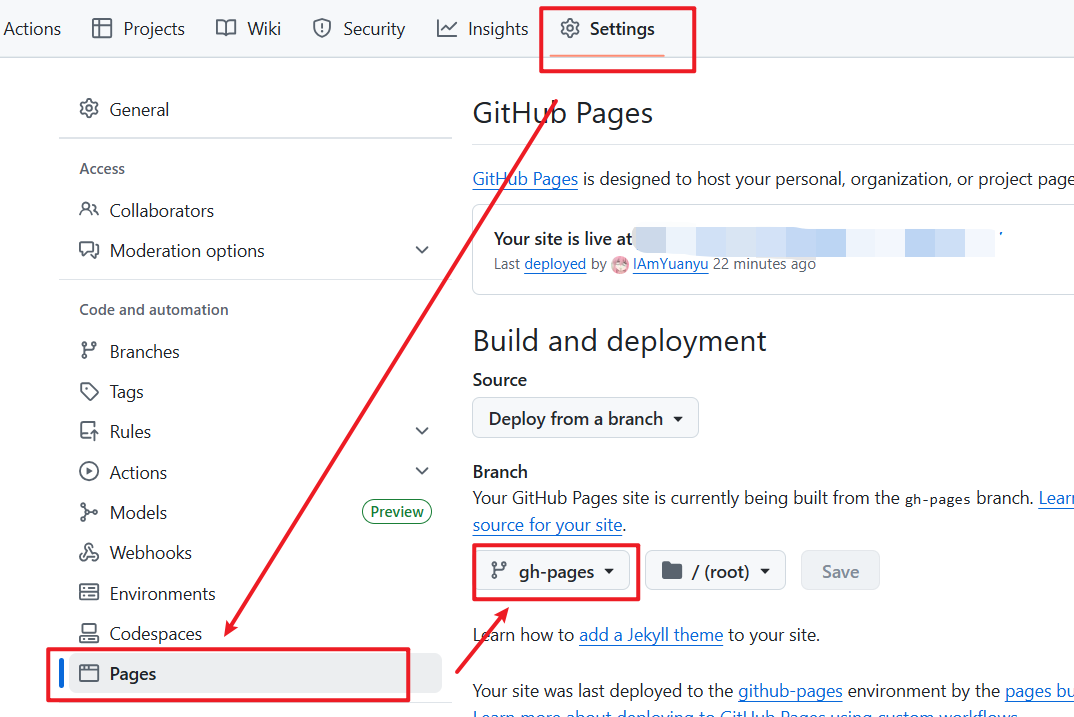
自动化部署
安装依赖
1
|
npm install gh-pages --save-dev
|
回到package.json文件新增下方内容
1
2
3
4
5
6
7
|
"scripts": {
    "dev": "vite",
    "build": "vite build",
    "preview": "vite preview",
    "predeploy": "npm run build", // 新增
    "deploy": "gh-pages -d dist"  // 新增
  }
|
之后更新在线网站只需要运行npm run deploy即可
常见问题:刷新页面后404
解决方式:
第一步:在项目根目录的public文件夹中添加404.html
 1
 2
 3
 4
 5
 6
 7
 8
 9
10
11
12
13
14
|
<!DOCTYPE html>
<html lang="en">
<head>
  <meta charset="UTF-8">
  <meta name="viewport" content="width=device-width, initial-scale=1.0">
  <script>
    sessionStorage.redirect = location.href;
  </script>
  <meta http-equiv="refresh" content="0;URL='/'">
  <title>404</title>
</head>
<body>
</body>
</html>
|
其中<meta http-equiv="refresh" content="0;URL='/'">表示跳转到该网页0秒后跳转到完整根目录/
这个跳转目录根据自己的情况进行更改,比如我有两个在线网页一个是我的博客https://iamyuanyu.github.io/,另一个是部署的项目https://iamyuanyu.github.io/项目名/,此时我的meta标签就需要改成<meta http-equiv="refresh" content="0;URL='/项目名'">,不然我的项目刷新后会直接跳转到我的博客
第二步:在项目根目录的index.html中添加以下内容
 1
 2
 3
 4
 5
 6
 7
 8
 9
10
11
12
13
14
15
16
17
18
19
20
|
<!DOCTYPE html>
<html lang="">
  <head>
	···
  </head>
  <body>
    ···
  </body>
  <!-- ***************需要添加的内容↓*************** -->
  <script>
    (function(){
    var redirect = sessionStorage.redirect;
    delete sessionStorage.redirect;
    if (redirect && redirect != location.href) {
      history.replaceState(null, null, redirect);
    }
  })();
  </script>
  <!-- ***************需要添加的内容↑*************** -->
</html>
|
如何重新部署即可